Bitdefender review 2026
Backed by leading cybersecurity experts and investigative journalists, we deliver independent, real-world antivirus testing and analysis, guaranteeing objective evaluations without undue influence or bias from outside parties.
Our transparent and consistent methodologies ensure objective, up-to-date reviews, empowering readers to make well-informed decisions.
Learn more

Bitdefender is among the leading antivirus providers on the market in 2026. Its entry-level product, Bitdefender Antivirus Plus, already includes many suite-level features. However, upgrading to Bitdefender Total Security takes things further by adding a comprehensive set of advanced security tools. These include useful features like multi-layer ransomware protection, safe online banking, and anti-theft tools, just to name a few.
Independent labs and Cybernews in-house testing have repeatedly shown that Bitdefender is among the top antivirus products on the market. While AV-TEST showed excellent results, I found some vulnerabilities during our in-house testing, as Bitdefender failed to detect 10% of the provided virus samples.
Despite that, Bitdefender consistently has the best results among the products we’ve tested. In this review, we tested the Bitdefender Premium Security plan specifically, which forms the basis of our hands-on findings below.
| ⭐ Rating: | |
| 🥇 Overall rank: | #1 out of #30 |
| 💵 Price: | From $12.99/year |
| ✂️ Free version: | Yes |
| 🖥️ Platforms: | Windows, macOS, Android, iOS |
| 🔥 Coupons: | Bitdefender coupon 78% OFF |




Our team of researchers thoroughly tests antivirus software following a well-established testing process. In unison, our experts combine in-house and independent testing lab findings with first-hand experience to help you make informed decisions about each product. Learn how we test antivirus software.
Getting started with Bitdefender: choosing the right plan
While all plans provide strong malware protection, I focused on the top-tier Bitdefender Premium Security subscription because it has more features that allowed me to evaluate this provider better. If you decide to go with the Total Security Plan, it will cost you $19.99/year per year, or go for Premium Security for $19.99/year.
Overall, Bitdefender's pricing is considered cheaper than that of other top antivirus providers, such as Norton, which starts from $29.99/year, or TotalAV, with a starting price of $19.00/year. In contrast, you can get Bitdefender Antivirus Plus for only $12.99/year.
| Bitdefender Free | Antivirus Plus | Total Security | Premium Security | |
| Platforms | Windows | Windows, macOS, Android, iOS | Windows, macOS, Android, iOS | Windows, macOS, Android, iOS |
| Device coverage | 1 | 1 | 3 | 5 |
| Web attack prevention | ✅ Yes | ✅ Yes | ✅ Yes | ✅ Yes |
| Ransomware protection | ✅ Yes | ✅ Yes | ✅ Yes | ✅ Yes |
| Anti-phishing | ✅ Yes | ✅ Yes | ✅ Yes | ✅ Yes |
| Password manager | ❌ No | ❌ No | ❌ No | ✅ Yes |
| VPN | ❌ No | ✅ Yes | ✅ Yes | ✅ Yes |
| Privacy Firewall | ❌ No | ❌ No | ✅ Yes | ✅ Yes |
| Performance optimization tool | ❌ No | ❌ No | ❌ No | ✅ Yes |
| Starting price | $0.00/year | $12.99/year | $19.99/year | $19.99/year |
| Renewal price | $0.00/year | $49.99/year | $89.99/year | $129.99/year |
One thing to keep in mind is Bitdefender’s auto-renewal policy. Bitdefender will automatically renew your subscription before the end of the term. It will notify you 30 days before so that you can cancel your plan if you’re not happy with it.
Bitdefender also offers a 30-day free trial and a 30-day money-back guarantee for all paid plans, so you can get a refund if you change your mind soon after subscribing.
To save money on Bitdefender, you can use our code to get up to 78% OFF your chosen antivirus package. I recommend Total Security, which you can use to protect up to 3 Windows, macOS, iOS, or Android devices for 1 year.
In total, Bitdefender offers over 7 tiers: Free, Antivirus Plus, Total Security, Premium Security, Ultimate Security, Ultimate Security Plus, Ultimate Security Plus – Extended, along with dedicated Family plans. The Ultimate Security plans add real-life features like identity theft protection, smart SSN trackers, or theft insurance to Bitdefender’s excellent device security features.
How good is Bitdefender’s free version?
Bitdefender offers a solid free version that has no validity due date. This means that you can use Bitdefender Antivirus Free at no cost for as long as you want. From my experience, Bitdefender provides strong security features, including virus scanning and real-time protection. What's even more impressive is that its free version also includes protection against phishing and online fraud. These features put it on par with the premium offerings from other antivirus providers. Of course, as is common in the industry, Bitdefender’s free plan comes with limitations. Unfortunately, I wasn’t able to use its free plan on my Mac, as it’s limited to Windows PCs only.
Even though there’s no free Bitdefender plan for Mac, you can start your 30-day trial, which applies to all plans no matter the device. Create a Bitdefender account and get your 30 days free with no credit card required.
Bitdefender security features
Regarding Bitdefender free vs paid, the software employs the same malware database to identify potential threats. So, regardless of your budget, you'll get the same excellent level of malware removal. However, there are additional subscription benefits to consider.
Here is a list of some of the most impressive features included in the Bitdefender antivirus package:
| Feature | What it does |
|---|---|
| Malware scanner | Offers different scanning options from quick to a thorough search for threats in your device system |
| Firewall | Allows you to monitor all the connections from your device |
| Anti-theft | Allows you to locate your device on Google Maps, lock your device remotely |
| VPN | A tool for digital protection and data collection prevention |
| Password manager | Keeps all your passwords safe and in one place |
Security and protection
Bitdefender offers great security and protection features that are worth your attention. I review each of these features below.
Malware detection rates
Bitdefender’s real-time protection feature is also known as Bitdefender Shield. This security feature constantly scans all of the downloaded files for threats. If a threat is caught, it either gets deleted or placed in quarantine. So, real-time protection can catch malware before you get to open the malicious files.

This feature is really effective in offering you the best protection since it works closely with Bitdefender's Global Protective Network, which monitors more than 500 million machines to extract new malware models. That’s how this feature ensures you’re protected against very recent or poorly documented threats and phishing attacks.
I’ve put Bitdefender’s malware scanner to the test to see just how reliable it is. After downloading 10 malware files, I unzipped them and allowed the real-time protection to do its thing. It caught the threats quickly and deleted most of the malicious files that had been unzipped.
Bitdefender's real-time protection feature cannot scan compressed files, so for it to be effective, you’ll have to unzip the downloaded files. Otherwise, this is a quick and highly secure feature that protects your device from new and already-known cyber threats.
Malware scanner
Bitdefender has an efficient and reliable virus scanner. It’s based on malware directory and machine learning, so it’s especially effective in detecting both known and unknown malware threats. The scans happen in the cloud, so there’s a minimal impact on the device system.
Bitdefender offers various virus scan options that ensure excellent protection from malware threats. You can scan certain folders, your entire device, or look for vulnerabilities to improve your device protection.
Get BitdefenderThere are three scan types for you to choose from:
- Quick scan – quick scan is a low-resource virus scan that usually takes less than a minute to perform. It detects malware using in-the-cloud scanning.
- System scan – this is a more resource-intensive scan since it scans the entire system for a variety of malware, including spyware, adware, and viruses.
- Rescue Environment – scans and removes more resilient threats that can’t be resolved in the current environment.

To test Bitdefender’s scanning abilities, I downloaded 150 malware samples and disabled the real-time protection feature. After that, I tested the System Scan and monitored computer resources to see how successful Bitdefender’s scan is and how much it affects the device system.
Firewall
Bitdefender Firewall is a security feature that protects your device from unauthorized access. It does this by blocking inbound and outbound connections, both on local networks and on the internet. The firewall uses a set of rules to determine which connections to allow and which to block. These rules are automatically created for known, legitimate applications. You can also manually create rules for applications that you trust.

This feature can be used to protect your computer from a variety of threats, including cybercriminals, malware, and data snoops.
When testing Bitdefender’s Firewall on Windows, I received pop-up boxes prompting me to either allow or block applications. I was able to configure and monitor all the permissions of known and unknown programs.
Anti-theft
Anti-theft is a security feature that helps you protect your lost or stolen device. I find it useful as we have to be extra careful with our belongings these days. The feature includes a variety of functionalities, such as:
- Remote location. Locates your device on a map, even if it’s turned off.
- Remote lock. You can remotely lock your device, preventing anyone from accessing your data.
- Remote wipe. Remotely wipes your device, deleting all of your data.
- Remote alarm. Remotely activates an alarm on your device, making it easy to find if it is lost or stolen.
- SIM card change alerts. Receive alerts if your SIM card is changed, which can help you to track your device if it is stolen.
- Photo capture. If someone enters your device's PIN or password incorrectly three times, Bitdefender Anti-theft will take a photo of them using the front camera.

Identity protection
Bitdefender goes beyond device security with a solid set of identity protection features that help keep your personal information safe. I review each of these features below.
- Dark web monitoring. Bitdefender constantly scans the entire internet, including the dark web, to ensure that your data isn't being leaked by threat actors. If your information, like emails, logins, credit card numbers, or passwords, is exposed, Bitdefender will inform you about it in real-time, allowing you to remedy the situation.
- Digital identity protection. Bitdefender can monitor the web 24/7 and notify you if your critical information has leaked online. Specifically, the service will check breached databases on the dark web to ensure your social security number, various login credentials, and payment details aren't exposed to threat actors. It's important to note that you must purchase this feature separately for a starting price of $3.33/month with a yearly subscription to gain its benefits.
- Identity theft insurance. Bitdefender offers identity theft insurance with its Ultimate Security Plus plan. The policy allows you to recover expenses and lost wages resulting from identity theft. The insurance ranges from $1,000,000 to $2,000,000, depending on the plan you purchase. This essentially extends Bitdefender's protection into real-life, ensuring that if a cybercriminal gets a hold of your personal data (like your SSN), you'll be able to get any money you lose because of their actions back.
Privacy protection
In addition to security protection features, Bitdefender is a capable antivirus when it comes to privacy protection.
Bitdefender VPN
One of the key differences compared to many other antivirus service providers is that Bitdefender offers a VPN as part of the app. By default, Bitdefender includes a standard VPN version which comes with a 200MB daily data cap.
If you opt for the Premium Security plan, you get Premium VPN with unlimited traffic already included in the service. However, if you want to add Premium VPN to any of the cheaper plans, it will cost you an additional $69.99/year.

There’s plenty to like about Bitdefender Premium VPN: it has 3,000+ servers in more than 100 countries, unblocks Netflix US, and offers a kill switch, split tunneling, and an auto-connect feature.
However, while this is a good VPN option when it comes to antivirus software providers, it cannot compete with premium options like NordVPN or Surfshark.
Bitdefender’s VPN runs on the WireGuard tunneling protocol, which is by far the most popular VPN protocol. With AES-256 encryption, your data will be safe while it is active.
Of course, if you’re really serious about your security and anonymity, this might not be the VPN for you since it doesn’t have an independently verified no-logs policy. Plus, if you purchase the cheaper Bitdefender antivirus plans, you’ll get only 200MB of data per day.
You can learn more about this VPN in our Bitdefender Premium VPN review.
Password manager
Rather than developing a standalone project, Bitdefender integrates its password manager into the main dashboard. Therefore, if you're using Bitdefender on multiple devices, you'll appreciate the ability to sync the password manager across all of them.

It’s a secure and easy-to-use password manager with a few features, including a password wallet, a password generator, auto-save, and auto-fill. However, premium password managers, such as NordPass and Keeper, offer higher security by supporting two-factor authentication and include more features.
You can learn more about this password manager in our Bitdefender password manager review.
Safepay
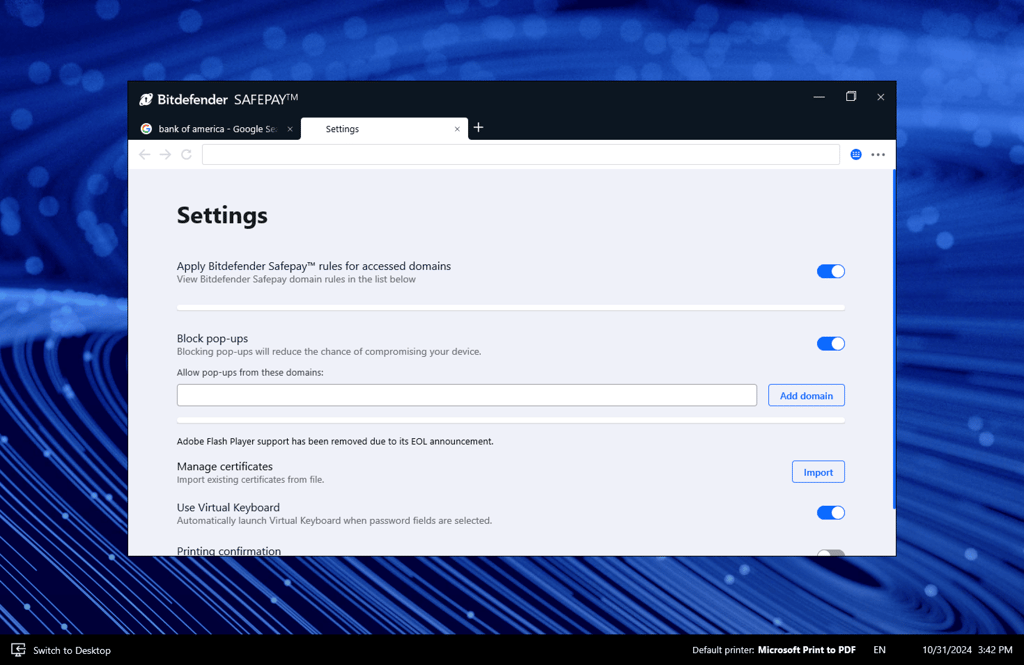
Bitdefender offers a secure browser for online transactions – Safepay protects you when making online purchases. It creates a sandbox that acts separately from your other browsers, making it unaffected by malware that could potentially be present on your regular browser. Also, this feature checks if your connection with the Wi-Fi network is secure and uses a virtual keyboard, so your keystrokes can’t be registered by third parties.
Review of lab test results
Bitdefender shows excellent scores in independent lab tests. Moreover, since the last independent testing by AV-TEST, the newest testing results haven't changed. According to the most recent AV-TEST, Bitdefender continued to block 100% of threats during the testing period of January-February 2026. This included both 0-day and 4-week-old malware and other threats.
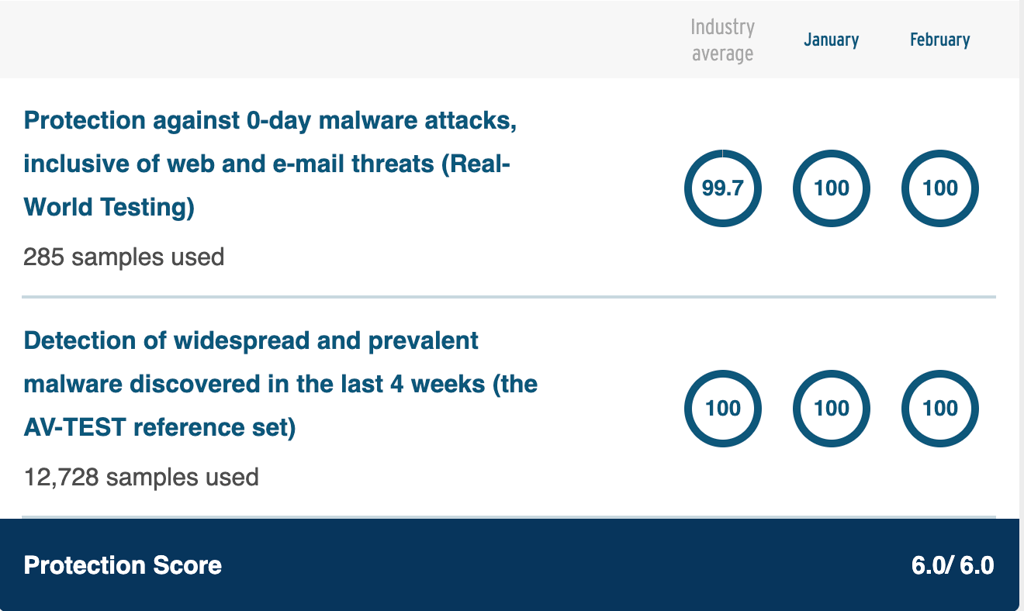
The Real-World Testing (0-day) was done with 285 samples, while the AV-TEST reference set (4-week) test used 12,728 malware samples. The excellent outcome resulted in getting a Top Product certificate with a maximum points of 6/6 in each category – protection, performance, and usability.

AV-Comparatives also gave Bitdefender its highest certification, Advanced+. In the latest malware protection test it scored an offline and online detection rate of 97.6% and an online protection rate of 99.94% with 4 false alarms.
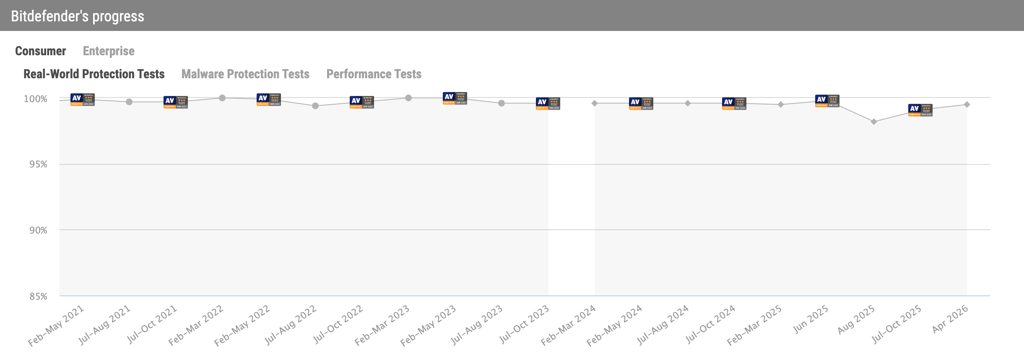
With these results, you can be confident that Bitdefender should eliminate most (threats from your device. That is exactly why Bitdefender is among the best and safest antiviruses for protecting your device from malware.
Our in-house testing results
We used the Bitdefender Premium Security plan to conduct in-house tests to confirm whether Bitdefender truly performs well. To get hands-on experience with Bitdefender’s capabilities, our tests were aimed at evaluating how well Bitdefender protects devices from malware, ransomware, and phishing attacks.
We performed all the tests on Windows 11 Oracle VirtualBox with 16GB RAM, 100GB SSD, and 2 CPU cores installed on Lenovo ThinkStationAMD Ryzen Threadripper PRO 3945WX 12-core processor with 3.99 GHz, 64GB RAM, and 3TB SSD.
Malware protection
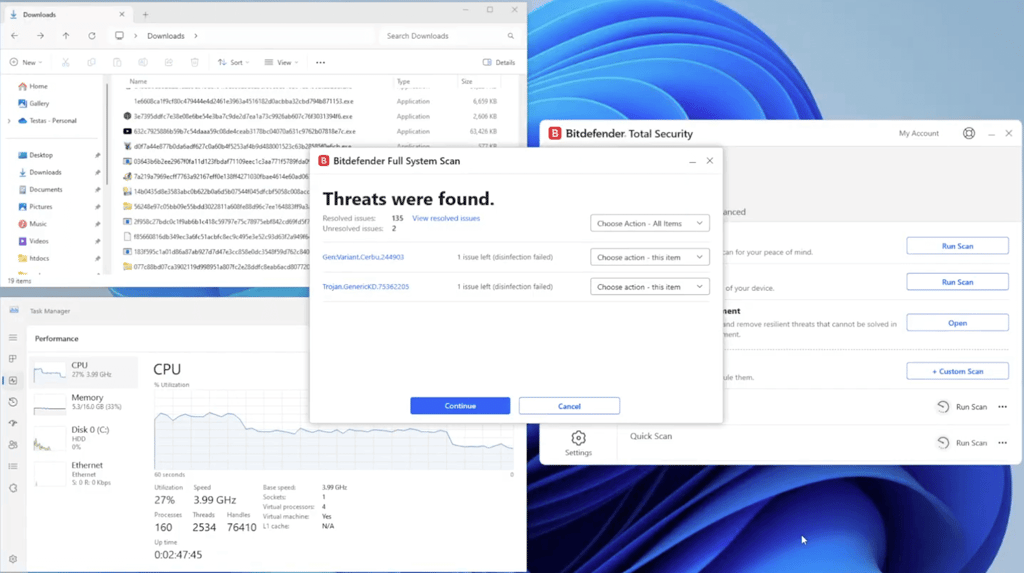
For the malware protection test, I used a package with 150 samples from bazaar.abuse.ch with random active threats. I then scanned the device using the System Scan feature, which took 1h 38m, compared to 1h 46m during our last Bitdefender test.

Out of 150 malware samples, 134 were successfully detected, making it a 89.33% success rate. This is a small decrease from our previous test, when 137 were successfully removed, making it a 91.3% success rate. Even though Bitdefender wasn’t able to remove all of the planted malware samples, overall, it provides good protection against various types of cyberthreats.
Ransomware remediation
To test how well Bitdefender protects against ransomware, I downloaded 10 .exe file-type crypto-locker ransomware samples, also from bazaar.abuse.ch, varying in age (from a few days old to over a year old). I then turned off other protection features, like real-time protection and firewall, enabled ransomware remediation, planted ransomware samples, and left the ransomware remediation feature working.
Bitdefender managed to locate and delete 9 of the samples, for a 90% success rate. This is down from a 100% success rate last year. This shows that Bitdefender antivirus can protect your devices from ransomware attacks, although it may occasionally struggle with newer threats.

Phishing protection
To test Bitdefender’s ability to block phishing attacks, I collected a list of newly reported malicious websites that varied in threat level (payment fraud, credential phishing, malware download) and URL type (domain name, IP address).
I then installed the Bitdefender browser extension on a Mozilla Firefox browser and accessed the links one by one. It was considered a failed test if a known malicious website was opened without any interference from Bitdefender.
Out of the 20 different malicious links I tested, 18 were successfully blocked by Bitdefender. This means that Bitdefender can block phishing and malware links with an impressive 90% success rate. During our last test, it managed to block 19 links, so the results remain relatively consistent here.

Bitdefender setup and interface overview
Setting up and using Bitdefender on your device is a pretty straightforward process. It provides users with step-by-step installation tutorials for different devices, including Windows, Mac, Android, and iOS. However, there are some key points that you need to keep in mind to ensure successful installation.
Setup
After you pick a plan, you have to set up Bitdefender on your device. Keep in mind that Bitdefender's setup might take some time as it uses 500MB of installation files, which can be irritating for some. Overall, the installation was fast. However, how fast you will be able to install Bitdefender also depends on the device you use.
Interface
Once I set Bitdefender up, the app was easy to navigate. I found the interface organized and clear. I especially liked that you can customize the dashboard by adding quick actions.
The default suite groups are divided into 3 categories: Protection, Privacy, and Utilities:
-
The Protection tab is dedicated to features associated with antivirus tools. It encompasses Cryptomining Protection, Advanced Threat Defense, Firewall, and Online Threat Prevention among others.

-
Privacy deals with methods to stay anonymous and secure when surfing online, like the Anti-tracker extension, Safepay browser, VPN, password manager, and parental controls.

-
Utilities encompass optimization tools, profile management, and an Anti-Theft feature.


Overall, I found the Bitdefender app intuitive and easy to use. Its interface is easy to navigate for beginners, more advanced, and business users.
Bitdefender on mobile
Bitdefender has dedicated apps for both Android and iOS. I tested both to see if the apps are equally good and offer good protection for your device no matter the OS it works with.
The differences between the Android and iOS mobile security apps are pretty big. While both apps were easy to download and set up, the experience of using them was different. The Android version is clearly the superior one, while the iOS apps only cover the basics and feel like an afterthought.
Bitdefender on Android
The Bitdefender Android app is really secure, easy to use, and even considered one of the best antivirus apps for Android. It mirrors the desktop version, is attractive to the eye, and includes all the necessary security features for your mobile device.

The Android version includes features such as a malware scanner, web protection, scam alert, anti-theft feature, and app lock. Moreover, it includes a VPN with a daily data limit of 200MB per device, an autopilot feature, which scans all new apps for potential threats, and identity protection, which informs if your email was included in any recent data breaches.
Bitdefender on iOS
The iOS version of Bitdefender Mobile Security is not as elaborate as the Android version. It lacks features like malware scanner, scam alert, or the Autopilot feature. However, the app is safe, easy to use, and is a great addition to your iOS security.
The iOS app comes with web protection, privacy monitoring, and a VPN. Noticeably fewer features compared to an Android app.

So, overall, you're getting privacy monitoring, a VPN that should be enough for a couple of websites, and browser protection, which isn't much. However, it’s not surprising, since most antivirus software for iOS doesn't provide many additional features, as Apple’s devices are less prone to malware threats. Nonetheless, Bitdefender antivirus still has room to improve in iOS security.
Impact on PC performance
During my tests, I monitored the extent to which the software used my system resources to better understand Bitdefender’s impact on the device. It's important to note that higher CPU loads can hinder the performance of other tasks.
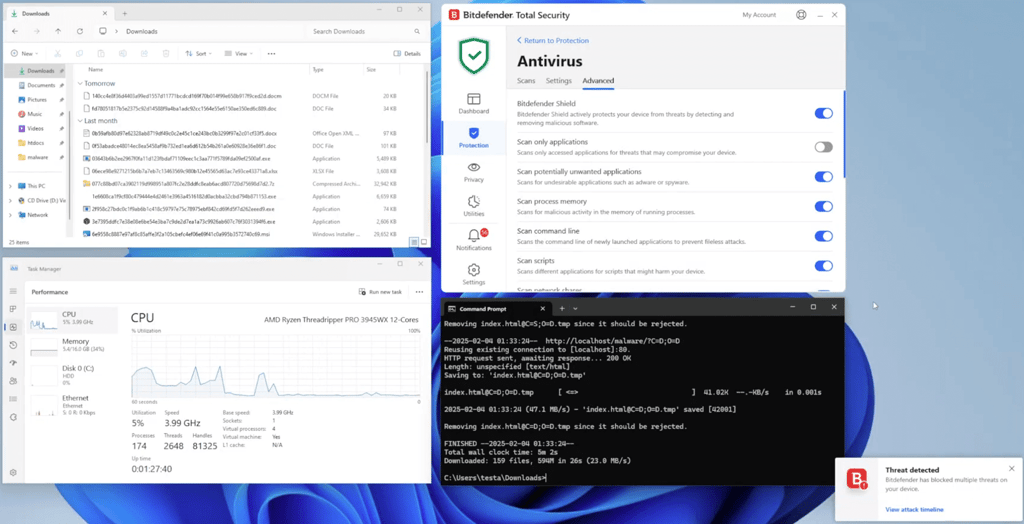
During a full scan, Bitdefender used between 29 and 100% of the device's CPU, which is a moderate-to-high impact on performance, depending on the moment in the scan. Additionally, Bitdefender’s full scan caught 89.8% of all malware samples on my testing device. Avira, for example, consistently used up to 92% of the CPU and only caught 70% of malware samples.
Customer support
The best thing about Bitdefender’s customer support is that it’s not a premium subscription feature. You can get help whether you're a free or a paying user. There are many different ways to access any support you might need.
| 24/7 live chat support | ✅ Yes |
| 24-hour phone support | ✅ Yes (Worldwide English service available) |
| Email support | ✅ Yes |
| Knowledge database | ✅ Yes |
| Community support | ✅ Yes |
Bitdefender’s live chat support is very quick – you can get in contact with a reliable support agent in a couple of moments. They’ll answer all your questions quickly and solve your problems efficiently.
To make things easier, Bitdefender also has a vast collection of FAQs, guides, and other information on its support website. So, while you're waiting in line, it might be worth checking these resources. As a result, you might resolve your issue before your turn comes.
If you prefer other methods, you can call them on the phone or contact them via email. Whichever way is the most convenient for you, you have options there.
Video review
If you would like a shorter format review, check out the video our team prepared on Bitdefender antivirus.
Is Bitdefender worth it?
Bitdefender is one of the best antivirus software suites on the market, which we confirmed with our own in-house tests. It continuously shows great malware detection and performance results in independent lab tests. During our in-house testing, Bitdefender also showed success rates of around 90% in catching all types of malware, ransomware, and phishing attacks.
The combination of real-time protection, web protection, and multiple personal security tools makes Bitdefender a provider worth considering. It’s easy to navigate, has great features, including a VPN and password manager, and offers prices are budget-friendly plans.
However, I have also encountered some downsides. The iOS app lacks some features, the VPN usage is strongly capped, and the web protection feature could be improved. Our in-house tests have also found that while Bitdefender had the highest detection rates among the software we tested, it still missed 10% of the virus samples we planted.
All in all, the Bitdefender antivirus app offers great protection and features, but there’s still room for improvement. Its free version is good for malware detection and removal, but if you want more thorough security, pick a paid plan.
How we tested Bitdefender
With the help of our research team, I conducted in-house tests for antivirus software and consulted third-party antivirus lab results to determine how good Bitdefender is.
The first evaluation involved putting the service’s real-time protection against 150 active malware samples. To do that, I downloaded the infected files to Windows 11 Oracle VirtualBox with 16GB RAM, 100GB SSD, and 2 CPU cores on a device with Bitdefender installed to see if the software reacted appropriately.
After that, I repeated the test with real-time protection disabled to check whether a full scan could detect the malware samples. During this time, I monitored metrics like CPU, memory, and disk load to see how Bitdefender impacted overall device performance.
This approach also allowed me to check relevant Bitdefender aspects, such as feature availability and ease of use.
FAQ
Is Bitdefender safe and legit?
Yes, Bitdefender is one of the safest antivirus software programs on the market. It was independently tested and proved to catch 100% of malware, both zero-day and 4-week-old threats. To date, there's no reason to doubt Bitdefender's trustworthiness.
Does Bitdefender have a VPN?
Yes, some Bitdefender Antivirus editions include a VPN with a 200MB limit per day. However, you can also buy the standalone version of Bitdefender VPN separately.
What Bitdefender plans are available?
Bitdefender offers a few different software packages for Antivirus Plus, Total Security, and Premium Security. You can check the latest deals on the provider's official website. There’s also a free version with real-time protection.
Is Bitdefender a Russian company?
No, Bitdefender is not a Russian company. The cybersecurity company was founded in Romania in 2001, with its headquarters in Bucharest. It provides a range of security products and services globally, including antivirus software and enterprise solutions.