Wix Studio review 2026: is it worth the money?
Our team of experts and researchers rigorously test and evaluate website builders through transparent, in-depth testing procedures and methods using both in-house and industry-approved tools.
Drawing on cybersecurity insights, we provide unbiased, empirical rankings and analysis to help users make informed digital platform choices.
Learn more

Yes, Wix Studio is worth it for agencies and freelancers building sites for clients. It’s an editor and shared team workspace that has advanced developer tools and built-in AI. Wix Studio starts at $19.00/month and offers a 14-day money-back guarantee.
Wix Studio is an advanced website builder made for agencies, freelancers, marketers, and anyone managing websites for clients. It gives teams one place to work on multiple projects, manage permissions, and collaborate more easily. The platform also includes responsive editing, custom code support, and built-in APIs to help reduce the need for extra tools and keep workflows organized.
In this Wix Studio review, I will look at the platform’s main features, pricing, ease of use, and overall performance based on my testing experience. I will also cover whether Wix Studio is actually worth using in 2026.
Wix Studio overview 2026
Based on my testing, Wix Studio is a strong option in 2026, especially for freelancers, agencies, and teams building client websites. It offers advanced control, including responsive design tools, custom code, AI-assisted workflows, team collaboration, and built-in business tools for eCommerce. However, I don’t recommend it for simple personal sites, as it might be too advanced, and beginners should expect a learning curve.
| ⭐ Rating: | |
| 🥇 Overall rank: | #3 out of #37 |
| 💵 Price: | From $19.00/month |
| 🪄 Ease of use: | Powerful, better suited for experienced users |
| 🎨 Templates: | 1200 |
| 🏢 Business features: | Large variety of business features |
| 👨💻 24/7 live support: | Yes |
| 🔥 Coupons: | - |
Wix Studio pros and cons




Our in-house research team and expert writers work hand in hand to regularly test website builders and provide accurate and fact-checked information. Discover the ins and outs of how we test and evaluate website builders.
Recent Updates
What is Wix Studio?
Wix Studio is Wix’s professional website creation platform. It’s for agencies, freelancers, and teams (for client site building). Wix Studio provides a responsive editor with a centralized workspace, helping you manage multiple sites, collaborators, and handoffs to clients.
Compared to the standard Wix builder, which targets individual creators and businesses, Wix Studio is a more hands-on solution geared toward multi-site workflows, collaboration controls, and developer features like custom code (CSS/JavaScript) and API integrations, plus built-in AI tools. In my testing, choosing Wix Editor from inside Wix Studio redirected me to the Wix AI website builder instead of the classic editor flow.
How to use Wix Studio
Wix Studio is canvas-focused, with a sidebar on the left for site and code tools, a right panel for elements and styling, and a coding area below. Outside the editor, there’s a left-side area for managing more items including sites and templates.
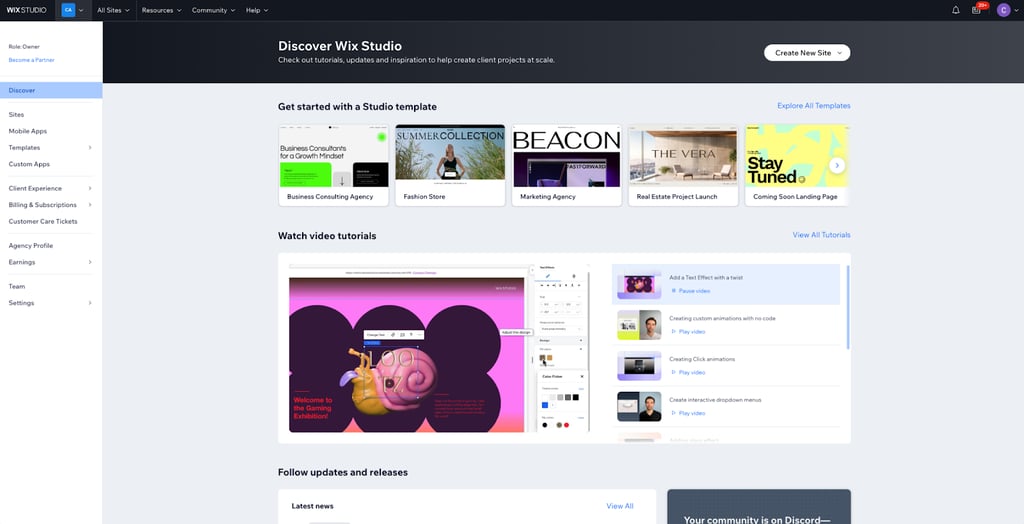
To start a Wix Studio project, go to Sites → Create a new site. Begin with Template or Blank Page (manual control), or Studio Sitemap & Wireframes for AI assistance. There’s also Wix Editor or Wix Harmony (but these redirected me to the Wix AI website builder).
In the editor: manage layout with Layers, customize pages and their SEO settings with Pages, and use Visual Sitemap for page structure. You can add content from Elements (+). In Site Styles, set width, colors, and typography. For advanced work, use CMS, Media, Global Sections, and Custom Code.
Wix Studio feature review
Feature-wise, Wix Studio is agency-grade. I’ll dive into some of the key features I noticed while building sample sites and exploring the Studio workspace. These include templates, AI assistance, and coding capabilities.
No-code animations
I could add motion without writing code directly from the Animations and Effects area. I used this to try out animations on elements and configure them when they run, for example: on hover, click, loop, or scroll. In my experience, this is usually enough for modern-day portfolios and professional landing pages.
I liked that you can prototype interactions quickly and iterate with a client without rebuilding in JavaScript.

However, it’s easy to over-animate a page and make it too busy with so many presets and options. For me, animations are best used simply: highlighting a headline or revealing a section – that’s it.
Custom coding
Professional-level tweaks like custom coding let me go beyond the editor’s capabilities. For example, I could add custom CSS for precise styling or JavaScript for behaviors not present in the editor.
There’s also a useful AI coding assistant inside the code workflow. In client work, custom work is required often, like when a layout needs specific hover-following mega-menus or a design system needs toggle-unavailable overrides.
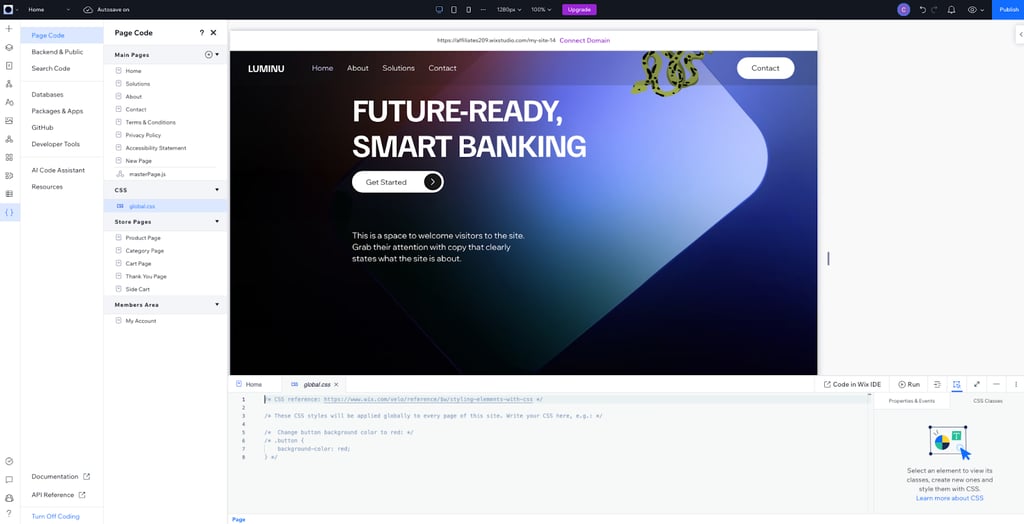
Also, it’s nice that the code panel was included in the editor and doesn’t feel like a separate product. For example, while working on the canvas visually, I’d go to the code area to refine things. Wix Studio also has GitHub integration for version control.
AI features
AI is a nice touch, and it’s in two places in Wix Studio: when you plan a site and when you want to speed up tasks. Planning-wise, that’s Studio Sitemap & Wireframes, where you describe the business and Wix generates a visual sitemap and structure. This feature should save agencies some time on heavier builds, since you can set architecture early and then focus on designing.
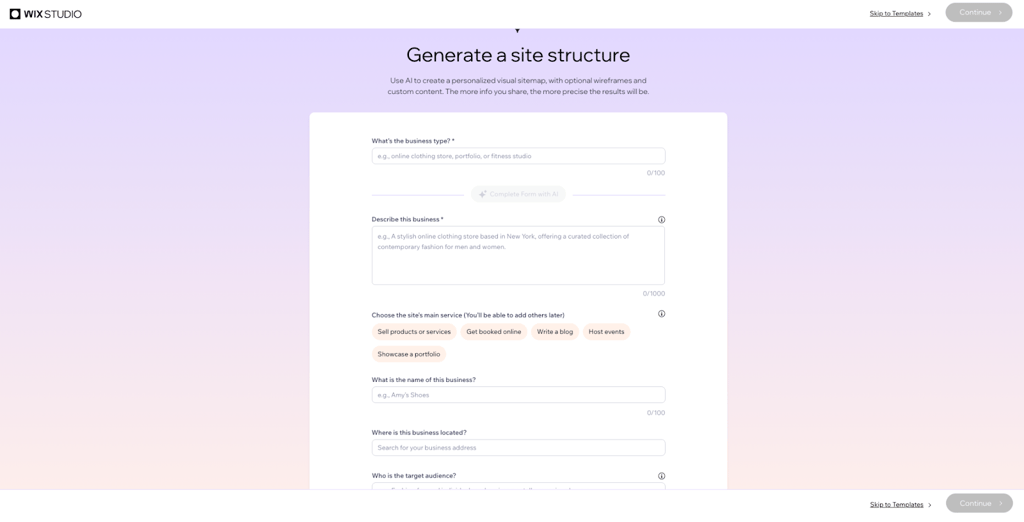
While I was testing, however, the AI-generated page didn’t finish loading. I tried twice. Beyond that, the AI system also helps with typical work like SEO, writing, and content or CMS tasks. Ultimately, the AI is an assistant, not a fully fledged autopilot.
Templates
In Wix Studio, you have practical templates you can use when you need to get going quickly. In my account, the Studio Editor Templates gallery had 1,273 templates, organized by use case. With this, an agency can start with a ready structure, swap sections, and then tweak spacing plus styling elements. This is useful for quickly aligning with a client’s brand vision without spending hours creating a layout.
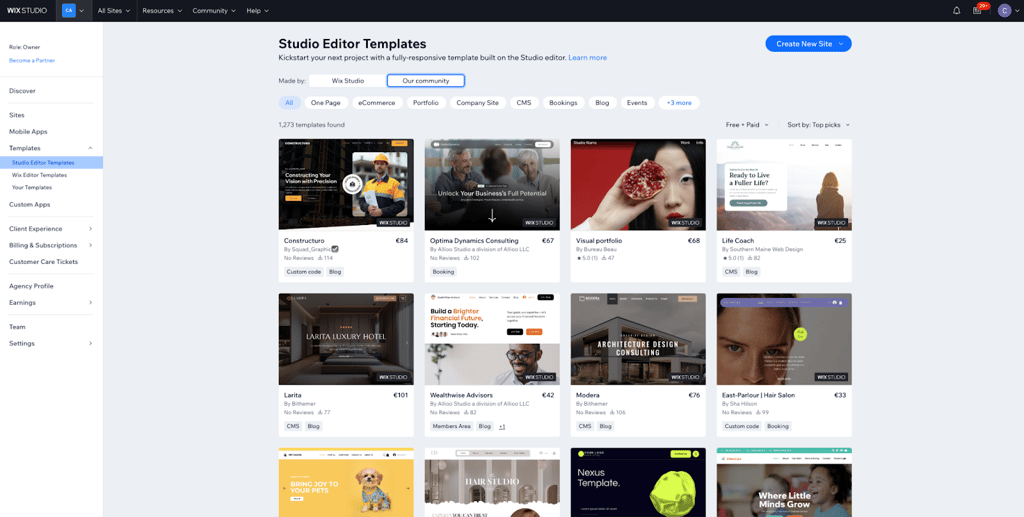
You can still just use a blank canvas for custom work, which I used for more design-system-first work. Otherwise, there are creator templates that may get you closer to what you want than the default ones.
SEO and GEO assistant
There are tools for SEO and GEO, which stands for “generative engine optimization.” GEO is how your site shows up in AI-driven results as well as traditional search.
I found that the SEO area is genuinely practical because it shows you the main issues affecting visibility. It also gives recommendations on how to fix SEO issues. For client work, that’s good, since SEO work is ongoing. Also, Wix Studio lets you connect to Google Analytics for deeper performance insights.
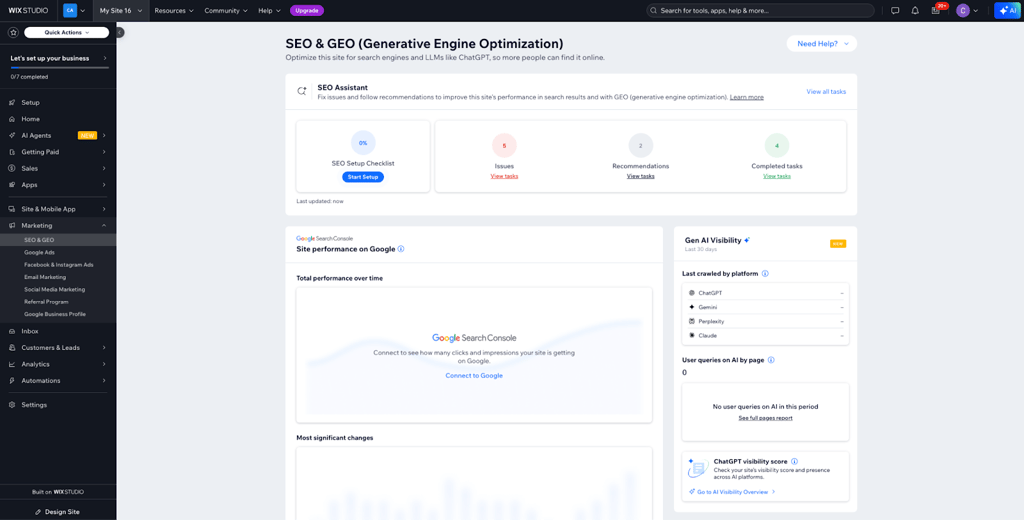
When I optimize websites, I tackle the biggest SEO problems first. After that, I scan analytics to look at the changes before I make more tweaks.
Team and collaboration
Wix Studio is a professional solution that’s made with teams in mind. You can invite people, assign permissions and roles, and choose from pre-built roles or create custom ones.
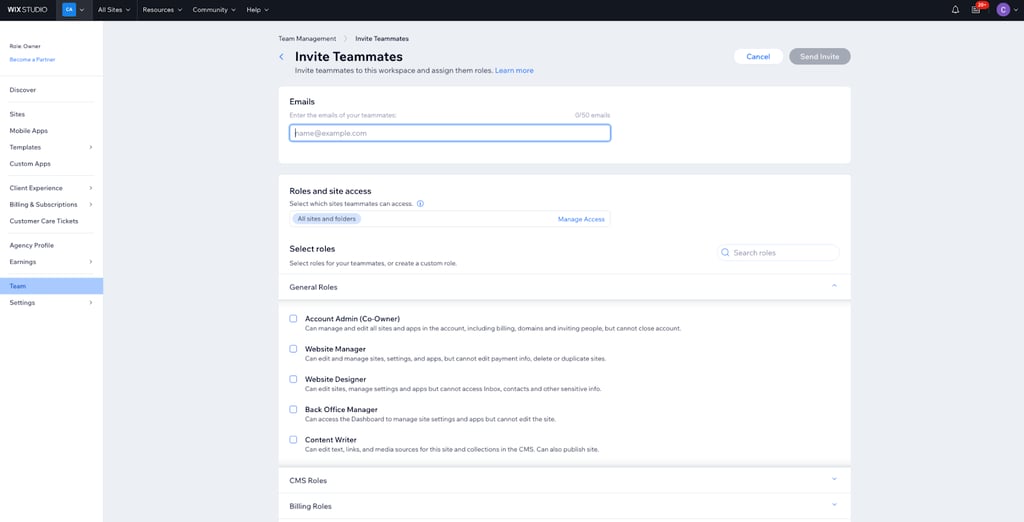
In my testing, I found the platform supports sending up to 50 invitations at once, so this works for agency onboarding. Wix collaborator access can vary depending on the plan, while teammates and site collaborators are distinctly separated.
Wix Studio pricing and plans
Wix Studio is free for using the workspace, but you’ll have to purchase a plan if you want to remove branding, accept payments, or connect a custom domain. There are four pricing tiers: Basic ($19.00/month), Standard ($27.00/month), Plus ($34.00/month), and Elite ($159.00/month). There’s also an Enterprise tier with quote-based pricing.
These prices are monthly but for annual subscriptions, paid in full at the time of purchase. I didn’t find any monthly-only options on the website, but they may be available at checkout. Remember, these rates are usually higher than annual rates.
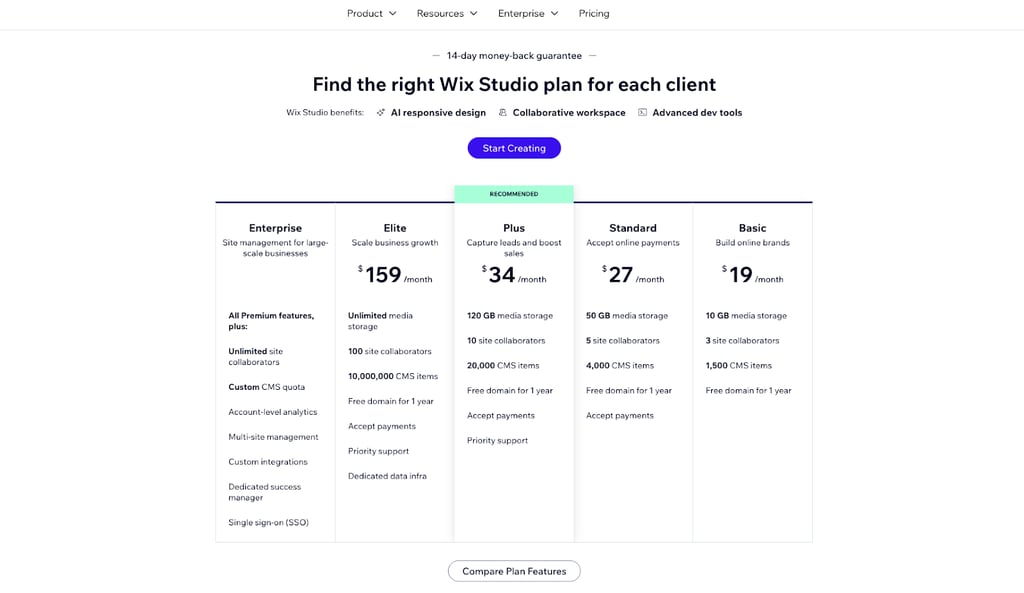
Wix Studio provides a 14-day money-back guarantee, so you can get a refund if you’re not happy with the service.
Final verdict: is Wix Studio worth it?
Wix Studio is worth it for building client sites and if you need professional-level workflows and editor features. I don’t recommend it for basic site building. In my testing, Wix Studio performed best on responsive design and manual control with its canvas-focused editor, no-code animations, and custom coding options.
| Category | Rating | Review |
| Templates | Wix Studio offers over 1,200 templates organized by use case, as well as a blank canvas and customization options for advanced designers. | |
| AI features | Wix Studio’s AI tools are useful for speeding up site design, planning, SEO, and content-related tasks. However, its AI is more of a productivity assistant than a true end-to-end builder and can sometimes be unreliable | |
| Ease of use | Wix Studio is easy enough to use once you get familiar with it, but beginners may find the editor a bit complicated at first because of all the advanced tools and settings. Still, it gives agencies and experienced users a lot of flexibility while keeping drag-and-drop editing simple overall. | |
| Pricing | Wix Studio offers flexible pricing with a free version and several paid plans. The pricing works well for agencies and growing projects, and the 14-day money-back guarantee adds some extra confidence. |
I also found it works well with teams and site collaborators. It’s clearly built with agency work in mind, with everything from role and permission features to SEO and GEO tools.
My criticisms are the ease of use issues for tech novices (many features) and the stability of some AI flows (loading problems). Overall, you should purchase a Wix Studio plan if you handle multi-site projects and need client-focused workflows. If you’re just building a simple site and want to get going fast, I recommend the standard Wix builder.
Wix Studio review FAQ
What is the difference between Wix and Wix Studio?
Wix is a classic drag-and-drop editor targeting individuals and small businesses. Wix Studio is a professional editor for agencies or freelancers with team collaboration and advanced coding/API integration capabilities.
How much is Wix Studio?
You can start creating with Wix Studio for free, but for premium plans, Wix Studio has four pricing tiers: Basic ($19.00/month), Standard ($27.00/month), Plus ($34.00/month), and Elite ($159.00/month). The fifth Enterprise tier has quote-based pricing. These prices are for yearly subscriptions, paid in full at the time of purchase. Monthly-only options may be available at checkout, but rates are usually higher this way.
How to switch from Wix Editor to Wix Studio?
You can switch your account to Wix Studio to access the Studio workspace and Studio Editor. However, existing Wix Editor sites can’t be converted unless you rebuild them in Studio Editor.