How to unblock Twitch in 2026
Our in-house cybersecurity experts and journalists, renowned for major reports like The Mother of All Breaches, conduct transparent, unbiased VPN testing and in-depth analysis.
With 750+ articles crafted based on real-world research, we empower readers to make informed purchasing decisions through first-hand expertise.
Learn more
Twitch is the world’s leading live streaming platform for gamers, creators, and communities. From competitive eSports and Just Chatting streams to music, art, and cooking content, it offers a space where millions tune in daily to watch, interact, and share experiences in real time.
But in 2026, accessing Twitch isn’t always easy. Many schools, workplaces, and even governments block the platform due to bandwidth concerns, productivity policies, or regional content restrictions. If you’re stuck behind a digital wall, in this article, I’ll show you how to unblock Twitch safely and effectively using a VPN.
How to get Twitch unblocked with VPN

- Pick a reliable VPN service, I recommend NordVPN, now 75% OFF
- Download the VPN and install it on your device
- Connect to a server in a location where Twitch is not blocked
- Launch Twitch and start streaming
Why do you need a VPN to use Twitch?
Whenever you’re online, the network you’re using provides you with an IP address that relates to your location. The website you are trying to use will check your IP address and then manage your access depending on the restrictions of your location.
If you are using Twitch in a location where access is restricted, you’ll need to use a VPN. A VPN works by hiding your actual IP address, so that you can bypass geo-restrictions and stream Twitch content safely. You simply need to connect your VPN to a server in a location where Twitch isn’t blocked, and you’re good to go.
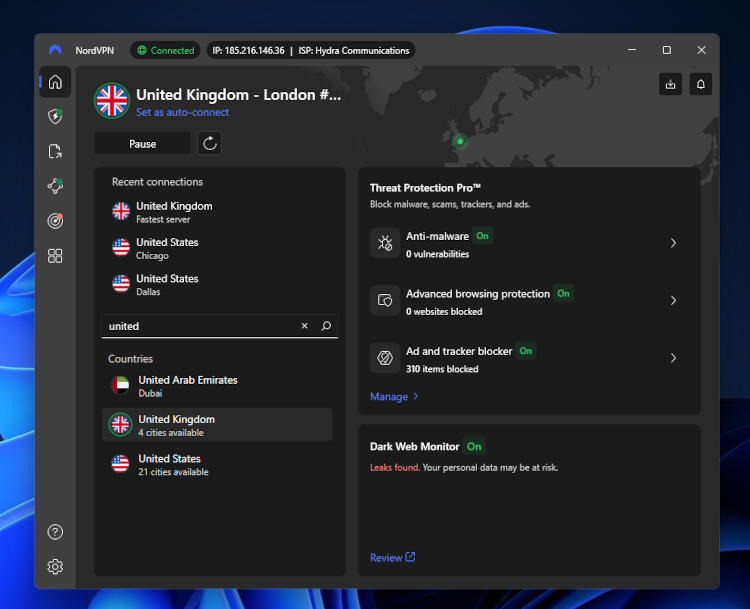
Alongside enabling access to Twitch in otherwise blocked locations, a VPN also keeps you secure online. A decent VPN encrypts your online traffic and keeps your activity completely private. This keeps you safe from malicious hackers or other harmful third parties.
Of course, not all VPN providers are effective at unblocking Twitch. Therefore, I compiled a short list of top-performing options below.
VPNs that unblock Twitch
VPN services come with different strengths and weaknesses. As such, not all of them are suitable for watching or streaming on Twitch.
The Cybernews research team and I reviewed 41 VPN providers to narrow down the best options that are secure and fast enough for use with Twitch. Best of all, they come with 30-day money-back guarantees, allowing you to test them out completely risk-free.
- NordVPN – best all-round VPN for using Twitch
- Surfshark – most affordable VPN option to use with Twitch
- IPVanish – fast and reliable VPN to use with Twitch
Alternatively, you can check our list of best VPNs for Twitch.
Why can’t you access Twitch?
If you’ve found that your access to Twitch has been blocked, there are a few possible reasons why this could be the case. Read on to find them out.
Geo-restrictions
You may struggle to access Twitch when traveling abroad. This is because the service isn’t readily available in select locations, like Russia, China, Vietnam, South Korea, and Slovakia, due to internet censorship. Twitch is full of big personalities and controversial opinions, which has led some countries to block the platform entirely.
Network policy
It’s quite common for institutions to block social media or entertainment platforms on their networks. Workplaces or schools may block streaming platforms like Twitch to limit distractions and boost productivity amongst students or employees. A good VPN lets you unblock websites and access restricted content from anywhere.
Issues with bandwidth
In order to regulate network traffic and avoid network congestion, some ISPs intentionally slow down the speed of a broadband internet connection. Every network has a limited amount of bandwidth available, and streaming videos can use lots of bandwidth and slow down the internet connection. As a result, closed private networks may impose bandwidth caps to keep all connections balanced.
Countries where Twitch is blocked
The popular streaming service is blocked in select locations. These include:
How to unblock Twitch at work or at school
If Twitch is blocked by your workplace or school, then there are a few solutions available.
Use a VPN
Geo-blocking and web filters prevent you from accessing Twitch at work or school. To fix this, you can use a VPN to hide your IP address and bypass any location or network restrictions. Check out our list of the best anonymous VPNs here.
Try the web version of Twitch
Sometimes, networks don’t block specific platforms. Instead, they manage access to certain sites by placing limits on users' ability to install EXE files on their computers. Whilst you can’t download the Twitch app in these instances, you may be able to access the Twitch web version.
Use a proxy
Much like a VPN, a proxy provides you with a new IP address so that you can bypass network restrictions. Unlike a VPN, which encrypts all of your internet traffic, a proxy is less secure and reliable at hiding your real IP address. It can be installed relatively easily through the browser extension store for your Firefox or Chrome.
Unblock Twitch on your device
The process for unblocking Twitch varies slightly depending on your device. In the next section, I show you how to unblock Twitch on Android, iOS, PC, and your laptop.
Android
Looking to stream Twitch content on your Android device? Here is a simple step-by-step guide:
- Choose a reputable VPN provider, I highly suggest NordVPN, now 75% OFF
- Head to the Google Play Store and download the VPN mobile app
- Open the Settings in the VPN app
- Enable the Override GPS location
- Open your phone settings and find Build Number
- Tap on the Build Number seven times – you should now be in Developer Mode
- In Developer options, click Select Mock Location App
- Choose your VPN, and start streaming on Twitch
Another way to unblock Twitch on your Android is to change your location within the VPN app.
Tip: Check that the location of your Google Play Store matches the country that your VPN is connecting to. This can be done within the settings of your phone.
iOS (iPhone, iPad)
Would you like to use Twitch on your iPhone or iPad? Check out my instructions below for changing your location on iOS:
- Find a reliable VPN option, I recommend NordVPN
- Go to the App Store and download the mobile app for your chosen VPN
- Open the VPN app
- Connect to a server in a location where Twitch isn’t blocked
- Your IP address will now be changed, so you can start streaming
Tip: Ensure that the location of your App Store matches the country that your VPN is connecting to. This can be done by heading over to the settings on your phone.
PC or laptop
If you prefer streaming Twitch on a bigger screen, here is my step-by-step guide for unblocking Twitch on your PC or laptop:
- Choose a decent VPN service, I highly recommend NordVPN, now 75% OFF
- Install the VPN on your PC or laptop
- Connect to a server in a location where Twitch is not blocked
- Open up Twitch on your web browser and start streaming
Tip: If you follow the above steps and find that Twitch is still blocked, try clearing the cache and cookies on your device and then try again.
Is it legal to unblock Twitch with a VPN?
The good news is that it’s completely legal to unblock Twitch with a VPN. All a VPN does is create an encrypted tunnel between the VPN server and your device – meaning you can connect to the internet without being seen. This is a legal activity, even within countries where many social media platforms are illegal.
It’s also legal to change your location and unblock Twitch with a proxy or GPS spoofing app. However, I advise against these methods, as they are unreliable and not as secure as using a VPN.
Can’t connect to Twitch, even with a VPN?
If you’ve downloaded and installed a VPN but still can’t connect to Twitch, there are a few possible explanations:
- Your device isn’t compatible with your VPN
- You’ve connected to a server in a region where Twitch is still blocked
- Your VPN can’t bypass the network or region restrictions
- Your real IP address is leaking
- The GPS location on your device doesn’t match the IP address of your VPN
- Cookies on your device expose your real location
When faced with any of the above problems, you can try the following solutions:
- Use a different browser
- Connect to a different server
- Ensure that IP leak protection settings are enabled on your VPN
- Clear your cache and cookies
- Contact the customer support team of your VPN
Check out our article on the best VPNs for multiple devices.
Final thoughts
Twitch is one of the biggest streaming platforms out there, but not everyone can enjoy it freely. In some countries, access to the platform is restricted or completely blocked, leaving many fans unable to watch.
Fortunately, unblocking Twitch in 2026 is relatively straightforward if you use a VPN. You simply need to find a reputable provider that can effectively change your IP address and bypass any regional or network restrictions. Alongside unblocking Twitch, a decent VPN encrypts your data and protects you from malicious hackers and other third parties. You can stream freely and rest easy that your data and devices are secure at all times.
If you need more help in picking a VPN to unblock Twitch, check out our article on the best VPNs for gaming.
More VPN guides from CyberNews:
How to change location on Facebook
How to change location on TikTok
How to change location on Instagram
FAQ
Why did my school block Twitch?
Your school may have blocked Twitch to eliminate distractions. Streaming videos also use a lot of bandwidth, so your school may have blocked the site to avoid any negative impact on the network performance.
How do I watch Twitch on Google Chrome?
You can watch Twitch on Google Chrome by visiting the official Twitch website and signing in. You can also use the Twitch Live extension to quickly access live channels.
What VPN do Twitch streamers use?
NordVPN is the best VPN for Twitch streamers, as it delivers fast and stable speeds, strong privacy protection, and a large server network that helps maintain lag-free streams. However, all of the VPN providers mentioned in this article are robust choices for Twitch streamers.
Are VPNs good for streaming?
Yes, reliable VPNs are great for streaming. They help you access content that may be restricted in your region, protect your privacy, and prevent throttling by your ISP. For the best experience, choose a VPN with fast and stable servers, such as NordVPN.


