How to watch ZEE5 in the USA in 2026
Our in-house cybersecurity experts and journalists, renowned for major reports like The Mother of All Breaches, conduct transparent, unbiased VPN testing and in-depth analysis.
With 750+ articles crafted based on real-world research, we empower readers to make informed purchasing decisions through first-hand expertise.
Learn more

ZEE5, previously known as OZEE, is one of India’s most popular streaming platforms, offering a rich library of Bollywood and Hollywood movies. While ZEE5 has expanded its availability to over 190 countries, including the US, some of its content remains region-locked due to licensing restrictions.
The good news is that this issue is easy to solve. By using a VPN to connect to a server in India, you can bypass ZEE5’s geo-restrictions and unlock its full library, no matter where you are in the world.
Beyond accessing ZEE5, a VPN provides additional perks. It secures your online activity with advanced encryption, protects your data from hackers, and can even block ads for a smoother streaming experience. Plus, it allows you to access other streaming services while traveling. In this guide, I’ll show you how to use a VPN to watch ZEE5 in the USA on a variety of devices and recommend the best VPNs based on our tests.
Watch ZEE5 in the USA with a VPN – a short guide

- Select a VPN with plenty of servers in India. I recommend NordVPN – get 75% OFF!
- Download and install the VPN software on your device
- Connect to a server in India
- Sign up for a ZEE5 subscription and create an account
- Sit back, relax, and enjoy a whole new library of content
Why do you need a VPN to watch ZEE5?
ZEE5 has now been launched in more than 190 countries, including the US, Canada, and the UK. However, you might not be able to access everything ZEE5 has to offer due to geo-restrictions on its content. If you try to watch a show or movie that’s not available in your region, you’re likely to be blocked by an error message.
This is where a VPN comes in handy. All you need to do is download a VPN with a strong fleet of servers and connect to a server in India, and you’ll be able to watch everything that ZEE5 has to offer.
Of course, it’s important to be aware that not all VPNs can successfully unblock ZEE5. So you’ll need to make sure you choose one that will give you access to the streaming services you want to watch.
Best VPNs to watch ZEE5
There is no end of providers to choose from, but you should be aware that only some VPNs can bypass region restrictions on ZEE5. Even if a VPN provider has servers in India, it might not be strong enough to unblock streaming services. And on top of this, VPNs vary massively when it comes to speed, reliability, and even security.
If you want more recommendations, take a look at our guide on the best VPNs. Or continue reading for my roundup of the best VPNs for unblocking ZEE5.
1. NordVPN – best VPN for unblocking ZEE5 in the USA

| Servers/countries: | 9,500+ servers in 149 countries |
| Free version: | No |
| Platforms: | Windows, macOS, Android, iOS, Android TV, Amazon Fire TV |
| Current deal: | Get 75% OFF NordVPN + 3 months free |
Out of all the VPNs we tested, NordVPN is the best for unblocking ZEE5 from anywhere in the world. It can consistently bypass ZEE5’s geo-restrictions without any difficulties, in addition to all the other major streaming services, including BBC iPlayer, HBO Max, and foreign versions of Amazon Prime and Netflix.
It comes with an extensive fleet of more than 9,500 servers in 149 countries, including more than 30 servers in India. And it performs well, offering fast and reliable speeds that make it ideal for streaming movies and TV shows.
Better still, NordVPN is the most secure VPN we’ve ever tested, with powerful encryption, leak protection, and a strict no-logs policy.
Plans start at $3.49/month.
If you want to know more, check out our full NordVPN review.
2. Surfshark – best-value ZEE5 VPN

| Servers/countries: | 4,500+ servers in 100 countries |
| Free version: | No |
| Platforms: | Windows, macOS, Linux, Android, iOS |
| Current deal: | Now up to 85% OFF Surfshark + 3 months FREE |
If NordVPN is a bit pricey for you, Surfshark is an excellent alternative because it offers most of the same features at a much lower monthly cost. You can save even more with this additional Surfshark promo code: OFFCN. Crucially, it can unblock ZEE5 without any difficulties, as well as every other streaming service we’ve tested it on, including Hulu, Sky Sports, and Hotstar.
On top of this, Surfshark will keep your data private with its large suite of security features, including military-grade encryption, leak protection, and a kill switch.
Despite being one of the cheapest providers on the market, Surfshark is the fastest VPN I’ve used, so it will help you to binge-watch without having to put up with buffering. And it comes with more than 4,500 servers in over 100 countries, giving you plenty of options.
Surfshark is a real bargain, with prices starting at just $2.49/month.
If you still need convincing, read our detailed Surfshark VPN review.
3. IPVanish – excellent all-round ZEE5 VPN

| Servers/countries: | 3,400+ servers in 112 countries |
| Free version: | No |
| Platforms: | Windows, macOS, Android, iOS |
| Current deal: | Now up to 83% OFF IPVanish |
If you want a powerful VPN that can unblock ZEE5 without any issues, you won’t go wrong with IPVanish. It can bypass ZEE5’s geo-restrictions without any difficulties and can also give you access to other popular streaming services from around the world, including Disney Plus, Channel 4, and Fubo.
The provider boasts more than 3,400 servers in 112 countries, including two dedicated server locations in New Delhi and Mumbai.
It will protect your sensitive information, too, with strong leak protection and sophisticated encryption. And you’ll get fast speeds that support streaming, along with unlimited simultaneous connections, so you can use it on all your devices.
Prices start from $2.19/month.
If you want any further details, make sure you check out our in-depth IPVanish review.
How we selected the VPNs for this list
Together with the Cybernews research team, I tested out loads of providers and put together a shortlist of the best VPNs for ZEE5. To do this, I looked for VPNs that can consistently unblock ZEE5 along with other popular streaming services. And I made sure that the VPNs on our list offer fast speeds and strong security features to keep your data safe while you’re online.
To top it all off, each of the providers I recommend comes with a 30-day money-back guarantee, so you can test them out for yourself before committing to a lengthy subscription.
Is ZEE5 blocked in the USA?
No, ZEE5 is no longer blocked in the US. In fact, ZEE5 was launched in the US on June 22nd, 2021, and is now available throughout the country. However, as with most streaming services, the content you can access on ZEE5 may differ depending on where you are in the world. This is because ZEE5 has to comply with licensing agreements and copyright laws.
So, if you’re in the US, Canada, or the UK, for example, you might not be able to access everything that’s available on ZEE5 in India. If you want to unblock the Indian version of ZEE5, use a VPN to connect to a server in India and then log in or create an account.
And once you’ve watched everything ZEE5 has to offer, take a look at our guide on how to watch US Netflix.
How to watch ZEE5 on your device
It’s much easier than you might think to watch ZEE5 on your device. However, the steps you need to take will differ slightly depending on the device you’re using. And, of course, you might need a VPN that can bypass ZEE5’s region restrictions if you’re trying to do this in a country that doesn’t have access to the platform’s full content library.
Here, I’ll walk you through how to do this on the most popular devices. Or if you need more help, check out our favorite VPNs for your device or operating system:
Watch ZEE5 on a PC
You’ll have no problems watching ZEE5 on Windows 10 or a Mac from wherever you are. You won’t even need to download the ZEE5 app. Instead, just follow these simple steps to get it to work on your device:
- Download and install a reputable VPN with a choice of Indian servers on your computer. I recommend NordVPN for this
- Connect to a server in India
- Go to the ZEE5 website and either log in or create an account
- If this doesn’t unblock the content, try clearing your cookies and cache and logging back in
- Search for your favorite shows and movies, and enjoy streaming
Watch ZEE5 on a phone
Whether you have an iPhone, an Android smartphone, or even an iPad, you’ll be able to use it to access ZEE5 on the go. Here’s what you need to do:
- Change your app store and phone locations to India
- Download and install a VPN app. NordVPN works particularly well on Android and iOS
- Create a new Google account or Apple ID and select India as your country
- Open or install the ZEE5 app on your device from the Google Play Store or Apple App Store and either log in or create a ZEE5 account
- Sit back and start watching your favorite Bollywood movies
How to watch ZEE5 on streaming devices
If you want to sit down to watch ZEE5 with your whole family, the good news is that you can watch it on your streaming stick. Here, I’ll break down how to do this on the most popular streaming devices.
Stream ZEE5 on Roku
Roku doesn’t support VPN apps. But you can watch ZEE5 on your Roku stick by connecting your Wi-Fi router to your VPN. Here’s how to do it:
- Choose a VPN with lots of Indian servers. NordVPN is my favorite for this
- Download and install the software and connect it to your Wi-Fi router
- Connect to a server in India
- Insert your Roku stick into your smart TV using the HDMI port
- Switch on your TV and select ZEE5 on the Roku home screen
- Gather the whole family together and start watching your favorite movies
Stream ZEE5 on Apple TV
As with Roku, Apple TV doesn’t support VPN apps. But you can still use a VPN to get around ZEE5’s geo-restrictions on your Apple TV. Here’s what you need to do:
- Choose a VPN provider that supports Smart DNS. NordVPN is ideal for this
- Find your Smart DNS addresses, then go to the Settings menu on your Apple TV, and choose Network at the bottom of the page
- Hit the Wi-Fi button and select your network. Then go to Configure DNS, and click Manual Configuration
- Type your DNS address in the box and restart your Apple TV
- Connect to a server in India
- Download and install the ZEE5 app on your Apple TV
- Start watching ZEE5 on your biggest screen
Alternatively, you can connect your VPN to your Wi-Fi router to get it to work on your Apple TV.
Stream ZEE5 on Firestick
The good news is, you can watch ZEE5 on your Amazon Firestick. Just follow these steps to get it up and running:
- Turn on Unknown sources on your Amazon Firestick
- Download and install a VPN that can access ZEE5. NordVPN is perfect for this
- Connect to a server in India
- Install the ZEE5 app on your Firestick
- Log in or sign up for a ZEE5 subscription and start searching for the content you want to watch
How to watch ZEE5 online from anywhere with a VPN
ZEE5 has geo-restricted content, which means that you might not be able to access its full content library without an Indian IP address.
Luckily, there’s a really simple way to get an IP address from India, no matter where you are. Simply download a reliable VPN and use it to connect to an Indian server. This will allow you to bypass ZEE5’s location restrictions, giving you access to the platform’s complete content library.
So, it doesn’t matter if you’re in the US, Canada, the UK, Australia, Europe, or anywhere else in the world; you’ll be able to enjoy all that ZEE5 has to offer. Here’s how to do it:
- Choose a VPN with Indian servers. I recommend NordVPN for thisI
- Download and install the software onto your phone, PC, or Wi-Fi router
- Connect to a server in India from the options provided by your VPN
- Head to the ZEE5 website or download the ZEE5 app and sign in or create an account
- Grab a drink and enjoy watching ZEE5
If you need more help, take a look at our in-depth guide that explains everything you need to know about changing your location with a VPN.
Can’t access ZEE5 with a VPN?
If you’re using a reliable VPN to connect to an Indian server and you still can’t access ZEE5, you might have accidentally connected to a server in the wrong country, or your VPN just isn’t working.
If you’re confident it’s not either of these things, it’s worth checking for the following issues:
- Your true IP address could be leaking
- Your VPN can’t get past ZEE5’s geo-restrictions
- Your cookies could be showing your true location
- ZEE5 may have updated its geo-restrictions, meaning that your VPN can no longer unblock it
If this sounds like you, try:
- Connecting to a different server
- Using a different browser
- Clearing your cache and cookies
- Checking that IP leak protection is enabled on your VPN
- Contacting your VPN’s customer service team
If all this fails, it might be time to consider upgrading to a better VPN. If you want any recommendations, check our list earlier in this article or read our guide on how to change your location with a VPN.
How to watch ZEE5 for free
Although it may be possible to use a free VPN to bypass ZEE5’s geo-restrictions, it’s not likely to work because free VPNs usually have far fewer servers. This means they’re more likely to be detected as VPN traffic and blocked by streaming services. Besides this, they almost always offer much slower speeds and limited functionality.
More troublingly, free VPN providers don’t tend to offer good security. In fact, a large number of them make money by selling customer data to advertisers and other third parties.
If you want to try a free VPN, I’d suggest opting for a freemium Proton VPN, which is a free version of a paid-for service.
What to watch on ZEE5
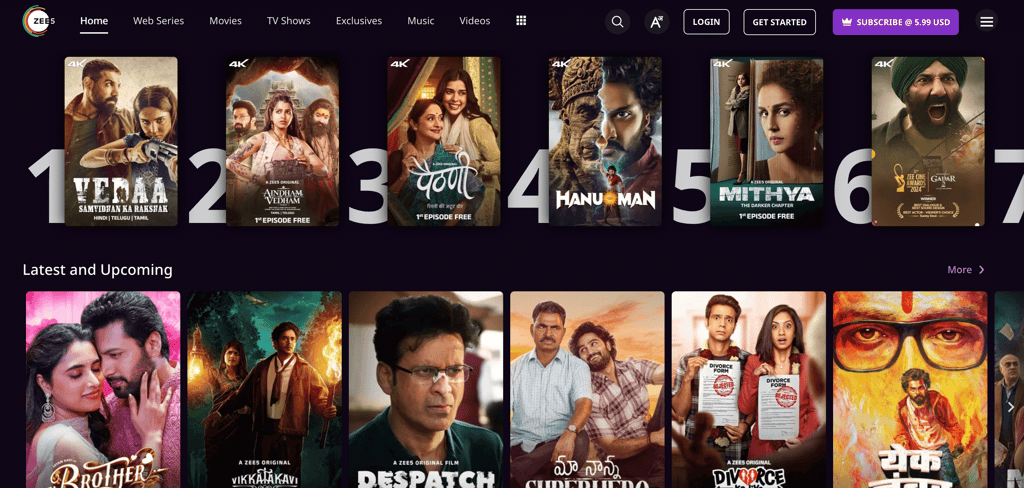
There are over 100,000 hours of content to watch on ZEE5. To help you decide on what to spend an evening on, I’ve pulled together a list of my favorite movies and TV shows:
| Abhay | Crime drama |
| Bicchoo Ka Khel | Crime drama |
| Crashh | Drama series |
| The Churails | Drama series |
| Jamai | Drama series |
| Jeet Ki Zid | Drama series |
| Kaagaz | Comedy movie |
| Nail Polish | Courtroom thriller |
| Naxalbari | Action thriller series |
| Rahde | Action movie |
| Simmba | Action movie |
| Suraj Pe Mangal Bhari | Romantic comedy |
| Taish | Drama |
| Uri – The Surgical Strike | War movie |
For more recommendations, take a look at ZEE5’s official website or Twitter page.
Conclusion
If you want to watch everything ZEE5 has to offer from the US, Canada, the UK, or anywhere else in the world, the best thing to do is download a good VPN with a choice of Indian servers. Then, you just need to connect to a server in India, and you’ll be able to bypass ZEE5’s region restrictions so you can watch everything it has to offer. Even better, this will also let you unblock any other streaming service you want.
But that’s not all a VPN can do for you. It comes with a ton of benefits, including protecting your privacy by encrypting your data so that it’s completely hidden from cybercriminals, government agencies, and other third parties. It can also help with ad blocking and prevent your internet service provider (ISP) from throttling your speeds.
If you want more recommendations, take a look at our guide on the best VPNs for streaming.
FAQ
How can I watch ZEE5 outside India?
ZEE5 is now available in more than 190 countries. But if you’re in a location that doesn’t give you full access to ZEE5, there’s a really simple solution. All you have to do is download a strong VPN and connect to an Indian server. This will bypass ZEE5’s geo-restrictions and allow you to access its full content library.
How can I watch ZEE5 in the USA on a Samsung Smart TV?
The ZEE5 app is now available on Samsung Smart TVs in the US. So all you need to do is switch on your Samsung TV, search for the app, install it, and then use it to log in or sign up for a subscription. Then you’ll be able to watch ZEE5 on your smart TV. To find out how to do this on other popular devices, check out our instructions in the guide above.
Can I use a ZEE5 subscription in the USA?
Yes, you can now sign up for a ZEE5 subscription in the US. Simply head to the ZEE5 website or download the ZEE5 app onto your device and either log in or sign up for a subscription. To find out more, read our step-by-step guide earlier in this article.
Is it legal to watch ZEE5 with a VPN?
Yes, it’s perfectly legal to use a VPN to watch ZEE5. However, it may go against the company’s Terms of Service. But this isn’t likely to cause you any problems.


