IPVanish vs Private Internet Access: which VPN is better?
Our in-house cybersecurity experts and journalists, renowned for major reports like The Mother of All Breaches, conduct transparent, unbiased VPN testing and in-depth analysis.
With 750+ articles crafted based on real-world research, we empower readers to make informed purchasing decisions through first-hand expertise.
Learn more

IPVanish and Private Internet Access (PIA) are both well-known VPN providers. I’ve tested them extensively to see which one really deserves a spot among the best VPNs.
From my experience, IPVanish comes out on top, but it was a close call. PIA is a solid choice, as it’s easy to use and great for support, but IPVanish comes out ahead in areas like speed and streaming. PIA still shines with torrenting and a bigger server network, though.
Even if you already know who I picked, it’s worth diving into the full review. I cover all the important details so you can figure out which VPN actually works best for you.
IPVanish vs Private Internet Access: overview
Before diving into all the details, here’s a quick overview of IPVanish and Private Internet Access. I like to lay out the main features, pricing, and performance side by side, so you can see how these two top VPNs compare.
| IPVanish | Private Internet Access VPN | |
| ⭐ Rating: | ||
| 🥇 Overall rank: | #8 out of #41 | #14 out of #41 |
| 🖥️ Servers: | 3,400+ servers in 112 countries | 35,000+ servers in 90 countries |
| 📖 No logs policy: | No logs | No logs |
| 💵 Price: | From $2.39/month | From $1.89/month |
| 🔥 Coupons: | IPVanish coupon 84% OFF | PIA coupon 84% OFF |
| 🔒 VPN protocols: | OpenVPN, WireGuard, IKEv2, IPSec | Wireguard, OpenVPN, IKEv2/IPsec |
| 🍿 Streaming services: | Netflix, BBC iPlayer, YouTube, Disney+, Hulu, and more | Netflix, YouTube TV, Hulu, BBC iPlayer |
| 🖥️ Platforms: | Windows, macOS, Linux, Android, iOS | Windows, MacOS, Linux, Android, iOS |
| 📥 Simultaneous connections: | Unlimited | Unlimited |
| 💁🏻 Support: | Knowledge base, email, 24/7 live chat | Knowledge base, FAQs, tickets/email, 24/7 live chat |

Recent Updates
IPVanish vs PIA: key differences
Choosing the right VPN comes down to what you value most – speed, streaming, features, or device support. Both IPVanish and Private Internet Access have unique strengths that make them better suited for different users. Here’s a quick guide to help you decide.
Choose PIA if
- Torrenting is a priority. PIA supports P2P on all servers and offers fast download speeds, making it ideal for safe torrenting.
- Server variety matters. With over 35,000 servers in 90 countries, PIA gives more options to bypass geo-restrictions.
- You want an ad blocker. PIA’s MACE feature blocks ads, trackers, and malicious websites for cleaner browsing.
Check our full Private Internet Access review for a deep dive into its features and performance.
Choose IPVanish if
- Speed and streaming are key. IPVanish is faster and unblocks more streaming platforms, including Netflix, Hulu, and Disney+.
- Unlimited device connections are needed. You can protect all your devices on a single plan, which is great for families or small teams.
- Extra features matter. IPVanish includes encrypted cloud storage, auto-connect, traffic obfuscation, and split tunneling for advanced security.
Read our full IPVanish review for a complete look at its features and streaming performance.
Speed, performance, and streaming
I tested PIA vs IPVanish for speed, performance, and streaming. Below are the results based on real-world usage.
IPVanish vs PIA speed comparison
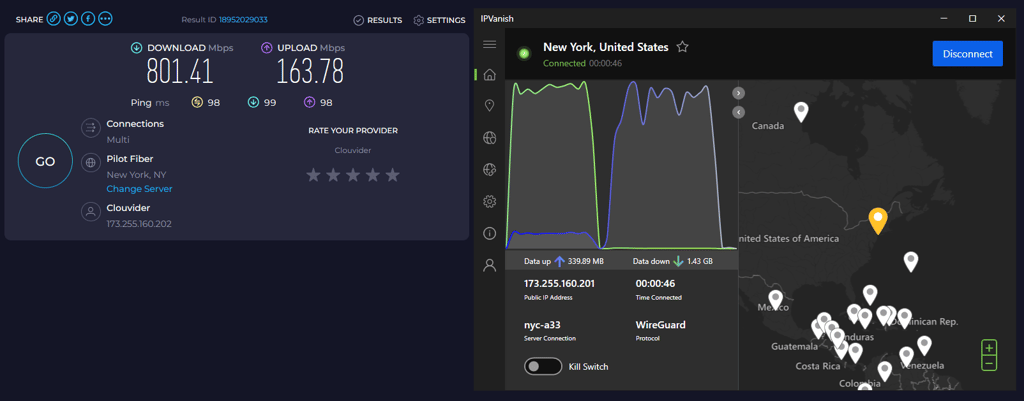
For this comparison, I tested both VPNs using the same server locations to keep results consistent. All tests were done using the WireGuard protocol on a high-speed connection.
IPVanish speed test results
| Server location | Download speed | Upload speed | Ping |
| UK | 846.57Mbps | 481.91Mbps | 39ms |
| US | 801.41Mbps | 163.78Mbps | 98ms |
| Australia | 726.33Mbps | 91.51Mbps | 221ms |
| Japan | 653.68Mbps | 75.95Mbps | 269ms |
PIA speed test results
| Server location | Download speed | Upload speed | Ping |
| UK | 507.53Mbps | 501.30Mbps | 36ms |
| US | 433.78Mbps | 168.43Mbps | 114ms |
| Australia | 405.68Mbps | 82.78Mbps | 245ms |
| Japan | 302.11Mbps | 71.58Mbps | 294ms |
Note: Speed results vary depending on server distance, your internet service provider, and server load.
Overall, IPVanish delivered faster download speeds across all tested servers, outperforming PIA in the UK, US, Australia, and Japan. PIA had slightly better upload speeds in some locations.
Both VPNs also support IKEv2 and OpenVPN, which may slightly alter performance. IKEv2 can provide stable speeds, while OpenVPN is more consistent but typically slower.
Streaming
| Platform | IPVanish | Private Internet Access |
| Netflix | ✅ | ✅ |
| Amazon Prime Video | ❌ | ❌ |
| YouTube | ✅ | ✅ |
| Hulu | ❌ | ✅ |
| HBO Max | ✅ | ❌ |
| Disney+ | ✅ | ❌ |
| BBC iPlayer | ✅ | ❌ |
It's no surprise that people mostly use VPNs to unblock streaming services. However, not all VPNs are equally suitable for the task. IPVanish vs PIA is a good example. Our test results show that IPVanish is more efficient than PIA at unblocking various streaming services. Plus, it has a native app for Apple TV, which PIA is lacking.
When it comes to Netflix, both providers can unblock it relatively well. However, there are a few things to note. Private Internet Access can easily unblock US libraries, but it's not that good with others, such as exclusive Netflix UK content.
On the other hand, IPVanish managed to unblock Netflix US, UK, and India. However, it failed to provide access to most European Netflix libraries.
Now, what about other streaming platforms? If you're looking to unblock BBC iPlayer, PIA may not be suitable for you since it has failed to unblock it. The same goes for Disney+ as well as Amazon Prime Video. However, it provided geo-restricted access to YouTube and Hulu US with ease.
On the contrary, IPVanish unblocked BBC iPlayer. But not without challenges — during our test, the streaming was laggy, and we faced some buffering issues. The Hulu performance was also disappointing, as well as Amazon Prime Video. The provider couldn't even unblock US servers.
Overall, both providers demonstrate decent performance, despite not being able to compete with top VPN providers, such as NordVPN, which unblocks all of these streaming sites. However, if you choose IPVanish you’ll be able to unblock more streaming services than with Private Internet access.
Torrenting
IPVanish and PIA are relatively good torrenting providers, but which is better? Let's take a look.
Private Internet Access is great for torrenting because it supports P2P on all of its servers. It also provides SOCKS5 and the Shadowsocks proxies to reroute your traffic and hide your IP address.
But the best part about it is its speed. We reached 10-15 MB/s speeds (80-120 Mbps) during our tests. We were pleasantly surprised by the result, especially compared to all the other torrenting VPNs we tested.
Now, what about IPVanish? Truth be told, when compared to PIA, IPVanish could be more impressive. It provides all necessary torrenting features, such as P2P servers for speed increase and a free SOCKS5 proxy for anonymity. Despite these features, IPVanish didn't match PIA's speed and performance. During our tests, the download speed was 7-8MB/s (56-64mbps).
Without a doubt, PIA has an edge when it comes to torrenting. Fast speed and security features have placed this provider ahead of the competition.
Plans and value
| Plan | IPVanish | Private Internet Access |
| Monthly | $14.99/month | $11.95/month |
| Six-months | N/A | $7.50/month |
| One year | $3.89/month | $3.99/month |
| Two years | $2.39/month | $1.89/month |
| Check pricing | Check pricing |
Private Internet Access comes with a quite simple pricing model. It does not require you to deliberate between necessary features and their price. Instead, the VPN provides all of its features with every plan. The only difference is the duration of the subscription.
PIA's cheapest plan is also the longest one – two years for only $1.89/month. The most expensive one is a single-month plan, which costs $11.95. The middle ground between these two options is a 6-month plan that costs $7.50 a month.
Keep in mind that Private Internet Access VPN doesn't have a free trial. The only reconciliation for those who want to try out the service is a 30-day money-back guarantee. Don't forget to grab our PIA coupon, to make sure you get the best deal possible.
IPVanish is slightly more expensive than Private Internet Access. However, when comparing PIA vs IPVanish, it's worth mentioning that IPVanish comes with more features that naturally increase the value.
A 1-month IPVanish plan costs $14.99 while an annual plan is priced at $3.89/month. But if you’re looking for the best deal, IPVanish 2-year plan is highly recommended – $2.39/month.
The best part about IPVanish is the unlimited simultaneous connections with all plans. Don’t forget that you can only get a 30-day money-back guarantee with the annual plan. Meanwhile, a 7-day free trial is only available for mobile devices.
All things considered, IPVanish is the winner of this round. It delivers a handful of relevant features, unlimited connections as well as excellent streaming performance. While PIA is slightly cheaper, one thing is clear — if you pay less, you also get less. But don't rely solely on our judgment. Instead, go to the features part of the review to see what both providers have to offer.
Servers
Large server count is not the most important criteria when choosing a VPN, but it surely does matter. After all, wide range of regions allows you to unblock geo-restricted content, meanwhile a large server fleet prevents traffic congestion
| IPVanish | Private Internet Access | |
| Servers | 3,400 | 35,000 |
| Countries | 112 | 90 |
Considering both the server fleet and a number of countries, it’s clear that Private Internet Access wins this round. PIA boasts over 35,000 servers that are scattered globally in 90 countries.

Features
| Category | IPVanish | Private Internet Access |
| Split tunneling | ✅ | ✅ |
| Encrypted storage | ✅ | ❌ |
| Auto connect | ✅ | ❌ |
| SOCKS5 proxy | ✅ | ✅ |
| Port forwarding | ❌ | ✅ |
| Traffic obfuscation | ✅ | ✅ |
| Ad blocker | ✅ | ✅ |
| Kill switch | ✅ | ✅ |
On top of the basic VPN feature, both PIA and IPVanish provide additional tools. This way, providers ensure security, privacy, and an excellent browsing experience. The most helpful features are SOCKS5 proxy, split tunneling, and kill switch, among many others.
However, there are some differences between the two. IPVanish comes with more features than Private Internet Access. It delivers traffic obfuscation, encrypted storage, and a flexible auto-connect feature.However, PIA comes with something IPVanish slacks — port forwarding and ad blocker.
While PIA delivers a solid arsenal of features, IPVanish provides more value to its users. Thus, we declare it the winner of the IPVanish vs PIA features part of this review.
Split tunneling
Split tunneling is necessary when users need more control over their VPN setup. This feature allows choosing apps that can connect to the internet while bypassing the VPN connection. This way, the selected apps will connect with your real IP, while others run on VPN simultaneously.

When we tested PIA's split tunneling feature, we found that it works only with certain apps. For instance, there were no issues with Google Chrome. However, Oracle VM VirtualBox should take note that split tunneling may not work for them.
When it comes to IPVanish, the split tunneling feature works well. Yet, there's a catch. Unlike PIA, which provides the feature on Windows, Linux, macOS and Android, IPVanish’ split tunneling is unavailable on macOS/iOS due to Apple's API restrictions. So, it's perfect if you're planning on using the VPN on your mobile, but it's a shame it's unavailable on desktop or macOS devices.
Encrypted storage
Encrypted storage is quite a rare feature for a VPN. Nevertheless, it's a useful one. After all, we all have sensitive files to protect.
Unfortunately, Private Internet Access doesn't have this feature. Meanwhile, IPVanish offers safe storage called SugarSync. It lets you store up to 500GB of files for a small extra fee on top of your IPVanish subscription.
The best part about SugarSync is the easy upload feature. You can simply forward emails with attachments to a unique email address, and the files will immediately appear on the cloud.
Auto connect
Another great asset that comes with IPVanish is the so-called On Demand feature. It allows you to set rules instructing when the VPN should connect automatically.

The features come with a variety of settings. For example, you can set it up to always connect automatically when your device boots. Or when you connect to specific public wifi, such as a favorite coffee shop.
SOCKS5 proxy
SOCKS5 is one of the fastest proxies that allow you to redirect the VPN connection through an additional location for an extra layer of anonymity. It completely hides your real IP address, making SOCKS5 a great tool for torrenting.
Private Internet Access lets you choose between the SOCKS5 Proxy and Shadowsocks. The proxies offer six countries: the UK, Switzerland, Canada, the US, Israel, and Japan. While both of them are efficient, Shadowsocks is the more powerful one — it can bypass the Great Firewall of China.
IPVanish offers a SOCKS5 proxy with its subscription as well. While the proxy can remove your IP address, it has some limitations. For example, when compared to PIA’s Shadowsocks, the IPVanish SOCKS5 proxy is not as efficient. So don’t expect it to work in China.
Port forwarding
If you ever end up in a situation where you need to connect to another device remotely, PIA will have you covered. The provider offers an advanced port forwarding feature.
Yet, no matter how useful, the feature is a bit frustrating. Here’s the issue we had: a forwarded port gets assigned to you randomly. This means that you need to configure your network to forward that port as well. Furthermore, PIA’s US servers don’t support port forwarding at all.
Other notable features
Both providers offer other features as well. For example, Private Internet Access boasts an effective ad-blocking feature called MACE. It works by blocking DNS, and as a result, you won't be seeing intrusive ads, pop-ups, banners, and even YouTube ads.
The best part about MACE is that it offers well-rounded protection. Not only does it block malicious ads, but it also protects you from dangerous websites as well.
While IPVanish doesn't offer an ad blocker, it also has something PIA doesn't — traffic obfuscation. The feature allows you to hide the fact that you're using a VPN. It works by enabling XOR cipher for your traffic, which wipes the traces your VPN's tunneling protocols leave behind. This feature is handy if your government has implemented firewalls with a deep-packet inspection to block VPN usage.
Privacy and security
| IPVanish | Private Internet Access | |
| Encryption | AES-256-GCM | AES-128-CBC (default), AES-256-CBC (more secure) |
| Hash | SHA-512 | SHA-1 and SHA-25 |
| RAM servers | No | Yes |
| Based in | United States | USA |
| No-logs policy | Audited | Audited and court-proven |
| Kill switch | Yes | Yes |
| DNS leak protection | Yes | No |
It's clear that both Private Internet Access and IPVanish take security seriously. Both providers offer the strongest AES encryptions, don't log your data, and deliver a wide range of additional security features.
While IPVanish uses only the AES-256-GCM cipher alongside the SHA-512 hash function, PIA offers more variety. The provider has a default AES-128-CBC encryption with SHA-1 hash that can be changed to a stronger setting — AES-256-CBC with SHA-25.
But there’s a catch — PIA is better suited for advanced users. You will need to set up the VPN according to your needs. Therefore, first time users may not be comfortable or knowledgeable enough to change the default settings. Meanwhile, IPVanish offers the highest possible security with no deliberation on the users end.
Since these providers are established in the US, their promise of not keeping data logs may be questionable. But both have been independently audited, and no privacy flaws were found.
However, when it comes to data retention, one provider is more trustworthy than the other — it’s Private Internet Access. The main reason is that, unlike IPVanish, PIA is using RAM-only servers. These servers wipe the collected data upon reboot, guaranteeing full privacy.
On the other hand, IPVanish offers a different invaluable feature: DNS leak protection. It ensures that your ISP provider, or any other third party, can't get their hands on your browsing traffic in case of a DNS leak protection.
As you can see, both providers come with their own security benefits. Since, IPVanish and PIA take security very seriously, we are declaring a draw for this round.
Infrastructure
RAM-only servers are the best way to ensure complete privacy for your data. When you use a RAM-only server, all your traffic data is wiped upon reboot. Not only do they prevent your data from being stored, but they also stop data breaches. For this reason, all top providers offer them as a good measure of protection.
Unfortunately, IPVanish is not one of them. The provider is still in the process of moving towards running on RAM-only servers. As of yet, it’s unknown when the transition will be complete. Meanwhile, Private Internet Access has RAM-only servers covered.
Privacy
PIA guarantees privacy with several protocols and allows you to choose the level of protection you need. The provider delivers WireGuard, IKEv2/IPsec, and OpenVPN protocols, regarded as the most secure on the market. Additionally, OpenVPN comes with two different encryption options: the default AES-128 or the more secure AES-256 cipher. You can switch between the two on the app.
On top of that, Private Internet Access allows you to disable encryption entirely. It is especially helpful when privacy is less of a concern than speed. But don’t worry, your credentials will still be encrypted, and your IP will be hidden.
While not as customizable as PIA, IPVanish delivers a high level of privacy. It does so by using the industry standard encryption — 256-bit AES. With it comes tunneling protocols: Wireguard as well as OpenVPN (UDP/TCP) and IKEv2/IPsec.
Logging
Both IPVanish and Private Internet Access claim not to log or sell user data. PIA temporarily collects your username, IP address, and data usage, but deletes this data as soon as the app closes. IPVanish may collect email and payment info, but does not track activity.
IPVanish previously disclosed user data in a legal case, but under new ownership, it enforces a strict no-logs policy, which is independently audited to confirm compliance. PIA also uses RAM-only servers that wipe data on reboot, with audits verifying its no-logs claims.
Both providers now maintain strong privacy practices, ensuring user activity is not stored.
User experience
When considering user experience, I wanted to see what devices each VPN supports, how the apps look, and how easy the interface is to navigate. I looked at platform support and tested both VPNs across different devices to see how they compare in everyday use.
| IPVanish | Private Internet Access | |
| Supported OS | Windows, macOS, Linux, Android, iOS | Windows, MacOS, Linux, Android, iOS |
| Other software and devices | Android TV, Fire devices, Apple TV | Android TV, Fire devices |
| Browser extensions | N/A | Chrome, Firefox, Edge, Brave, Opera |
| Simultaneous connections | Unlimited | Unlimited |
| Usability level | Easy to use | Needs some experience |
When it comes to platform support, both providers deliver a similar variety. You'll be able to connect to VPN on your devices, whether you're an Android, Linux, Windows, or macOS fan. Yet, there are some differences between IPVanish and PIA.
First of all, IPVanish doesn't offer any browser extensions. So you won't be able to change any VPN settings without switching between your browser and the app. Meanwhile, Private Internet Access delivers extensions for all major browsers: Chrome, Firefox, Edge, Brave, and Opera.
Then, there are simultaneous connections. Both PIA and IPVanish are especially generous with this as they offer an unlimited amount of connections. There may not be many situations where you need to run many devices at once, but it helps if you're sharing the VPN with family and friends.
Other than compatibility, it's also important to compare the user experience. But there are barely any differences between these providers. Both PIA and IPVanish deliver well-designed, smooth interfaces for all of their apps. However, to gain the full benefits of PIA, you will be required to change default settings. This may be challenging for first-time users.
Desktop apps
Let's take a look at PIA's Windows desktop application. Without a doubt, it is user-friendly and easy to navigate. The app's main interface includes a dashboard that displays the user's connection status, paired with an easy-to-find on-and-off switch.

The app also features plenty of other useful information about your connection, like the protocol, encryption, port, and authentication cipher. All of this is wrapped in a sleek and pleasant design.
PIA's macOS app is very similar to the Windows application. Overall, it's a well-designed application with excellent usability.
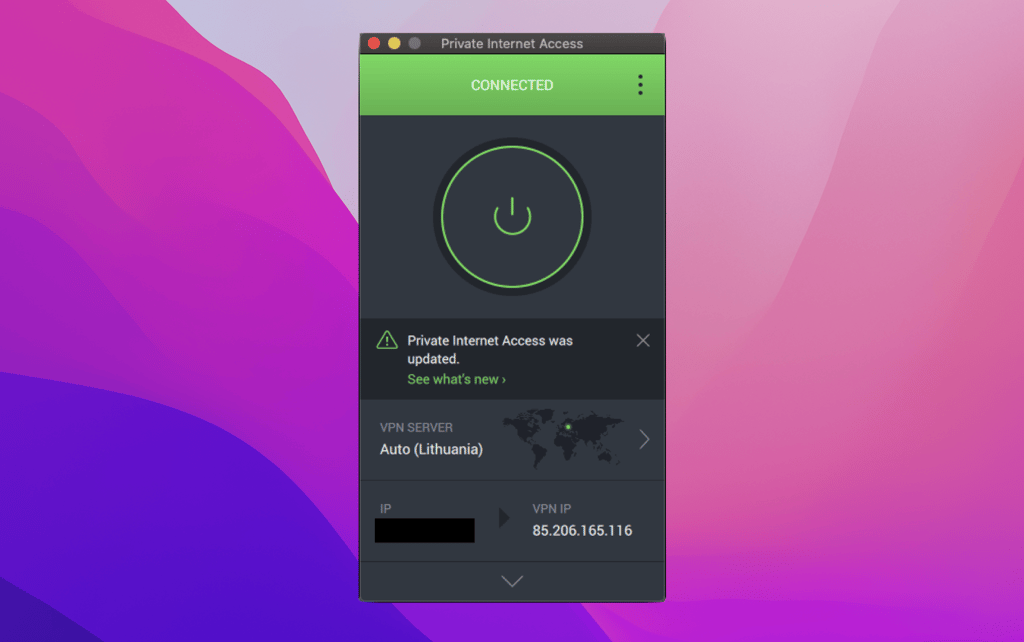
A nice benefit that comes with PIA's VPN is an app for Linux. The setup of it is quite simple. All you need to do is download an installation script and run it—the interface and features are exactly the same as those of Windows and macOS apps.
Now, let's take a look at what IPvanish has to offer. When it comes to a Windows app, it provides a sleek, clean, and well-designed user interface.

The main dashboard displays the connection status and allows you to quickly connect and disconnect from the VPN, as well as switch between protocols. It's also easy to customize. The settings tabs provide many relevant configuration settings for the connection, split-tunneling, IP rotation and others.
The macOS app is not that different in design. It has a similar user interface that doesn't pose any usability issues. However, the app itself is less customizable than Windows, allowing slightly less flexibility for the user.
Mobile apps
Private Internet Access provides very similar functionality and design for both Android and iOS. These apps look quite similar, both in regard to design and features. Expect to be comfortable with any or both of these apps.

When it comes to IPVanish apps, usability is just as good as PIAs. However, we noticed that the design on iOS is slightly better. However, that doesn't mean that the Android app's usability is worse. Both apps are easy to navigate.

Customer support
| IPVanish | Private Internet Access | |
| 24/7 live chat | ✅ | ✅ |
| ✅ | ✅ | |
| Phone line | ✅ | ✅ |
| Guides or articles | ✅ | ✅ |
| FAQs | ✅ | ✅ |
At some point, you’re bound to run into a problem. Whether it may be an issue with a VPN setup or payments — only the customer support can sort it out. While some VPN providers, especially the free ones, are notorious for poor customer service, fortunately, PIA and IPVanish are not the case.
IPVanish and PIA are well-established VPN providers offering a range of services to help answer user queries. Both providers offer extensive guides, articles, and FAQs to help you get started with your VPN.
In case you prefer talking with an actual person regarding your issues, you can turn to 24/7 live chat, call or email the providers. From our experience, IPVanish and PIA’s agents were polite and helpful.
To sum up, both providers have equally good customer service. No matter the issue you’re having, you’ll be able to get assistance.
Final verdict
| Category | IPVanish | Private Internet Access |
| Streaming | ✅ | ❌ |
| Price | ✅ | ❌ |
| Protection | ✅ | ✅ |
| Ease of use | ✅ | ❌ |
| Speed | ✅ | ❌ |
| Features | ✅ | ❌ |
| Server locations | ❌ | ✅ |
| Torrenting | ❌ | ✅ |
| Customer support | ✅ | ✅ |
It’s time to sum up the vast results of our review. As you can see, IPVanish turned out to be a better choice than PIA, although it was a close competition.
IPVanish has excelled in the most important areas. First of all, the provider is excellent for unblocking streaming services. Second, IPVanish is the undeniable winner of the speed competition. Not to mention that it comes with plenty of additional features and excellent security measures.
Meanwhile, Private Internet Access demonstrated surprising performance when we tested its torrenting capabilities. The provider also boasts a larger and more diverse server fleet and even offers an ad blocker. However, PIA can’t match IPVanish in terms of value, streaming capabilities and speed.
It’s worth noting that both providers are just as efficient in terms of security. They are loaded with features that will keep your browsing traffic, IP and other personal information secure. Additionally, PIA and IPVanish have great customer support. These providers won’t leave you hanging with whatever issue you may have.
While both IPVanish and PIA come with their own benefits, IPVanish has the edge. But if you are hesitating about whether IPVanish is the right choice for you, don't forget that it offers a 30-day money-back guarantee.
FAQ
Is PIA VPN better than IPVanish?
No, PIA is not better than IPVanish. While PIA offers a large fleet of servers and a slightly better torrenting experience IPVanish beats it in other areas. IPVanish comes with more features as well as much better streaming capabilities. Additionally, IPVanish is also faster than PIA.
Should I choose PIA or IPVanish for Kodi?
IPVanish may be a better choice for Kodi. IPVanish offers much better compatibility and streaming capabilities. Even though PIA owns a larger and more diverse server fleet, IPVanish delivers better performance and speed.
Is PIA better than IPVanish for Firestick?
IPVanish may be a better choice for Firestick than PIA. According to our tests, IPVanish provides a nearly instant connection and impressive speed, despite owning a slightly smaller server fleet than PIA. Additionally, IPVanish is excellent at unlocking various streaming services, such as Netflix and BBC iPlayer.