Surfshark vs Windscribe: which VPN is better?
Our in-house cybersecurity experts and journalists, renowned for major reports like The Mother of All Breaches, conduct transparent, unbiased VPN testing and in-depth analysis.
With 750+ articles crafted based on real-world research, we empower readers to make informed purchasing decisions through first-hand expertise.
Learn more

Surfshark is one of the most popular VPNs on the market, while Windscribe is known because of its free VPN plan. Additionally, both VPNs offer strong security. However, I spent several weeks testing both providers to see which VPN is better.
For this Surfshark vs Windscribe comparison, I tested their performance, security features, streaming and torrenting capabilities, and speed. I also reviewed usability and pricing.
Continue reading to find out which VPN fared better during my tests, Surfshark or Windscribe.
Surfshark vs. Windscribe
Both Surfshark and Windscribe have their strengths and weaknesses. Surfshark is faster, more affordable, and offers strong security features. On the other hand, Windscribe offers some unique features, such as TCP socket termination, decoy traffic, and a decent free plan. In the table below, you can see how these two VPNs compare side-by-side and which of the two is the best VPN you can get.
| Surfshark VPN | Windscribe VPN | |
| ⭐ Rating: | ||
| 🥇 Overall rank: | #2 out of #41 | #18 out of #41 |
| 🖥️ Servers: | 4,500+ servers in 100 countries | 480+ servers in 69 countries |
| 📖 No logs policy: | No logs | No logs |
| 💵 Price: | From $2.49/month | From $5.75/month |
| 🔥 Coupons: | Surfshark coupon 87% OFF | Cybernews VPN Coupons |
| 🔒 VPN protocols: | OpenVPN, WireGuard, IKEv2, Dausos | WireGuard, OpenVPN, IKEv2/IPsec, WStunnel and StealthVPN |
| 🍿 Streaming services: | Netflix, Disney+, Amazon Prime Video, Hulu, and more | Netflix, BBC iPlayer, YouTube |
| 🖥️ Platforms: | Windows, macOS, Linux, Android, iOS | Windows, macOS, Linux, Android, iOS |
| 📥 Simultaneous connections: | Unlimited | Unlimited |
| 💁🏻 Support: | Knowledge base, email, 24/7 live chat | Self-help, bot chat, tickets |

Recent Updates
Key differences between Surfshark and Windscribe
Both Surfshark and Windscribe can be great services for different users as they focus on different priorities. Surfshark is fast and offers advanced security features for a low price. On the other hand, Windscribe offers a generous free plan and some unique features for desktop and mobile devices.
Choose Surfshark if:
- You want above-average security. Surfshark offers built-in antivirus, Alternative ID, and Surfshark alert, among other security features that push your security beyond the basics.
- You need to protect many devices. If you have a large household or simply want to protect more than 10 devices, Surfshark is your best choice. It supports unlimited simultaneous device connections per account.
- You mainly want to use a VPN for streaming. With a server fleet spanning over 4,500 servers in 100 countries, Surfshark is reliable at accessing popular streaming platforms, such as foreign Netflix libraries, BBC iPlayer, and GLOBO TV.
Read our detailed Surfshark review to learn more.
Choose Windscribe if:
- You’re on a budget. Windscribe offers a decent free version with a 10GB monthly limit, making it a great option for users on a budget.
- You’re interested in unique features. Windscribe stands out for the variety and uniqueness of its features. Several notable features include TCP socket termination for your desktop, decoy traffic for your mobile devices, and language wrap that fakes your browser language to match the location of a connected proxy.
- You want a highly configurable VPN. Windscribe can be easily customized. While using this VPN, I could choose protocols, ports, and DNS configurations.
For a thorough provider breakdown, check out our Windscribe review.




We spare no effort to test the products & their features. All information is gathered by our in-house research team & fact-checked by our team of experts. Discover the ins and outs of our testing procedures.
Speed, performance, and streaming
I tested Surfshark and Windscribe for speed, performance, and streaming. Below, I share my findings.
Speed comparison: Surfshark vs Windscribe
The speed test results are pretty mixed when it comes to comparing Windscribe and Surfshark. How fast a VPN is or will be may depend on your baseline speed, the location you’re connecting from and to, and numerous other factors.
- Baseline: 940 Mbps download/ 940 Mbps upload
WireGuard
| Surfshark download, Mbps | Surfshark upload, Mbps | Windscribe download, Mbps | Windscribe upload, Mbps | |
| UK | 848 | 173 | 251 | 73 |
| US (NY) | 790 | 92 | 174 | 111 |
| CA | 800 | 82 | 80 | 73 |
We tested Surfshark and Windscribe’s speeds with the WireGuard protocol. As is evident from the table, Surfshark was faster across all three locations compared to Windscribe. Surfshark has the better download speed, yet Windscribe has better upload speeds in the US.
If you'd like to see more VPN speeds compared, take a look at our VPN speed test tool.
Netflix and streaming performance
| Surfshark | Windscribe | |
| Netflix | ✅ Yes | ✅ Yes |
| Apple TV | ✅ Yes | ✅ Yes |
| BBC iPlayer | ✅ Yes | ✅ Yes |
| Youtube TV | ✅ Yes | ❌ No |
| Hulu | ✅ Yes | ✅ Yes |
| HBO Max | ✅ Yes | ✅ Yes |
| Disney + | ✅ Yes | ✅ Yes |
Both Surfshark and Windscribe are really good at unblocking geo-restricted streaming services and their libraries.
Surfshark is like a streaming wizard – there was no platform it didn’t unblock during our tests. Netflix, Apple TV, Hulu – all of them are at your fingertips with Surfshark. The streaming quality was also good, for the most part. Of course, video quality and buffering occurrences depend on your baseline speed. But Surfshark is fast enough to not cause problems when streaming shows or movies.
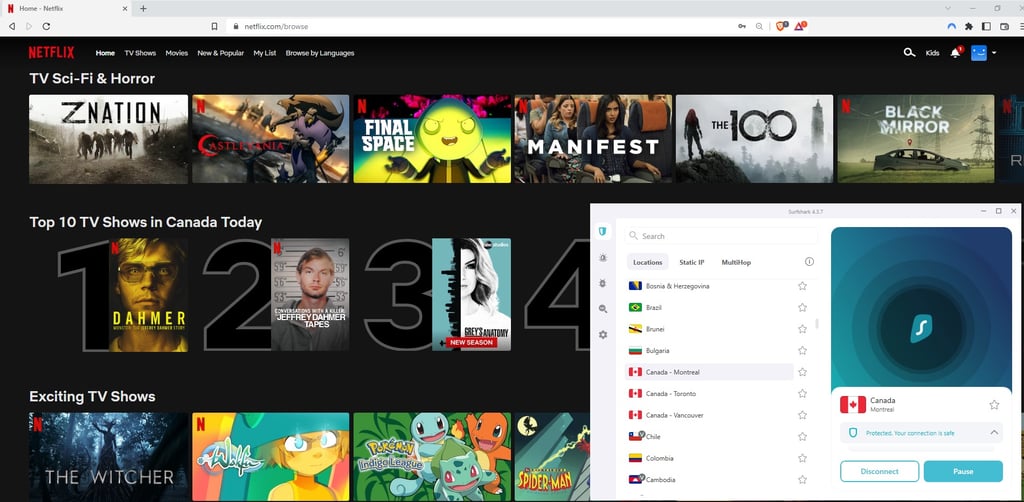
Windscribe is a pretty good VPN for streaming as well. It’s not as good as Surfshark, though. Windscribe managed to unblock Netflix libraries in 14 countries and most other popular streaming services. However, YouTube TV was where Windscribe hit a wall. Otherwise, the video and audio quality was decent – probably thanks to WireGuard. One more thing to note, though – Windscribe’s Windflix servers for streaming are only available with the paid version. Nevertheless, free users can expect to unblock some streaming services, too.
Plans and value
| Surfshark | Windscribe | |
| Free | - | $0.00/month |
| Monthly plan | $4.49/month | $9.00/month |
| 1-year plan | $2.49/month | $5.75/month |
| 2-year plan | $2.49/month | - |
| Build a plan | - | $1.00/location/month |
| Get discounts | Get discounts |
Most VPNs offer pricing plans based on a monthly recurring payment. However, there is the option to pay for a whole year upfront – and the longer the subscription, the lower the monthly price.
Surfshark offers three different pricing tiers, which all include the same features and unlimited device connections. The monthly plan is quite expensive – $4.49 is a lot for a VPN. However, the yearly plan is where things take a turn – you can get Surfshark for a whole year for just $2.49/month. The 2-year plan is even cheaper at $2.49/month.
With Surfshark, you also get to enjoy a pretty long trial period – there is a 7-day free trial. After that, you can use the 30-day money-back guarantee if you’re unsatisfied with the VPN.
Windscribe’s most notable pricing feature is the free tier. With it, you get 10GB of data per month, three server locations, and the most basic security features. However, if you wish to upgrade to a paid version, you have three options – to pay $9.00 per month, on a monthly basis, to get the 1-year plan for $5.75/month, or to build your own plan. With the latter, you pay $1.00/month for one location you want to connect to. All of Windscribe’s paid plans include the same features plus unlimited device connections.
When it comes to trial periods and money-back guarantees, Windscribe is not extremely generous. You can try the paid version for 1 day. And if you’re not satisfied with your purchase, you have only 3 days after your purchase to get your money back.
Server locations
| Surfshark | Windscribe | |
| Servers | 4,500 | 480 |
| Countries (total) | 100 | 69 |
| Virtual locations | Yes | No |
| Specialty servers | Yes | Yes |
Surfshark has more servers than Windscribe, and in more countries too. Besides, it also uses virtual servers for special locations such as India. In these locations, having physical servers means that a VPN would be legally obliged to log user data. Therefore, opting for virtual servers instead was a good move. Overall, 4,500 Surfshark servers cover 100 locations all over the world, including in several cities in some of the countries.
Windscribe, on the other hand, doesn’t have a lot of servers (480) but has plenty of server locations (69). While the wide coverage can be attractive, it’s good to keep in mind that fewer server numbers mean crowding in one place, and could result in lower speeds in some cases. The free version of Windscribe offers 11 server locations.
Torrenting
Both Surfshark and Windscribe support P2P connections on their servers. However, only Windscribe clearly indicates which servers should not be used for torrenting.
We tested how well both VPN providers work for torrenting. Surfshark showed very good results – we were able to download a ~3GB file in under three minutes. Windscribe, on the other hand, did not perform very well. The speeds were so low that it would’ve taken us around two to three hours to download a 4GB file. Sure, the file size is different, but it doesn’t really warrant the drastic difference between the two VPNs.
Features overview
| Surfshark | Windscribe | |
| SmartDNS | ✅Yes | ❌No |
| Specialty servers | ✅Yes | ✅Yes |
| Split tunneling | ✅Yes | ✅Yes |
| Web filters | ✅Yes | ✅Yes |
Both Windscribe and Surfshark have plenty of additional features, including but not limited to specialty servers, web filters, split tunneling, and some other features.
However, there are some features that Windscribe lacks, such as SmartDNS, an IP rotator, and a feature for bypassing stricter VPN blocks. By contrast, all of these features can be found on Surfshark.
Specialty servers
Of all that makes up a VPN, specialty servers are probably the most interesting part. Both Surfshark and Windscribe have something to show here. Both VPNs have multi-hop and static IP servers.
With multi-hop servers, your VPN connection goes through not one, but several different servers. This in turn masks your IP address several times and makes it more difficult to trace you online.
Static IP servers work on the basis of assigning you the same IP address every time you connect. Other users can use the same server at the same time, though, and the static IP will also be shared. Windscribe offers them at an additional cost. With Windscribe, you can also choose between a residential and a data center static IP.
Dedicated IP servers are similar to static IPs, however, a dedicated IP address will not be shared by anyone else except you. Surfshark offers dedicated IPs in six locations, though this number could change in the future. A dedicated IP also comes at an additional cost of $3.75/month.
Windscribe also has some other special servers under its belt. The Windflix servers in the UK, US, Canada, and Japan are servers optimized for streaming Netflix. They work quite well. However, for unblocking Netflix in other locations, you’d have to rely on regular servers, which might not always be able to provide access to geo-restricted content.
Split tunneling
Both Surfshark and Windscribe have split tunneling. This feature is super handy when you want the traffic from only specific apps to be routed through a VPN server. For example, you can use split tunneling when you want online shops to be in local currency, but you also want to access a Netflix library from another country – you can connect only the Netflix app to the VPN.
Both Surfshark and Windscribe have split tunneling available on Windows and Android apps.

Web filters
Web filters are usually a set of features that keep you safe when browsing online. Both Surfshark and Windscribe have these features on their apps.
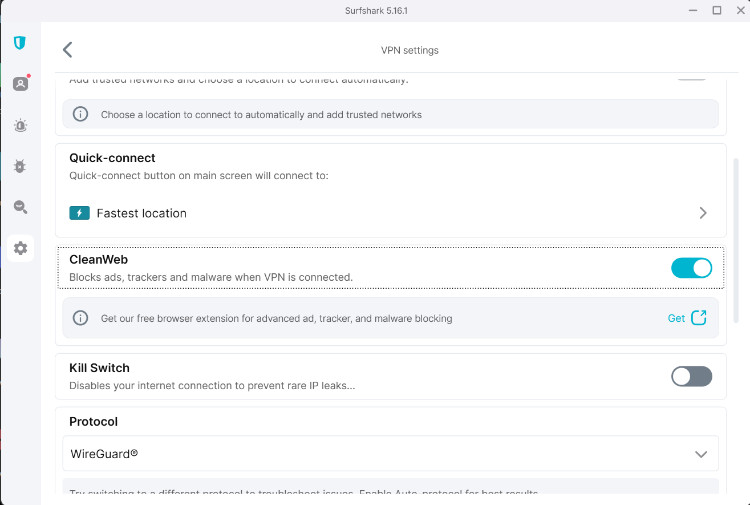
Surfshark’s web filter feature is called CleanWeb, and it is a DNS feature that blocks ads and malicious websites from loading, as well as stops online trackers from collecting your data. It is not turned on by default, and you have to enable it yourself. You can enable it on the selected browser: Chrome, Firefox, or Edge.
Windscribe has a feature called R.O.B.E.R.T., which functions as a domain and IP blocking tool. This essentially means that it blocks ads, trackers, and malicious websites. You can also choose to whitelist some websites.
Other features
Besides the ones mentioned above, Surfshark and Windscribe both have some additional features.
Surfshark’s other features include:
- Surfshark Antivirus – this is a full-fledged integrated antivirus tool, which includes scans and nearly everything else that an antivirus program has.
- GPS spoofing – only available on Android, this feature allows you to spoof your GPS location together with your IP address, which comes in handy with mobile games such as Pokemon Go, and dating apps.
- SmartDNS – this is a feature that helps with setting up Surfshark on devices that don’t support VPNs, for example, smart TVs or gaming consoles.
- IP rotator – this feature will change your IP address from time to time, without disconnecting you from the VPN. This will make it more difficult for interested third parties such as your ISP to track your activities online.
- NoBorders – this is a cool feature for people living in countries that heavily restrict access to content on the internet. NoBorders allows you to easier bypass firewalls and heavy VPN bans.
For more information about Surfshark features, visit our Surfshark review.
Windscribe’s extra features are:
- Firewall – this feature is mainly there to prevent DNS, WebRTC, and IPv6 leaks. Windscribe firewall is available on Windows and macOS.
- Autopilot – available on the Windscribe browser extension, this feature will automatically pick the best location to connect to.
- Time Warp – this feature is also only available on the browser extension. It essentially allows you to fake your timezone on the browser and make it more difficult to detect that you’re using a VPN.
- Secure Hotspot – only available on Windows, this feature allows you to create a VPN-protected wifi hotspot so that other people can use the secure connection without having to download the Windscribe app themselves.
For more details, take a look at our Windscribe review.
Surfshark vs Windscribe: which is more secure?
| Surfshark | Windscribe | |
| Encryption | AES-256-GCM and Chacha20Poly1305 | AES-256 |
| Hash | SHA512 | SHA512 |
| RAM servers | Yes | No |
| A member of the 5-Eyes, 9-Eyes Alliance? | Yes | Yes |
| No-logs policy | Audited | Not audited |
| Kill switch | Yes | Yes |
| Ad blocker | Yes | Yes |
| DNS leak protection | Yes | Yes |
As expected of respectable VPNs, both Windscribe and Surfshark take security very seriously. However, one VPN has done a little more than the other.
Both VPNs have industry-standard AES-256 encryption and use the SHA512 hash for authentication. However, Surfshark also supports the ChaCha20Poly1305 encryption cipher.
When it comes to RAM servers, of the two VPNs, only Surfshark has them. These servers are instrumental in ensuring that the VPN doesn’t log user info – they don’t have hard drives, and all information gets wiped after each server reboot.
Additionally, it is only Surfshark that has had its security infrastructure independently audited, twice. Windscribe’s security measures remain unaudited.
But when it comes to security features such as a kill switch, ad blocker, and DNS leak protection, both VPNs stand on equal ground.
Infrastructure
In this case, the infrastructure refers to what kind of servers a VPN operates on, how susceptible they are to breaches, whether they log information, and the general security of users' data that travels through them.
It is universally accepted that having RAM-only servers is the best way to go. These servers don’t have hard drives on which usage logs are kept, which limits the possibility of breaches and other unauthorized access to information.
Since July 2020, Surfshark has upgraded most of its servers to be RAM-only. This is a step in the right direction, and who knows, maybe in the near future, all of their servers will get an upgrade.
By contrast, Windscribe doesn’t have RAM-only servers, and considering the Ukrainian server seizure in 2018, it may be in their best interest to think about changing things up a little.
Privacy
The privacy section concerns the country in which a VPN is based, and how the country’s privacy and data retention laws affect the users.
Surfshark is based in the Netherlands and is a part of the 9-eyes alliance. This means that any relevant intelligence information will be shared with other member countries, should the need arise. Users will be right to be concerned about their data collection, then, but there is no need to worry. Surfshark is not legally obliged to collect user-identifying logs – and they don’t. See Surfshark’s logging policy discussed in more detail below.
Windscribe is based in Canada and is also a member of the 5-eyes alliance – essentially the same as the 9-eyes and the 14-eyes alliances. The VPN has published transparency reports which indicate how many requests to turn in user data it receives daily. Fortunately, Windscribe has not complied with these requests, because it didn’t really have data to turn in. For more details on Windscribe’s logging policies, continue reading below.
Logging
Both Surfshark and Windscribe have strict no-logs policies. However, there are some minor differences between them. Let’s take a look.
Surfshark’s no logs policy shortly states that the VPN doesn’t log anything pertaining to your online activities with a VPN. That is, it doesn’t store information such as IP address, browsing history, session information, etc. The only logs it will keep are purely related to keeping up the VPN connection. And after you disconnect, all data gets wiped permanently. Plus, it is worth noting that Surfshark’s no-logs policy has recently been audited.
Windscribe also has a no-logs policy, but it contains some exceptions. Since there is a free version, they need to log free users’ bandwidth usage and some connection stamps – just to ensure that no one is abusing the service. Additionally, Windscribe takes care to publish transparency reports related to how many requests it has gotten from authorities to hand over user data. As of yet, Windscribe has not complied with any of these requests, simply because it had no data to hand in. However, Windscribe’s no-logs policy has not been independently audited.
Platforms, interface, and ease of use
| Surfshark | Windscribe | |
| Supported OS | Windows, macOS, Android, iOS, Linux | Windows, macOS, Android, iOS, Linux beta |
| Other software and devices | Android TV, Amazon Fire | Amazon FireTV, Nvidia Shield, Kodi |
| Browser extensions | Chrome, Brave, Firefox, Edge | Chrome, Firefox, Opera, Edge |
| Simultaneous connections | Unlimited | Unlimited |
| Usability level | Easy |
Windscribe and Surfshark both support a pretty wide variety of operating systems. They are also available on some other software and devices. Both VPNs also have extensions for several different browsers. In addition, Surfshark and Windscribe also both offer unlimited simultaneous connections and are overall pretty easy to use.
However, Surfshark has some advantages over Windscribe – the desktop apps are larger and thus easier to navigate. Both VPNs have graphic Linux interfaces, which is lowkey admirable.
Desktop apps
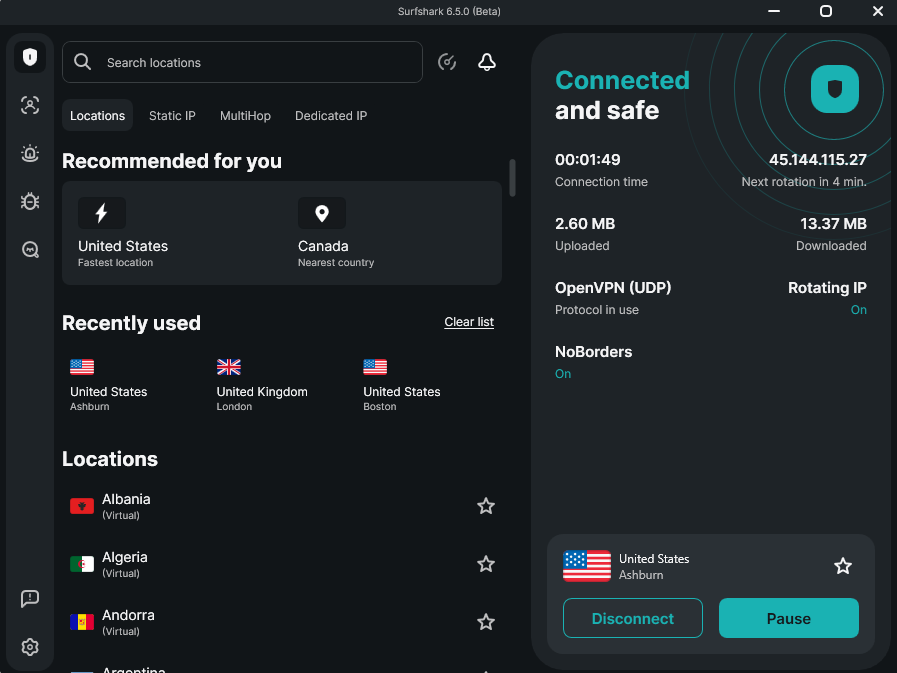
Surfshark has apps for Windows, macOS, and even Linux. All these apps look pretty much the same, but some have more features than others. For example, the macOS app doesn’t have the split tunneling feature.
Otherwise, the Surfshark desktop apps are incredibly easy to use and navigate. There is a big button for connecting that you just can’t miss, and all the features, locations, and settings are neatly arranged in a sidebar. The navigation couldn’t get simpler.
Windscribe desktop apps are very small in size. The Windows and macOS apps are very simplistic, with all the necessary features easy to find in several dropdown menus, and the settings are easy to customize, too. The Windscribe Linux app looks and feels the same as the other desktop apps.

Mobile apps
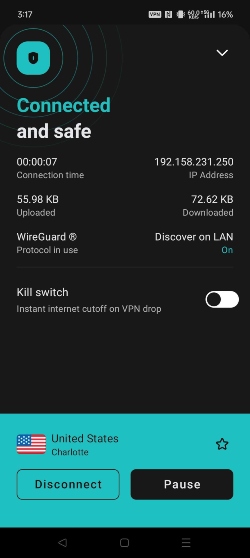
The Surfshark mobile apps don’t differ much from the desktop. The design is sleek and minimal, and all the extra features and functionalities are super easy to find. The Android app has all the same features as the Windows desktop app, plus the GPS spoofing feature. The Surfshark iOS app doesn’t have split tunneling or GPS spoofing, but it should come as no surprise – almost no iOS VPN has split tunneling.
Windscribe Android and iOS apps are a little more convenient than their desktop counterparts, if only by size. The location list is easily accessible, and all the other features reside exactly where you would expect to find them. As for the features, they are all the same as on the Windows app, except for split tunneling – it’s not available on the iOS app.

Customer support
| Surfshark | Windscribe | |
| 24/7 live chat | ✅ | ❌ |
| ✅ | ✅ | |
| Phone | ❌ | ❌ |
| Guides and articles | ✅ | ✅ |
| FAQs | ✅ | ✅ |
Surfshark and Windsribe have pretty nice customer support systems. Both VPNs have extensive FAQ pages, and you can also browse through countless articles for troubleshooting or set-up guides. Both Windscribe and Surfshark are also readily available through email, and they usually get back to you in a timely manner. Windscribe also has a chatbot. However, it’s only Surfshark that has a 24/7 live chat and is accessible at any time you can think of – yes, even in the middle of the night.
Neither VPN is reachable by phone, but it is not very surprising – most VPNs don’t have this option.
Surfshark vs Windscribe – which one wins?
Surfshark and Windscribe are both good VPN services, but in this comparison Surfshark is the ultimate winner. It was faster, demonstrated better streaming unblocking capabilities, and great security, all for an affordable price. However, Windscribe can still be a good choice for users that appreciate a solid free version and are on the lookout for unique features.
| Feature | Surfshark | Windscribe | Verdict |
| Pricing | Surfshark starts at only $2.49/month, while Windscribe offers a free version, which is rare among VPNs. | ||
| Speed | Our tests showed that Surfshark is faster than Windscribe, thanks to its larger server network and its support for WireGuard, a protocol known for offering the best speeds. | ||
| Features | Both providers have multiple subscription tiers with different feature packages. But overall, Surfshark has a more comprehensive feature package than Windscribe. | ||
| Streaming | Surfshark is better equipped to unblock various streaming services. It has a larger server network and, during testing, was more reliable at accessing popular streaming platforms. | ||
| Torrenting | Surfshark’s faster connection speeds and P2P-optimized servers make it a more capable option for torrenting. | ||
| Support | Surfshark offers more customer support options, including 24/7 live chat, while Windscribe relies on a ticketing system and a chatbot. |
FAQ
Which is better Surfshark or Windscribe?
Surfshark is a better VPN than Windscribe. It has more servers and locations to choose from, better speeds, and unblocks more streaming services. Surfshark is also great for torrenting and has excellent security measures plus some very useful extra features.
Is Windscribe trustworthy?
Yes, Windscribe is a VPN that you can trust. It has numerous excellent security features and a no-logs policy, as well as advanced leak protection. Windscribe even publishes transparency reports, so you can make sure that no user data has been collected and shared.
Does Windscribe work with Netflix?
Yes, during our tests, Windscribe successfully unblocked Netflix in over 14 countries. The paid version of Windscribe even has special Windflix servers in the UK, US, and Japan – these servers are optimized for streaming Netflix.