Best Minecraft server hosting 2026

I’ve been playing Minecraft since I was a kid, and after all these years, it’s still my favorite game. There’s just something timeless about punching trees, surviving your first night, and accidentally blowing up your friend’s house with a creeper. But after spending too much time on public servers filled with griefers, pay-to-win setups, and power-tripping admins, I decided it was time to run my own server.
Hosting my own world meant I could finally control the rules, play with friends I trust, and avoid the chaos of random players setting everything on fire for fun.
What I didn’t expect was how tricky it would be to find a reliable host. Some services were laggy, unstable, or just plain confusing. It felt like trying to find diamonds with a wooden pickaxe.

I spent a few weeks in August 2026 testing Minecraft server hosting providers, trying them in real gameplay situations with friends. I’ve narrowed it down to 8 services that actually deliver.
This guide is based on real experience: the good, the bad, and what I’d actually recommend if you’re ready to build your own server without the headaches.
Best Minecraft server hosting services 2026
- Contabo – best Minecraft server hosting overall in 2026
- Hostinger – best Minecraft server hosting for easy setup
- Apex Hosting – Minecraft server hosting for mod support
- Shockbyte – beginner-friendly Minecraft server hosting
- Godlike – Minecraft server hosting with high-performance
- exaroton – best pay-as-you-go Minecraft server hosting
- Aternos – free Minecraft server hosting provider
- CloudNord – Minecraft server hosting with instant setup
What are the minimum requirements for Minecraft dedicated server hosting?
Generally speaking, your server's requirements depend on what you plan to do on it. However, if you want to know the bare minimum, here are the requirements:
- 1 CPU core
- 2.0GHz CPU frequency
- 1GB of RAM
- 2GB of storage
This setup should be good for playing with one friend. However, as the world grows, you'll need more storage. So, for a large public server, prioritize storage and RAM since people will be exploring the world and doing all kinds of stuff. Also, heavy redstone use will require a stronger CPU, so consider that if you plan on making huge redstone projects with your friends.
Best Minecraft server hosting – detailed list
I tested many web hosts to find out which ones can actually run a Minecraft server properly. No crashes, no lag, and smooth gameplay. I spent hours building, farming, and blowing stuff up (on purpose). Some hosts held up. Others... not so much. Below are the ones that impressed me, based on real gameplay.
1. Contabo – best value Minecraft server hosting

| Pricing: | From $5.28/month |
| Player slots: | Unlimited |
| RAM: | From 8GB to 96GB |
| Control panel: | Contabo Customer Control Panel |
| Mod support: | ✅ Yes |
| DDoS protection: | ✅ Yes |
| Money-back guarantee: | ✅ Yes, 14 days |
| Best deal: | Get Contabo for just $5.28/month! |
Contabo takes a different approach from every other host on this list: instead of a gaming-specific panel, you get a general-purpose VPS with far more RAM and CPU per dollar than dedicated Minecraft hosts typically offer. The Cloud VPS 4 plan I tested gave me 4 vCPUs and 8GB RAM for $5.28/month – resources that would cost noticeably more with a specialized Minecraft host.
Getting set up with Contabo felt more like configuring a proper server than clicking through a wizard, but in a good way. The checkout process let me lock in my root password ahead of time, so by the time payment went through, I could jump straight into SSH instead of hunting around for access details first. A small thing, but it saved me a step compared to a couple of other hosts I've tested.
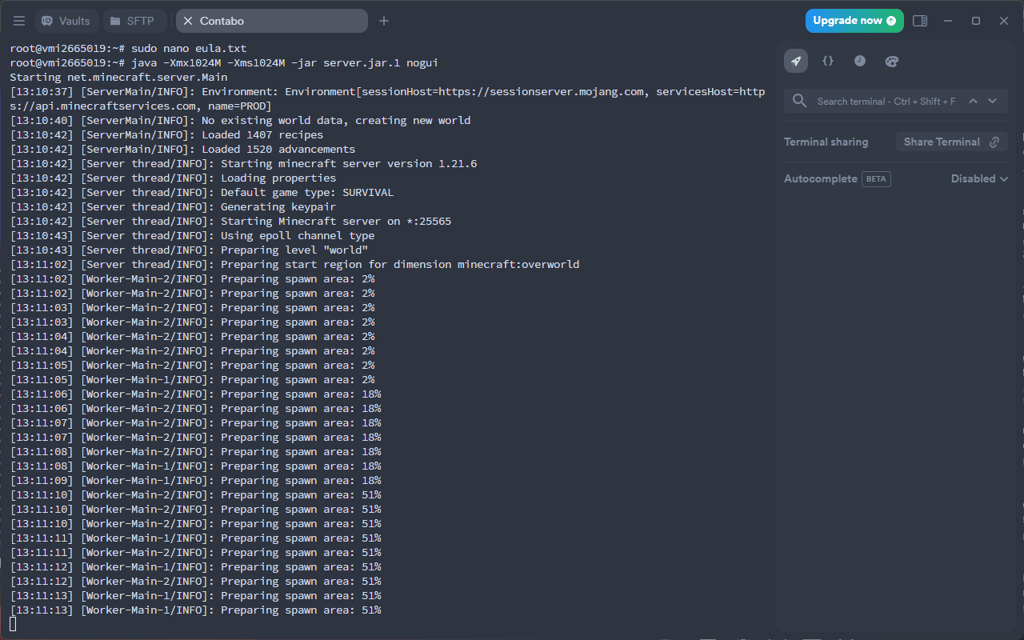
Contabo does publish a Minecraft setup walkthrough, though I ran into a mismatch between the Java version it recommended and what the latest Minecraft release actually needed. That cost me a couple of failed compile attempts before I sorted it out manually. Still, it isn’t a server issue, just a documentation gap worth knowing about going in. Once I had the right Java build installed, pulling the server files and spinning up a fresh world took only a few commands, and I was in-game shortly after.
2. Hostinger – best Minecraft server hosting for ease of use

| Pricing: | $6.99/month |
| Player slots: | Unlimited |
| RAM: | From 4GB to 32GB |
| Control panel: | hPanel/Gaming panel |
| Mod support: | ✅ Yes |
| DDoS protection: | ✅ Yes |
| Money-back guarantee: | ✅ Yes, 30 days |
| Exclusive promo code: | CNMINECRAFT15 |
Hostinger is my ultimate provider for hosting a Minecraft server without trouble due to its stellar performance and exceptional ease of setup, which comes from its specialized game panel.
Setting up a Minecraft server with Hostinger was honestly one of the easiest parts of the whole process, and that’s not something I say lightly. I’ve used other hosts where you spend half the day tweaking settings, messing with ports, or figuring out where the mod files even go. With Hostinger’s Game Panel, I logged in, picked my version, and had the server running in minutes.
I tested it with OptiFine first, then switched to Pixelmon and even gave Vault Hunters a go. The mod support handled all of it without breaking. Adding plugins like EssentialsX and setting up a whitelist to keep randoms (and griefers) out was dead simple. You can manage it all from the panel or jump in via FTP if you want to fine-tune things.

Hostinger offers its AI Assistant, which will help you manage your Minecraft server. Just ask any question, and it will answer immediately. During my testing, I found this feature helpful when I encountered configuration issues with a modpack installation. The AI promptly provided step-by-step instructions on how to resolve Java version conflicts that were preventing server startup.
I was able to quickly add anti-griefing plugins like WorldGuard and economy plugins without diving into file structures. The anti-griefing measures were effective when I invited my friends and new players, preventing unwanted destruction while maintaining an enjoyable gameplay experience. However, you can also install third-party plugins with File Manager or FTP/SSH, which I utilized when adding some more obscure grief prevention plugins that weren't in the automatic installer.
3. Apex Hosting – Minecraft server hosting for mods

| Pricing: | From $1.88/month |
| Player slots: | Unlimited |
| RAM: | From 512MB to 32GB |
| Control panel: | Multicraft panel |
| Mod support: | ✅ Yes |
| DDoS protection: | ✅ Yes |
| Money-back guarantee: | ✅ Yes, 7 days |
| Best deal: | Get up to 25% OFF Apex Hosting |
Apex Hosting takes third place, but it’s far from a fallback, especially if you’re into modded Minecraft. From my experience, I had no trouble running modpacks like RLCraft, Pixelmon, and Better Minecraft, even with a larger group. It has unlimited player slots and storage, so it’s well-suited for busy servers running heavy mods.
The Multicraft control panel made it easy to manage everything. I spent my first weekend tweaking settings and testing different world setups without feeling overwhelmed. I also appreciated the scheduled tasks feature – it kept my server stable by handling automatic restarts and clearing lag before it became a problem.
And thanks to FTP access, uploading files is easy. I drag and drop the new mod or config, and it’s ready to go without any extra setup.

Additionally, Apex Hosting has DDoS-protected servers worldwide, ensuring low ping and protection from network attacks.
4. Shockbyte – easy-to-use Minecraft server hosting

| Pricing: | From $3.99/month |
| Player slots: | Unlimited |
| RAM: | From 1GB to 16GB |
| Control panel: | Shockbyte Control Panel |
| Mod support: | ✅ Yes |
| DDoS protection: | ✅ Yes |
| Money-back guarantee: | ✅ Yes, 3 days |
| Best deal: | Get up to 25% OFF Shockbyte |
Shockbyte is an easy-to-use Minecraft server hosting provider. Its modified version of the Multicraft control panel makes configuring your server very easy, even for beginners.
Talking about the server setup, similar to Apex Hosting, Shockbyte activated my server instantly after purchase. I received the access details via email, which allowed our group to begin playing that same evening without unnecessary waiting.
While I spent a few weeks building a storage room linked to my Nether hub, the server stayed stable the whole time.

What I found different about Shockbyte was the Instance Management feature, which allowed me to switch between different server configurations easily. Also, Shockbyte has very well built live chat support. When I tested it, the AI chatbot quickly provided accurate answers to my questions about the control panel. I found this surprising since I didn't need to contact a live support agent to get a precise answer.
5. Godlike – fast Minecraft server hosting

| Pricing: | From $6.39/month |
| Player slots: | Unlimited |
| RAM: | From 2GB to 33GB |
| Control panel: | Godlike Panel |
| Mod support: | ✅ Yes |
| DDoS protection: | ✅ Yes |
| Money-back guarantee: | ✅ Yes, 14 days |
| Best deal: | Get up to 20% OFF Godlike |
Godlike Minecraft server hosting is known for providing high-performing servers. It also offers a range of features and tools designed to enhance the gaming experience and even has a free version.
The control panel looked a bit confusing at first, and it’s probably not the best choice if you’re brand new to hosting. I was able to schedule automatic restarts, change how much RAM the server used (which helped when I added Vault Hunters), and even adjust the firewall settings. Uploading mods and plugins like EssentialsX was also easy once I knew where to look.
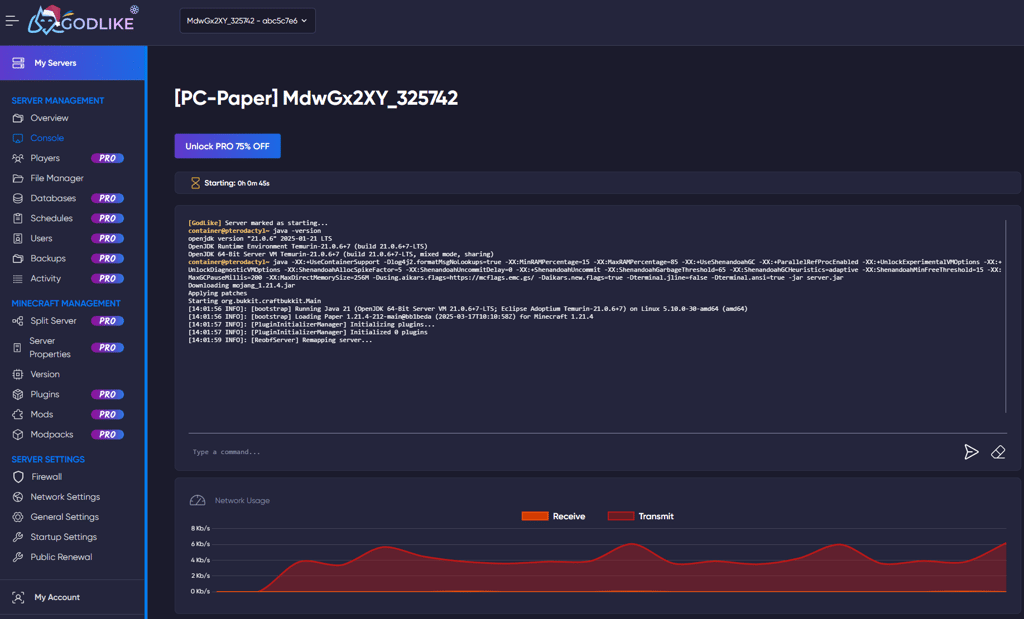
I started out with Godlike’s free plan, mostly just to see how it worked before committing to anything. It came with 2GB of RAM and space for 20 players, which was more than enough for me and a couple of friends to test out a small world. I didn’t knew what to expect from a free server, but it held up well.
6. exaroton – Minecraft hosting for shorter gaming sessions

| Pricing: | From $3.17/month |
| Player slots: | Unlimited |
| RAM: | From 2GB to 16GB |
| Control panel: | Exaroton custom panel |
| Mod support: | ✅ Yes |
| DDoS protection: | ✅ Yes |
| Money-back guarantee: | ✅ Yes, 14 days |
| Best deal: | – |
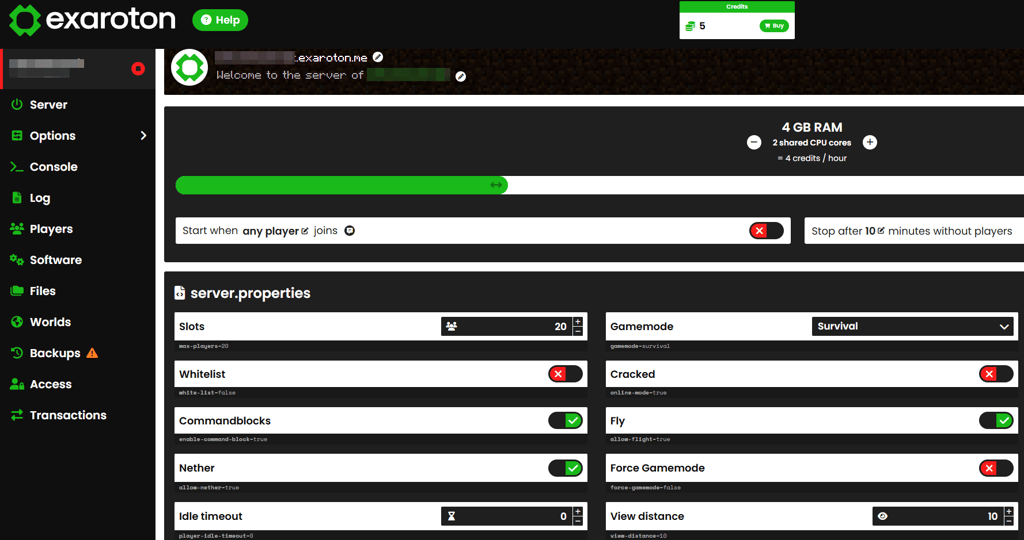
exaroton stands out as a pay-as-you-play Minecraft server hosting provider. It allows you to purchase credits to pay for each hour your server is running. This makes it ideal for players who only need their server running for a few hours daily.
I created an account, picked the game version, and the server was live within minutes. There’s no need to pay upfront – you get 5 free credits, which gives you about 5 hours of runtime. That was more than enough for me to see how well the server handled basic gameplay, plugins, and a few light modpacks.
I started by running a vanilla world to test stability and latency with a few friends. We set up a small base, activated spawn protection, and ran through early-game tasks.
I especially enjoyed that exaroton has an application programming interface (API) integration. This means it lets users create custom integrations to manage server starts, stops, and other functions automatically. In addition, it allows you to seamlessly transfer your server from Aternos, the other provider on this list, which is popular for being a good free Minecraft server hosting service.
7. Aternos – fully free Minecraft hosting

| Pricing: | From $0.00/month |
| Player slots: | Unlimited |
| RAM: | From 2.6GB |
| Control panel: | Aternos custom panel |
| Mod support: | ✅ Yes |
| DDoS protection: | ✅ Yes |
| Money-back guarantee: | – |
| Best deal: | – |
Aternos is a popular, fully free Minecraft server hosting platform. It's developed and maintained by the same company as exaroton and shares the same user-friendly interface and some features.
Setting up a server with Aternos was very easy. I created an account, chose the Minecraft version for my server, and started playing immediately. Also, I could change spawn protection, install mods and plugins, and use the console without any confusion.
I also built a small villager trading hall to test how the server handles a bit more activity. It slowed down slightly with lots going on, but overall, it handled things better than I thought.

The only real downside I’ve run into so far is the limited resources – I’ve got 2.6GB of RAM and 4GB of storage to work with. It’s been totally fine while playing with a couple of friends and running basic plugins, but I can already tell it wouldn’t hold up if I tried loading a heavy modpack or invited a larger group. There’s no upgrade option either — if I outgrow it, I’d have to move everything over to exaroton, which is basically the paid version from the same team.
8. CloudNord – easy-to-setup Minecraft server hosting

| Pricing: | From $2.78/month |
| Player slots: | Unlimited |
| RAM: | From 2GB to 24GB |
| Control panel: | Multicraft control panel |
| Mod support: | ✅ Yes |
| DDoS protection: | ✅ Yes |
| Money-back guarantee: | ✅ Yes, 30 days |
| Best deal: | Get up to 15% OFF CloudNord |
CloudNord is a lesser-known but perfectly performing Minecraft server hosting provider. It uses cloud-based technology to deliver high performance and perfectly suits vanilla and modded Minecraft servers.
CloudNord was the last host I tried, and it worked well for what I needed. After picking a server location and entering my email, I got access to the panel along with a 2-hour free trial. I started a small co-op world with a friend to test the basics — mining, exploring, and some redstone farms. I installed OptiFine and a few plugins like EssentialsX and Dynmap. I also adjusted spawn protection and a few game rules through the panel, which was easy to use.

What I liked about CloudNord was that it uses cloud-hosting technology. The server didn’t rely on just one machine, instead, resources are spread across multiple servers. So, if something goes wrong on the backend, your world stays online.
I also liked CloudNord's pricing model. It lets me fully customize my server's specifications. It’s especially useful if you need extra RAM without upgrading everything else.
Minecraft server hosting providers compared
Here’s a table comparing the prices and hardware specifications of our selected providers’ starting Minecraft hosting plans. This will help you choose a provider that best suits your budget and technical needs.
| Provider | Pricing | RAM | Storage | Bandwidth |
| Contabo | From $5.28/month | From 8GB | From 100GB | Unlimited |
| Hostinger | From $6.99/month | From 4GB | From 50GB | 4TB |
| Apex hosting | From $1.88/month | From 512MB | Unlimited | Unlimited |
| Shockbyte | From $3.99/month | From 1GB | Unlimited | Unmetered |
| Godlike | From $6.39/month | From 2GB | Undisclosed | Undisclosed |
| exoroton | From $3.17/month | From 2GB | From 10GB | Undisclosed |
| Aternos | From $0.00/month | From 2.6GB | From 4GB | Undisclosed |
| CloudNord | From $2.78/month | From 2GB | Unlimited | Unlimited |
Minecraft server hosting ranking methodology
The research team and I evaluated 64 Minecraft server hosting options to determine which are the best options overall. We adhered to a strict hosting provider testing process to give every service a fair chance of showing its strengths. Below is a summary of the most critical aspects of testing and how much they influenced the overall ranking process:
- Ease of use (30%). The first thing I looked at was how easy it is to set up and manage the server. Some hosts make you jump through a bunch of steps just to get started — others let you launch your world in a few clicks. I gave the highest scores to those with simple control panels, clear setup guides, and built-in tools that handle things like backups and restarts for you. The easier it is to use, the quicker you can start playing.
- Features (25%). A good Minecraft host needs to do more than just run the game. I looked for ones that support popular mods and modpacks like OptiFine, Pixelmon, Vault Hunters, and RLCraft. I also checked for extras like DDoS protection, automatic backups, mod/plugin support, and options to tweak RAM or storage. Basically, anything that makes the server more flexible and fun to play on.
- Performance (25%). I tested each server by running modpacks, playing with friends, and checking how stable everything felt. Servers that kept things smooth, even with more players or heavier mods, scored the highest. It’s not all about speed, but it definitely matters.
- Price (10%). I focused on services that offer solid features without charging a fortune. Most players don’t need a super powerful dedicated server, so I looked for affordable plans that still give good performance. Whether you're playing with a few friends or running a small community, price definitely plays a role.
- Customer support (10%). I gave points to hosts with 24/7 support, live chat, and helpful guides. Quick replies and clear answers made a big difference when I hit a problem or just needed to check something.
FAQ
Is a VPS good for Minecraft servers?
Yes, a VPS is good for Minecraft servers. VPS hosting is cheaper than dedicated servers and still offers excellent performance. If you're tech-savvy, you can manually set up your Minecraft server through the terminal on any VPS provider, including my top pick, Contabo. However, for first-timers, I recommend Hostinger because its Game Panel makes the setup process much easier.
Can I host a 24/7 Minecraft server for free?
Yes, you can host a 24/7 Minecraft server for free. Aternos offers genuinely free 24/7 hosting with limited resources. For paid options, Contabo's low-cost VPS plans let you run a server continuously with far more RAM and control than free alternatives provide.
How much does Minecraft hosting cost?
Minecraft hosting prices can range from $0/month to as much as $100/month. The cost mainly depends on how many resources you need. However, if you're looking for the best option, then choose Contabo. It costs as low as $5.28/month and provides enough resources for a medium-sized server, even with its entry plan.
Is Hostinger good for game servers?
Yes, Hostinger is one of the best options for hosting game servers. It offers gaming-optimized plans that come with a game panel that greatly simplifies the setup and management of an online game server.