Major flaw affecting password managers: they autofill credentials for attackers
A major flaw is affecting major password managers – attackers can steal credit card details and credentials from tens of millions of users with just “a single click anywhere.” 1Password, Bitwarden, Dashlane, Enpass, iCloud Passwords, Keeper, LastPass, LogMeOnce, NordPass, ProtonPass, and RoboForm – all failed, and many remain vulnerable.
Image by Cybernews.

 Follow us
A major flaw is affecting major password managers – attackers can steal credit card details and credentials from tens of millions of users with just “a single click anywhere.” 1Password, Bitwarden, Dashlane, Enpass, iCloud Passwords, Keeper, LastPass, LogMeOnce, NordPass, ProtonPass, and RoboForm – all failed, and many remain vulnerable.
- Password managers have a critical flaw: they autofill credentials, credit card details and allow attackers to steal them with a single click.
- Many popular password managers, including 1Password, Bitwarden, and LastPass, were found vulnerable, with some still unpatched.
- Users should disable autofill features for safety, and copy paste passwords instead.
Click “Accept cookies” – your password is gone. Close the ad – your credit card details are stolen. A single click anywhere is enough for your password manager extension to autofill sensitive credentials for attackers. And a few additional clicks, like solving a captcha, could completely compromise all your passwords.
Security researcher Marek Tóth from the Czech Republic urges users to disable autofill functions in password managers and only use copy/paste.
Tóth unveiled massive zero-day flaws affecting the most popular password manager browser extensions during the DEF CON hacking conference.





Attackers have many approaches to compromise users and often don’t even need a malicious website.
Six major password managers have not yet addressed the flaws, leaving tens of millions of users at high risk of clickjacking attacks.
Security researchers from Socket have confirmed that it’s easy to steal passwords and even easier to steal credit card details.
If you see your password, credit card, or other sensitive data autofilled anywhere, you’re likely in danger.
How can hackers steal passwords unnoticed?
The new attack technique relies on password managers' autofill functionality. The extensions often fail to recognize malicious websites, subdomains on legitimate platforms, invisible overlays that cover legitimate websites, or other cross-site scripting or cache poisoning tricks that attackers can use to trick extensions into giving the secrets away.
It’s not just a single attack method – the researcher demonstrated multiple approaches that can exfiltrate credentials. These attacks rely on loading a login screen or other form, which will then be autofilled by password managers, and conceal the theft from the user using web development tricks.
In the most basic approach, an attacker can create a malicious page with an invisible iframe (opacity:0) containing the target website (i.e., a banking website’s login form). Then, cookie consent forms or other visual elements trick users into unknowingly clicking on these elements.
“With four clicks, it was possible to share all items from the password manager to an attacker's account. The result was that the attacker gained access to all stored passwords, credit cards, and personal data without the user’s knowledge,” the researcher described a now-patched NordPass flaw that netted him a $10,000 bug bounty.
Attackers can also find legitimate websites with XSS or other vulnerabilities that allow malicious code to be injected by taking over a subdomain, poisoning the web cache, or using other methods. If the user has an account on this platform, the attacker can steal their credentials.
“All password managers fill credentials not only into the same domain where the credentials were stored, but also into all subdomains or parent domain in default configuration.”
For example, an attacker could steal a Google account by creating and exploiting a subdomain on test.dev.sandbox.cloud.google.com or issuetracker.google.com.
And there are many ways attackers can conceal the autofilled forms and buttons with overlays or other DOM-based clickjacking trickery:
- Setting the opacity to 0 will allow only the elements behind it to be displayed, such as cookie consent banners or CAPTCHA, with button placements matched.
- The form can be partially overlaid with other intrusive UI elements without changing its opacity. The user will be forced to click the small uncovered area.
- A full overlay can be used, covering the entire form. It would normally not be clickable, but attackers can bypass this by using “pointer-events:none,” which makes the overlay ignore mouse actions and enables clicks to pass through to underlying elements.
Various positioning methods can also be used to place the autofill UI behind or in front of where the user clicks.
Which password managers fail?
According to the researcher, all tested password managers were vulnerable to DOM-based extension clickjacking attacks one way or another.
Attackers can write a single script that targets all password managers, identifying the vendor and setting up the malicious forms and overlays accordingly.

Malicious phishing sites can easily collect credit card numbers and personal data (name, email, phone, address, date of birth) because the data is not tied to specific websites.
Most password managers will autofill this data for attackers, and one or two clicks will send the data to the attacker.
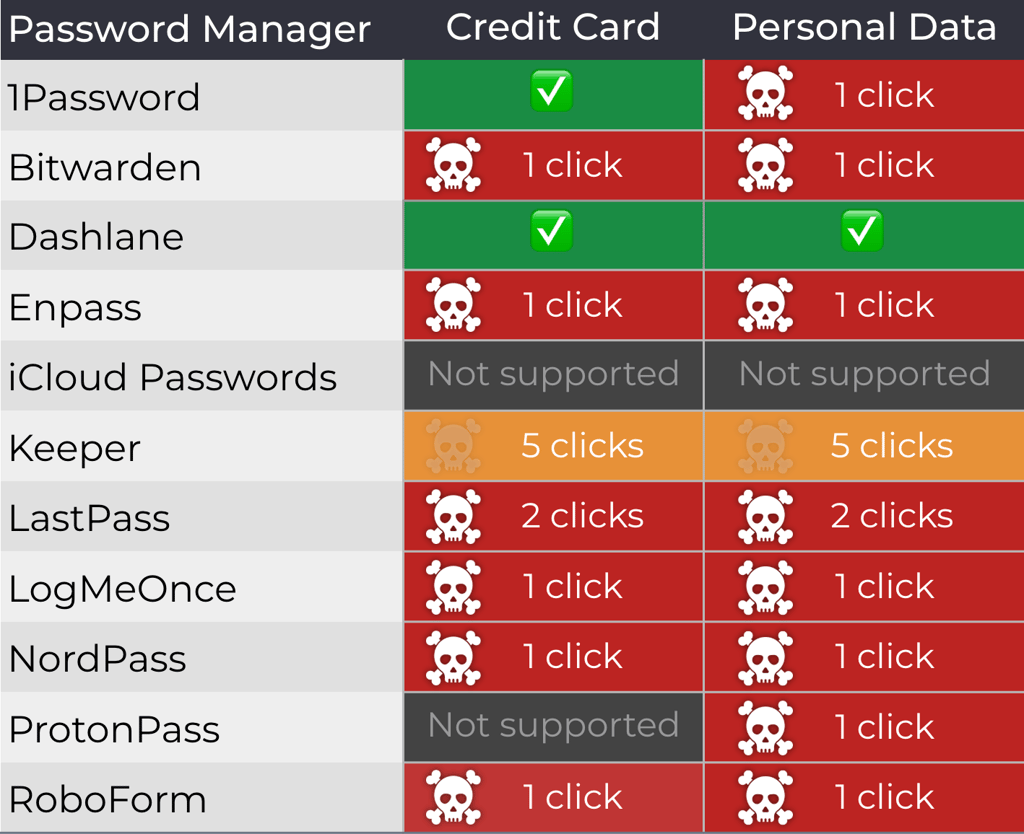
On trusted platforms with XSS or other flaws, allowing attackers to inject JavaScript code, most password managers will, too, beam data to remote servers with just a single click, exposing credit cards, personal data, login credentials, and single-use codes.
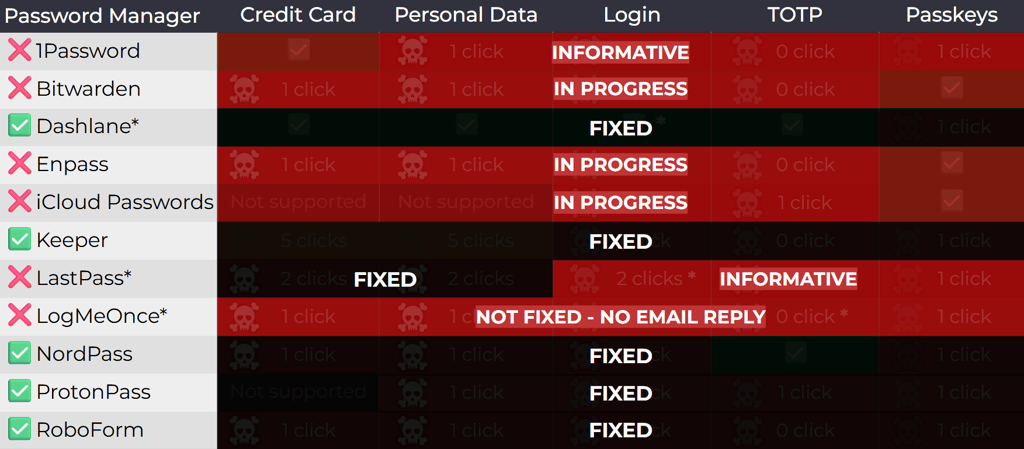
The researcher responsibly disclosed the findings to all vendors in April 2025. However, at the time of disclosure, six vendors had yet to patch the flaws: 1Password, Bitwarden, Enpass, iCloud Passwords, LastPass, and LogMeOnce. Together, these password managers have over 32 million active installations. Bitwarden has released an update since then.
“This has been fixed in version 2025.8.0, rolling out this week. As always, users are advised to pay attention to website URLs and stay alert for phishing campaigns to avoid malicious websites,” Bitwarden said in a comment.
Mitigations are bypassable
However, a Socket researcher warns that the mitigations may be bypassable, as password managers are not keen on sacrificing usability for security.
“The only way to mitigate the vulnerabilities fully would be to implement a dialog popup to prompt the user before autofilling,” the Socket team, who talked to the 1Password team, explained.
“1Password stated they considered this dialogue popup solution, and implemented it for credit card fields, but opted not to implement this for PII due to user feedback.”
Robust mitigation of DOM-based clickjacking is a technically difficult challenge. While confirmation dialogs before autofilling are the most straightforward solution, they do add significant usability friction.
“What’s convenient for users in the short term can leave them exposed to systemic risks that attackers may exploit,” the Socket report reads.
Jacob DePriest, CISO at 1Password, explains that clickjacking is not unique to their browser extension.
“It is a long-standing web attack technique that affects websites and browser extensions broadly. Because the underlying issue lies in the way browsers render webpages, we believe there’s no comprehensive technical fix that browser extensions can deliver on their own,” DePriest told Cybernews.
“We take this and all security concerns seriously, and our approach to this particular risk is to focus on giving customers more control. 1Password already requires confirmation before autofilling payment information, and in our next release, we’re extending that protection so users can choose to enable confirmation alerts for other types of data. This helps users stay informed when autofill is happening and in control of their data.”
LastPass also told Cybernews that the clickjacking vulnerability highlights a broader challenge facing all password managers: striking the right balance between user experience and convenience, while also addressing evolving threat models.
“LastPass has implemented certain clickjacking safeguards, including a pop-up notification that appears before auto-filling credit cards and personal details on all sites, and we’re committed to exploring ways to further protect users while continuing to preserve the experience our customers expect,” LastPass said in a statement.
“In the meantime, our threat intelligence, mitigation and escalation (TIME) team encourages all users of password managers to remain vigilant, avoid interacting with suspicious overlays or pop-ups, and keep their LastPass extensions up to date.”
What can you do to be safe?
Tóth recommends that all users disable manual autofill and use copy/paste options only.
“Many password managers allow the disabling of this function. But it can be inconvenient for someone. Especially when filling in personal information.”
For those unwilling, the researcher also suggests setting only exact URL matches for autofill credentials, so this doesn’t work on subdomains. However, this leaves credit card and personal data exposed.
For Chromium-based browsers, users can also manually control autofill functionality by setting extension site access “on click” (Extension settings → site access → "on click"). This makes websites inaccessible to extensions unless temporarily granted by clicking on the extension icon.
The researcher warns that other browser extensions, such as password managers, crypto wallets, notes, and others, may also be vulnerable to DOM-manipulation-based clickjacking.
Updated on August 25th [06:35 a.m. GMT] with a statement from LastPass,1Password.