Cybercrooks find a way to bypass MFA: how do they take over Microsoft accounts?
Hackers have devised a new, highly effective scheme that tricks every second user into handing over control of their Microsoft accounts, even with two-factor authentication enabled. Proofpoint researchers have already identified breaches in hundreds of Microsoft 365 environments, posing a potentially devastating risk to entire companies.

Image by Cybernews

 Follow us
Hackers have devised a new, highly effective scheme that tricks every second user into handing over control of their Microsoft accounts, even with two-factor authentication enabled. Proofpoint researchers have already identified breaches in hundreds of Microsoft 365 environments, posing a potentially devastating risk to entire companies.
Stealing a password is no longer enough to compromise an account, but that doesn’t stop hackers.
Proofpoint security researchers detailed a clever new credential phishing scheme that cybercriminals use to take over Microsoft accounts with a 50% success rate.
“So far in 2025, Proofpoint has observed attempted account compromises affecting nearly 3,000 user accounts across more than 900 Microsoft 365 environments, with a confirmed success rate exceeding 50%,” the report reads.
Cyber crooks spawned dozens of apps as gateways, impersonating Adobe, DocuSign, and other legitimate services, asking for seemingly basic permissions to access Microsoft accounts. Attackers use multiple other tricks to obtain session tokens and control the account.






To counter this, Microsoft announced changes to the default settings in Microsoft 365. Users will no longer be able to grant third-party apps access to their accounts without admin approval.
Step by step: how does the attack work?
Like many phishing campaigns, supercharged by phishing-as-a-service (PhaaS) platforms, in this case Tycoon, the attack begins with a carefully crafted email.
“Messages are often sent from compromised email accounts and include subjects related to request for quotes or business contract agreements,” the Proofpoint researchers write.
One campaign usually targets thousands of email recipients and impacts hundreds of users.
Hackers tailor the content according to the targeted industry. The email previously mimicked enterprise apps and services, such as RingCentral, DocuSign, SharePoint, and Adobe. In one case, phishers even posed as a small aviation firm, ILSMart, requesting a quote.
The link from the email leads to the legitimate Microsoft login (OAuth) consent page, which hackers exploit with a malicious app. Microsoft's OAuth page grants various apps access to certain information without sharing a password.
However, users rarely pay attention to the application that is asking for permission. Hackers have been using 50 malicious apps, requesting access to view basic profile and maintain access to this data.
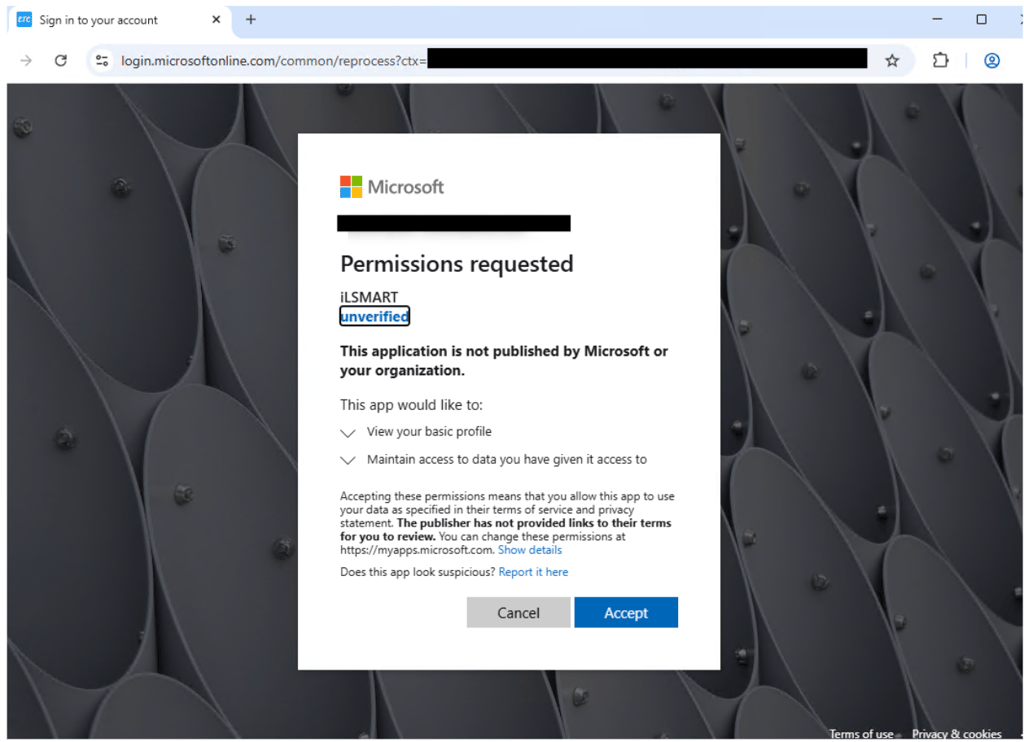
These permissions are of limited use to the attackers, but they’re used to set up the next stage. Because hackers control the OAuth app, they set its configuration so that users are redirected to a malicious website via another intermediary site.
“Whether the target clicked either Cancel or Accept as depicted in the diagram above, they would be redirected to a CAPTCHA page. In this case, if solved, it led to counterfeit Microsoft authentication page,” Proofpoint explains.
The malicious page ultimately displays a fake Microsoft login page to harvest credentials and intercept the second-factor authentication token associated with the session. The victims think they’re logging in to Microsoft, but they’re actually issuing session cookies to the attackers in real time.




Proofpoint researchers identified over two dozen malicious applications exhibiting similar characteristics, redirecting users from Microsoft to malicious sites.
“Four applications impersonated Adobe applications, five impersonated DocuSign, and all the others had distinct, unrelated names. Despite their naming differences, the goal of these applications was the same: gaining user authorization or triggering a cancellation flow that redirected the victim to a phishing page,” the report reads.
This demonstrates that users must constantly validate that they are still on the legitimate domains before providing authentication credentials.
Proofpoint warns that threat actors will increasingly target users’ identities with similar credential phishing tactics, devising innovative attack chains to bypass detections, which are becoming the criminal industry standard.