Best website hosting for nonprofits in 2026
Our in-house experts conduct internal independent, hands-on testing and transparent reviews of web hosting providers by using custom-built tools or utilizing industry-recognized tools and methods to ensure impartial and evidence-based assessments.
Using the same criteria for all services, we share our detailed methodologies and practices to help customers make informed hosting decisions.
Learn more

It’s hard to find web hosting that’s both affordable and high-quality for nonprofit organizations. When choosing web hosting for a nonprofit, dependable performance, easy management, free plans for officially registered nonprofits, and nonprofit discounts are all important factors.
To help you pick the best website hosting for nonprofits, I tested multiple providers and identified the top 7 options. Below, you’ll find the key details for each provider, including pricing, features, and potential limitations.
Best website hosting for nonprofits 2026
- DreamHost – free for nonprofits, best web hosting for nonprofits overall
- Hostinger – extra 10% for nonprofits, $2.69/month, best user-friendly web hosting service
- InterServer – free for nonprofits, secure hosting offer for nonprofits
- IONOS – from $1.00/month, affordable hosting for nonprofits
- GreenGeeks – $2.95/month for nonprofits, best for eco-conscious nonprofits
- Hosting.com – from $1.99/month for nonprofits, best for fast-growing nonprofits
- Kinsta – 15% discount and 2 months free for nonprofits, best for managed hosting for nonprofits




Our in-house research team and expert writers work hand in hand to regularly test hosting services and provide accurate and fact-checked information. Discover the ins and outs of how we test and evaluate website hosting providers.
Best nonprofit web hosting – detailed overview
To find the best nonprofit web hosting, I analyzed each provider’s pricing options, available discounts, essential features, ease of use, performance, security, and customer support. Since nonprofits often have limited budgets, I put a strong emphasis on cost-effective options that still offer reliability, ease of use, and the necessary tools to build and maintain a website.
1. DreamHost – best web hosting for nonprofits

| Cybernews rating: | |
| Pricing: | $1.99/month |
| Special nonprofit deal: | Free web hosting for 501(c)(3) or 501(c)(19) |
| Money-back guarantee: | ✅ Yes, 30-day |
| Free domain: | ✅ Yes (.org TLD included) |
| Free SSL: | ✅ Yes |
| Hosting types: | Shared, WordPress, VPS, cloud, and dedicated hosting |
|
Current deal:
| Get DreamHost, now 83% OFF |
DreamHost offers a free plan for organizations. It’s easy to use, delivers great performance, and offers flexible scaling options as your website grows.
👉Does DreamHost offer nonprofit-friendly perks?
DreamHost offers a Shared Hosting plan for free for US-based nonprofits, available for the lifetime of the account. The plan includes email hosting, and domains and subdomains are added automatically.
DreamHost pricing
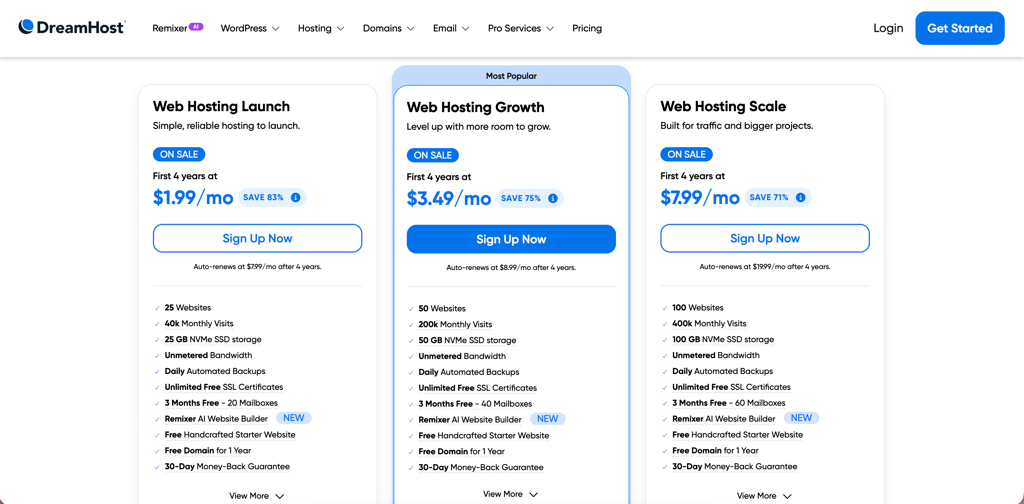
DreamHost offers convenient shared hosting pricing options:
- Web Hosting Launch ($1.99/month) – includes a domain name, SSL certificate, AI-powered website builder, daily automated backups, 25GB storage, and 20 mailboxes.
- Web Hosting Growth ($3.49/month) – adds 50GB storage and 40 mailboxes.
- Web Hosting Scale ($9.99/month) – adds 100GB storage and 60 mailboxes.
DreamHost ease of use
Hosting a website with DreamHost was super straightforward right from the start. The custom dashboard guided me through the setup process step by step, and I was able to choose a shared hosting plan, register a domain, and launch WordPress in under 30 minutes. The interface was clean and beginner-friendly, so I never felt overwhelmed, even without much technical experience.
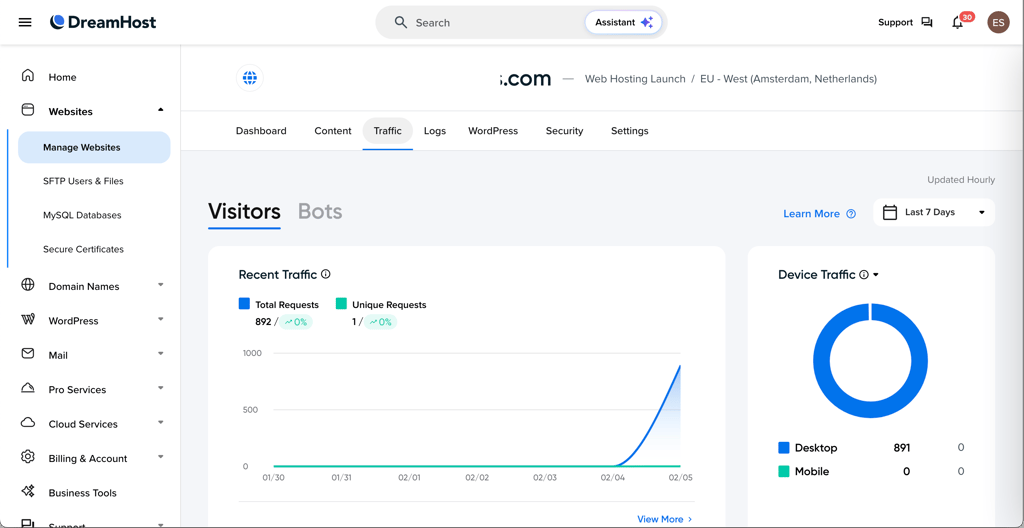
Installing WordPress took slightly longer than expected during setup, but it was still simple overall. One feature I especially liked was the built-in WordPress AI website builder, which suggested layouts and helped me get a basic website online quickly.
For nonprofits that may not have dedicated tech staff, this simplicity makes a big difference. From my experience, DreamHost makes launching and managing a website feel approachable, whether you're starting a small nonprofit site, blog, or community project. Also, if you want a deeper breakdown of the platform, you can check out a full DreamHost review.
2. Hostinger – best user-friendly web hosting for nonprofits

| Cybernews rating: | |
| Pricing: | From $2.69/month |
| Special nonprofit deal: | Extra 10% OFF with code CNHOSTINGER |
| Money-back guarantee: | ✅ Yes, 30-day |
| Free domain: | ✅ Yes (.org TLD included) |
| Free SSL: | ✅ Yes |
| Hosting types: | Shared, WordPress, VPS, cloud, and email hosting |
| Current deal: | Get up to 81% OFF Hostinger + 3 free months |
Hostinger ranks as the best user-friendly host for nonprofits. It offers a strong balance of affordability, reliable performance, and ease of use. Its built-in AI tools and website builder make creating and managing a site simple. It’s a great option for nonprofits that don’t necessarily need free hosting but still want an affordable, high-performing, and secure platform.
👉Does Hostinger offer nonprofit-friendly perks?
Hostinger offers affordable hosting for nonprofits together with a free domain (including .org), with plans starting at $2.69/month. Nonprofits also get two free email accounts per website and access to an AI website builder. You can apply the code CNHOSTINGER for an additional 10% discount.
Hostinger pricing
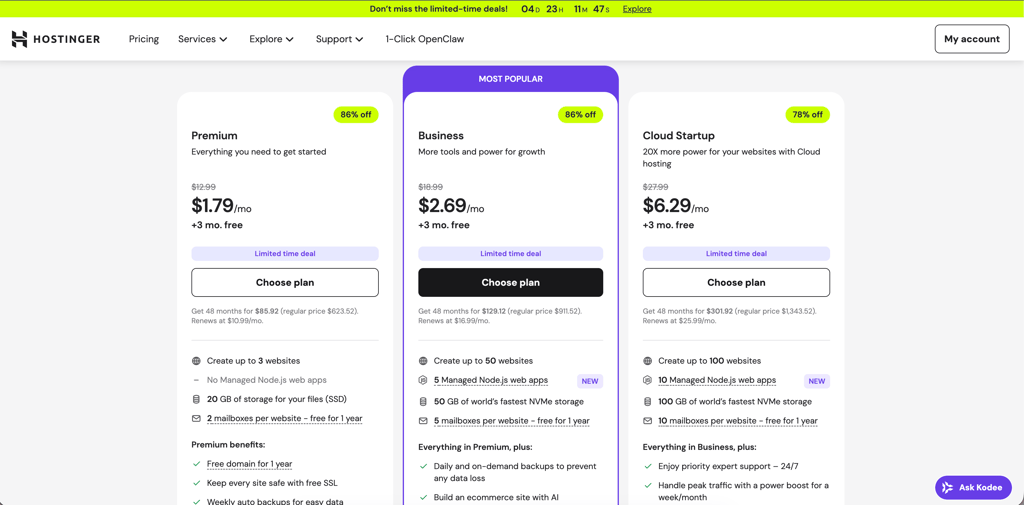
Hostinger offers budget-friendly plans:
- Premium ($2.69/month) – includes a free domain, SSL certificate, 3 websites, weekly automatic backups, 2 mailboxes, 20GB storage.
- Business ($3.59/month) – adds daily backups, 50 websites, 5 mailboxes, and 50GB storage.
- Cloud Startup ($7.19/month) – adds 100 websites, 10 mailboxes, and 100GB storage.
Hostinger ease of use
I used Hostinger for several nonprofit projects because I needed reliable tools that didn’t require spending hours learning a complicated system. The hPanel control panel is, in my opinion, one of the best-designed panels out there. At first, the sheer number of options can feel overwhelming, but the clear labels and short descriptions quickly make navigation intuitive.
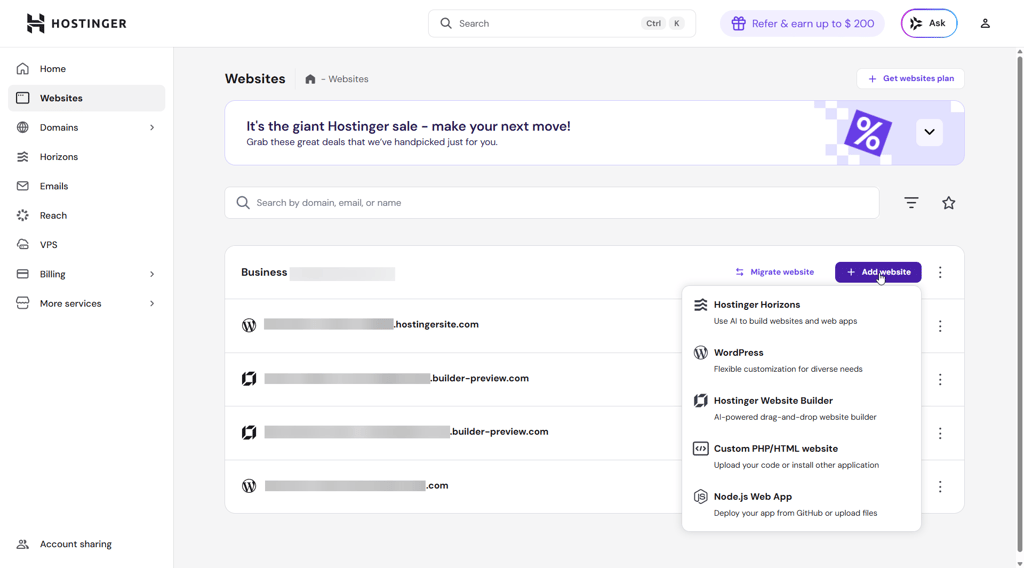
I loved having a dedicated dashboard for each website. From there, I could install WordPress or another CMS with a single click, manage SSL certificates, handle email, or even migrate a site. The Kodee AI assistant is a nice bonus – it’s not perfect, but it helps me locate features quickly.
For nonprofits running WordPress sites, Hostinger’s dedicated WordPress section in hPanel makes managing updates and security simple and stress-free. Overall, it’s beginner-friendly while still powerful enough for larger projects. You can read more about its features in this detailed Hostinger review.
3. InterServer – nonprofit hosting with advanced security features

| Cybernews rating: | |
| Pricing: | Free |
| Special nonprofit deal: | Free with IRS 501(c)(3) tax identification letter |
| Money-back guarantee: | ✅ Yes, 30-day |
| Free domain: | ❌ No |
| Free SSL: | ✅ Yes |
| Hosting types: | Shared, VPS, reseller, and dedicated hosting |
| Current deal: |
InterServer is another strong free hosting option for nonprofits. What really sets it apart is its security focus. Features like InterShield protection, a Cloudflare CDN, and free weekly backups help maintain solid performance and keep websites secure. While its shared hosting isn’t ideal for heavy traffic, it’s a secure, flexible choice for nonprofits.
👉Does InterServer offer nonprofit-friendly perks?
InterServer offers a free Standard shared hosting plan for nonprofits. It includes unlimited storage, email accounts, and websites, along with reliable performance. You can also choose between cPanel and DirectAdmin for site management. Unfortunately, free domain isn't included in the plan.
InterServer pricing
InterServer offers different plans depending on your needs:
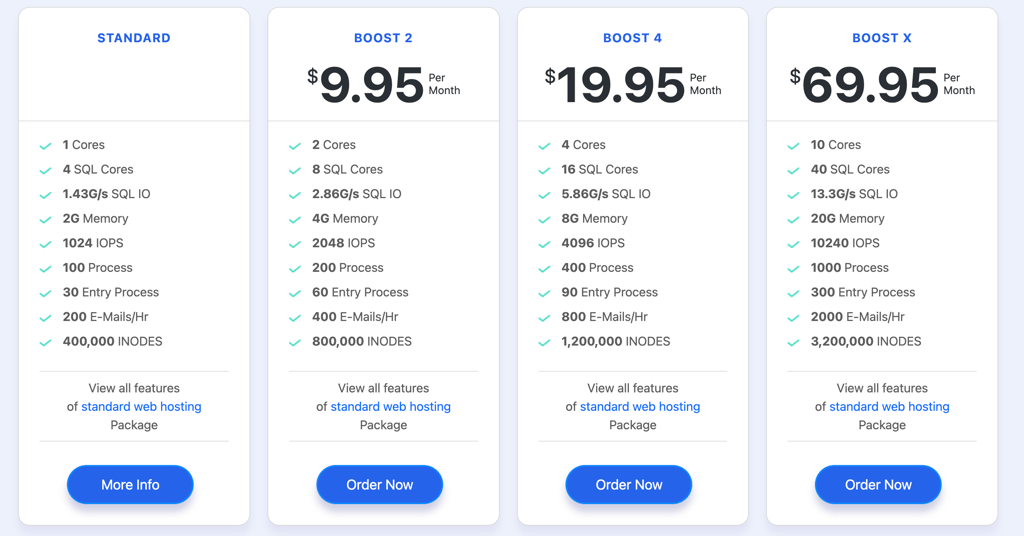
- Standard ($2.50/month) – includes an SSL certificate, SitePad website builder, global CDN, unlimited email accounts, weekly backups, and unlimited storage.
- Boost 2 ($9.95/month) – adds 2 CPU cores and 4GB memory for improved performance and higher resource limits.
- Boost 4 ($19.95/month) – adds 4 CPU cores and 8GB memory for handling higher traffic and more resource-intensive websites.
- Boost X ($69.95/month) – adds 10 CPU cores and 20GB memory for high-performance websites.
InterServer ease of use
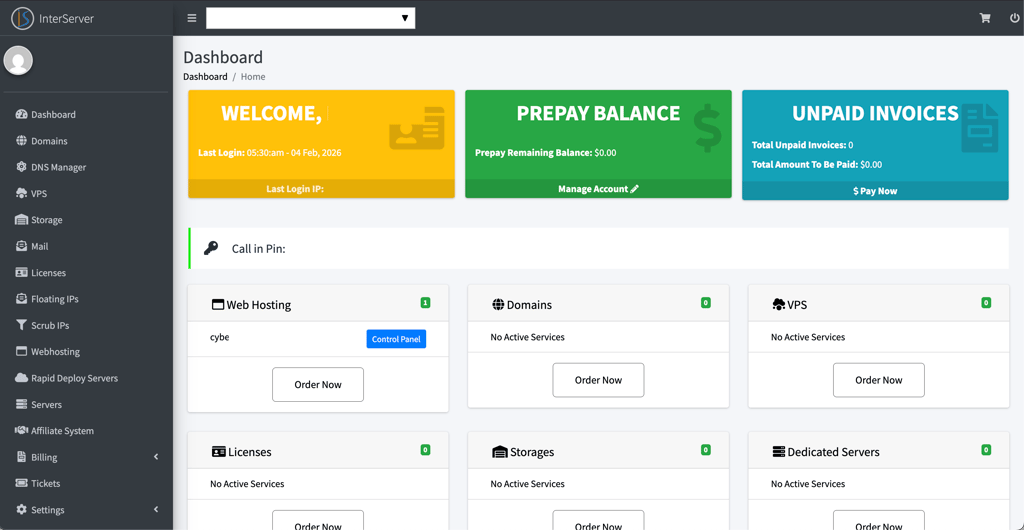
Getting started with InterServer was fairly quick, though I found the dashboard a little confusing at first. There are plenty of options, but some key features, like app installer, took a minute to find. For example, you have to type the domain into the search bar, and only then does a pop-up suggest the transfer option.
InterServer lets you choose between cPanel and DirectAdmin, and I went with the recommended DirectAdmin. It isn’t as intuitive as cPanel, but it’s clearly organized. Some tools are hidden in dropdowns, so it takes a little digging, but once you’re familiar, it’s lightweight, fast, and functional.
For nonprofits and charities, this level of control can be useful, especially if you manage multiple sites or need custom email setups. Overall, my experience using this provider was positive, and you can read the full InterServer review for more details.
4. IONOS – budget-friendly hosting for nonprofits

| Cybernews rating: | |
| Pricing: | From $1.00/month |
| Special nonprofit deal: | Special pricing plans |
| Money-back guarantee: | ✅ Yes, 30-day |
| Free domain: |
✅ Yes
|
| Free SSL: | ✅ Yes |
| Hosting types: | Shared, WordPress, Windows, VPS, dedicated |
| Current deal: | Get up to 94% OFF IONOS |
IONOS offers very affordable hosting for nonprofits. While it may not be the best option for handling large traffic spikes, it provides an easy-to-use dashboard and solid scalability options as your website grows.
👉Does IONOS offer nonprofit-friendly perks?
IONOS offers budget-friendly hosting for nonprofits, starting at just $1.00/month. This promo includes unlimited websites and storage, and you can even register a domain for 1 year for free.
IONOS pricing
IONOS offer 4 shared hosting plans:
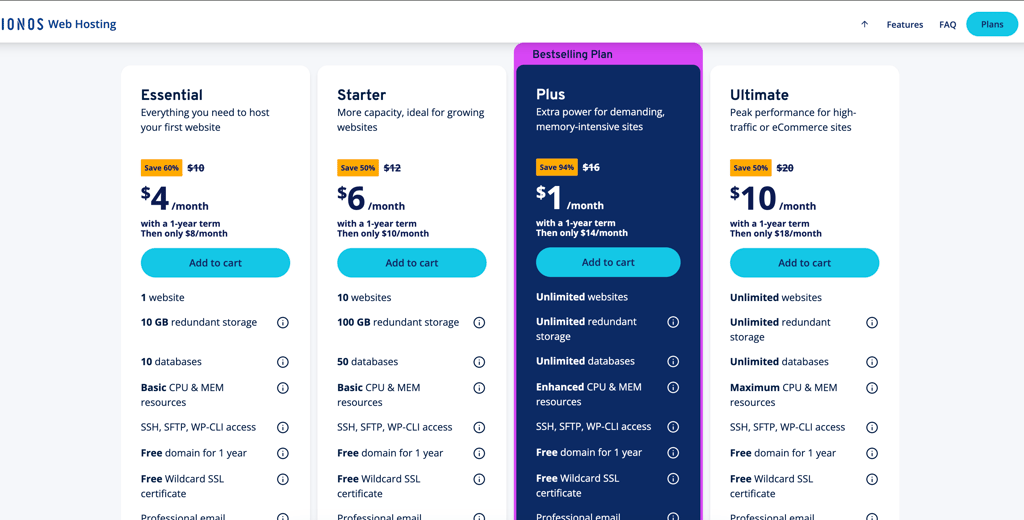
- Essential ($4.00/month) – includes a free domain, SSL certificate, professional email, daily backups, 1 website, 10GB storage, and basic CPU and MEM resources.
- Starter ($6.00/month) – adds 10 websites and 100 storage.
- Plus ($1.00/month) – adds unlimited websites, unlimited storage, and enhanced CPU and MEM resources.
- Ultimate ($10.00/month) – adds maximum CPU and MEM resources.
IONOS ease of use
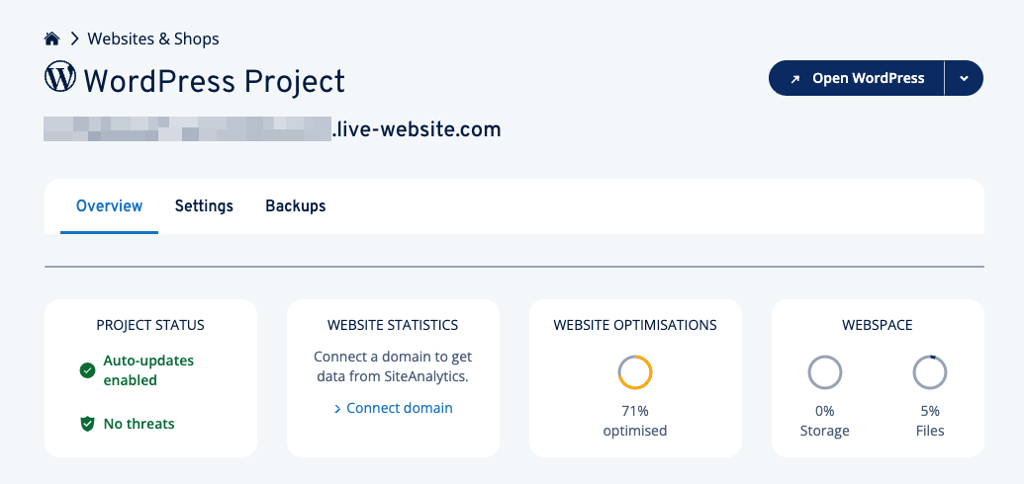
I found the IONOS control panel clean and well organized, with big, clearly labeled tiles that make managing domains, emails, and websites easy, even for beginners. I especially appreciated the built-in security and performance-enhancing tools.
Setting up my account was simple, and IONOS even provides an automated migration tool for moving existing WordPress sites, which saved time and hassle. There’s a short adjustment period if you’re used to cPanel, but once familiar, I found the navigation quick and convenient.
For nonprofit users, IONOS is truly an excellent choice that balances affordability, control, and ease of use. You get reliable hosting without needing to spend hours learning a complicated system. You can read more in the complete IONOS review.
5. GreenGeeks – nonprofit web hosting with environmental focus

| Cybernews rating: | |
| Pricing: | From $2.95/month |
| Special nonprofit deal: | Special pricing plans |
| Money-back guarantee: | ✅ Yes, 30-day |
| Free domain: |
✅ Yes
|
| Free SSL: | ✅ Yes |
| Hosting types: | Shared, WordPress, VPS, and reseller hosting |
| Current deal: | Get up to 75% OFF GreenGeeks! |
GreenGeeks stands out for its eco-friendly hosting. The host combines a strong commitment to environmental sustainability with reliable performance, making it a great fit for nonprofits that prioritize environmentally conscious practices.
👉Does GreenGeeks offer nonprofit-friendly perks?
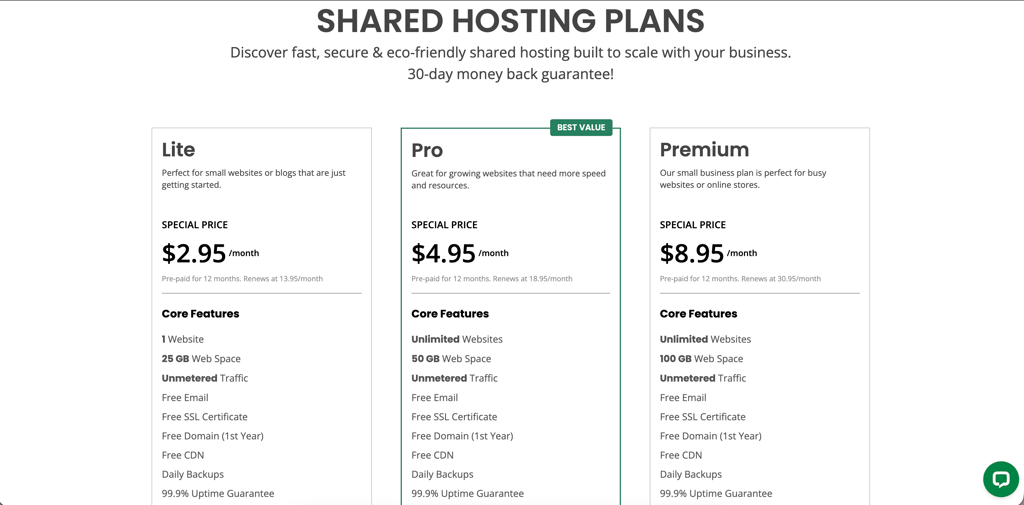
GreenGeeks provides nonprofit-friendly hosting plans starting at $2.95/month. The basic plan is best for small or new organizations with simple websites. Higher-tier plans include unlimited websites, email accounts, and databases.
GreenGeeks pricing
GreenGeeks offers scalable shared hosting plans:
- Lite ($2.95/month) – includes free domain, SSL certificate, daily backups, email, 1 website, and 25GB storage.
- Pro ($4.95/month) – adds unlimited websites, 50 GB storage, priority support, on-demand backups, and WordPress Repair Tool.
- Premium ($8.95/month) – adds 100GB storage, a free dedicated IP address, free AlphaSSL, and object caching.
GreenGeeks ease of use
GreenGeeks' main dashboard is modern, clean, and well organized. Everyday tasks like setting up email accounts, activating SSL, connecting domains, or checking resource usage are straightforward. If your nonprofit doesn’t have a dedicated team, this clear layout makes managing the site much less stressful.
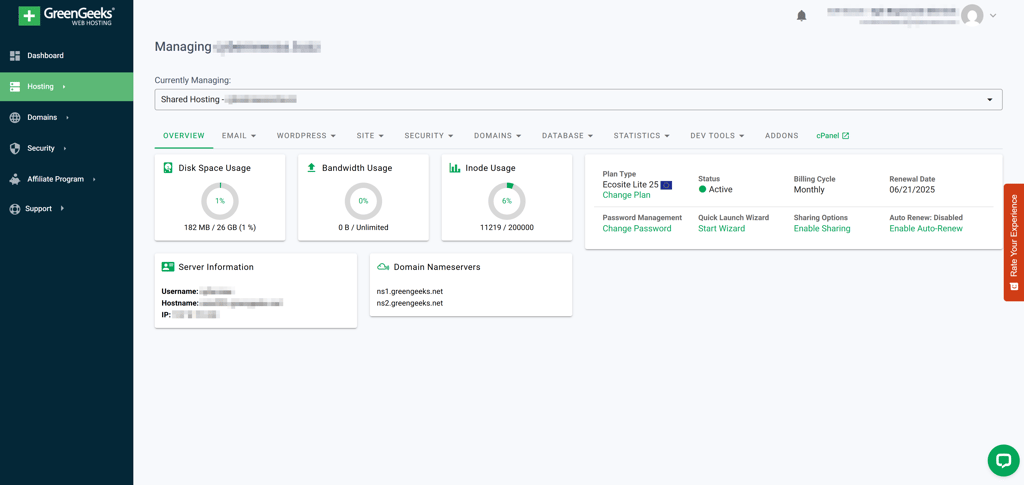
What I particularly liked is that the dashboard works alongside the familiar cPanel interface. This combination gives you simplicity for daily tasks while still offering more advanced tools when you need them. For example, if you want to stage updates to its website or manage databases, those options are easy to find without digging through complicated menus.
I also appreciated that GreenGeeks has servers in North America, Europe, and Asia. This means you can choose a location close to your audience, which helps ensure better site performance and faster loading times. If you want more details, you can read our GreenGeeks review.
6. Hosting.com – web hosting for growing nonprofits

| Cybernews rating: | |
| Pricing: | From $1.99/month |
| Special nonprofit deal: | Special pricing plans |
| Money-back guarantee: | ✅ Yes, 30-day |
| Free domain: |
✅ Yes
|
| Free SSL: | ✅ Yes |
| Hosting types: | Shared, managed WordPress, VPS, reseller, and dedicated hosting |
| Current deal: | Get hosting.com, now up to 86% OFF |
Hosting.com is a solid option for organizations expecting rapid growth. It provides strong scalability options and reliable performance, making it well suited for nonprofits that need flexibility.
👉Does hosting.com offer nonprofit-friendly perks?
Hosting.com offers hosting plans tailored specifically for nonprofits, starting at $1.99/month, depending on resource needs. All plans include a free domain for the first year, free website migration, and a security suite. To access nonprofit discounts, you can contact the sales team for a customized offer.
Hosting.com pricing
Hosting.com has scalable shared hosting options:
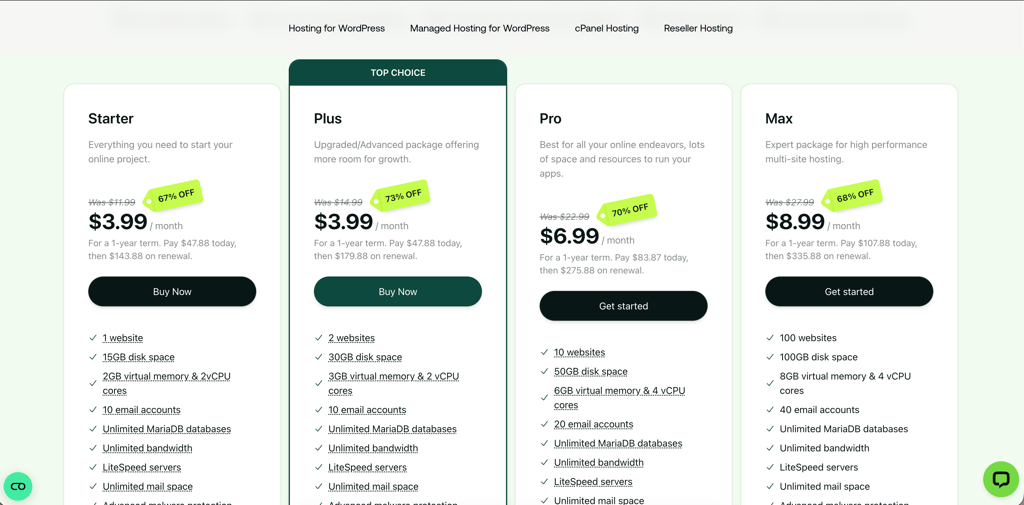
- Starter ($2.99/month) – includes a free domain, SSL certificate, daily backups, 1 website, 15GB storage, 2GB virtual memory, 2vCPU cores, and 10 email accounts.
- Plus ($1.99/month) – adds 2 websites, 50GB storage, and 3GB virtual memory.
- Pro ($6.99/month) – adds 10 websites, 50GB storage, 6GB virtual memory, 4vCPU cores, and 20 email accounts.
- Max ($8.99/month) – adds 100 websites, 100GB storage, 8GB virtual memory, and 40 email accounts.
Hosting.com ease of use
In my personal experience, the platform strikes a genuinely good balance between simplicity and capability. The main dashboard, which doubles as a control panel, is clean and intuitive, with a well-organized homepage that makes it easy to see all available products and actions. For nonprofits managing sites with limited technical staff, this kind of low-friction interface matters a lot.
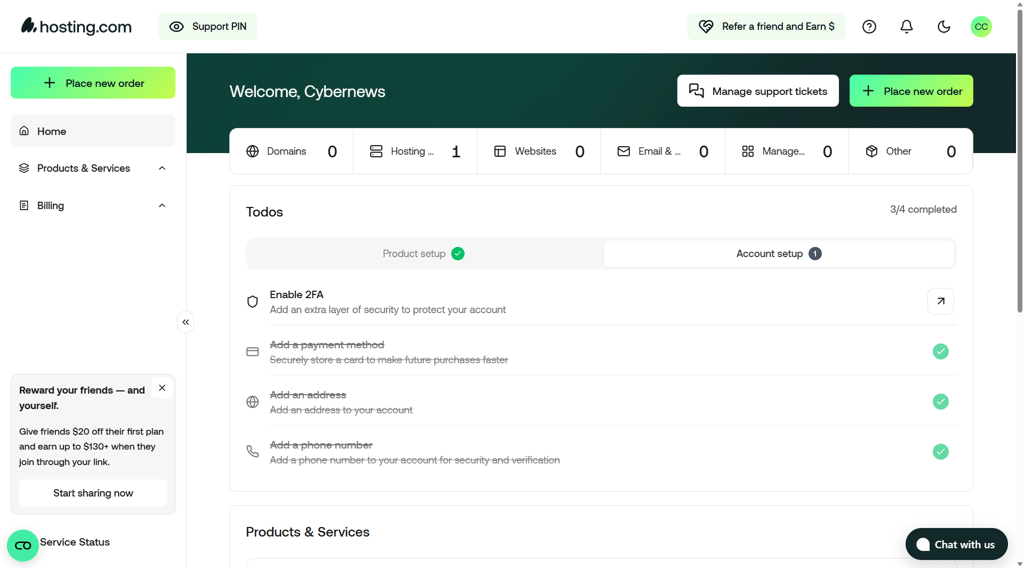
Hosting.com uses cPanel for server-level controls, while the main dashboard handles everyday tasks like domain management and adding sites. Security settings live exclusively in cPanel, which can get a little confusing at first. Migrating my existing site was also easy, with zero downtime, free migration, and a staging environment. Support is available 24/7 through live chat, which is helpful. Plus, as highlighted in the Hosting.com review, phone support was addeded recently, which is my personal favorite way to get help.
7. Kinsta – managed web hosting services for nonprofits

| Cybernews rating: | |
| Pricing: | From $35.00/month |
| Special nonprofit deal: | 15% off for 501(c)(3) or equivalent |
| Money-back guarantee: | ✅ Yes, 30-day |
| Free domain: |
❌ No
|
| Free SSL: | ✅ Yes |
| Hosting types: | Managed WordPress, Application, Database hosting, Static Site hosting |
| Current deal: | Get Kinsta, now up to 17% OFF! |
Kinsta specializes in managed WordPress hosting powered by cloud infrastructure. While its pricing sits on the higher end, the platform delivers premium performance and reliability, and it offers special programs and discounts for nonprofit organizations.
👉Does Kinsta offer nonprofit-friendly perks?
Kinsta offers nonprofits a 15% discount and an additional 2 months free with the annual plan. Because of its higher pricing, it’s better suited for organizations with larger budgets. However, nonprofits that rely heavily on WordPress may find it a worthwhile investment.
Kinsta pricing
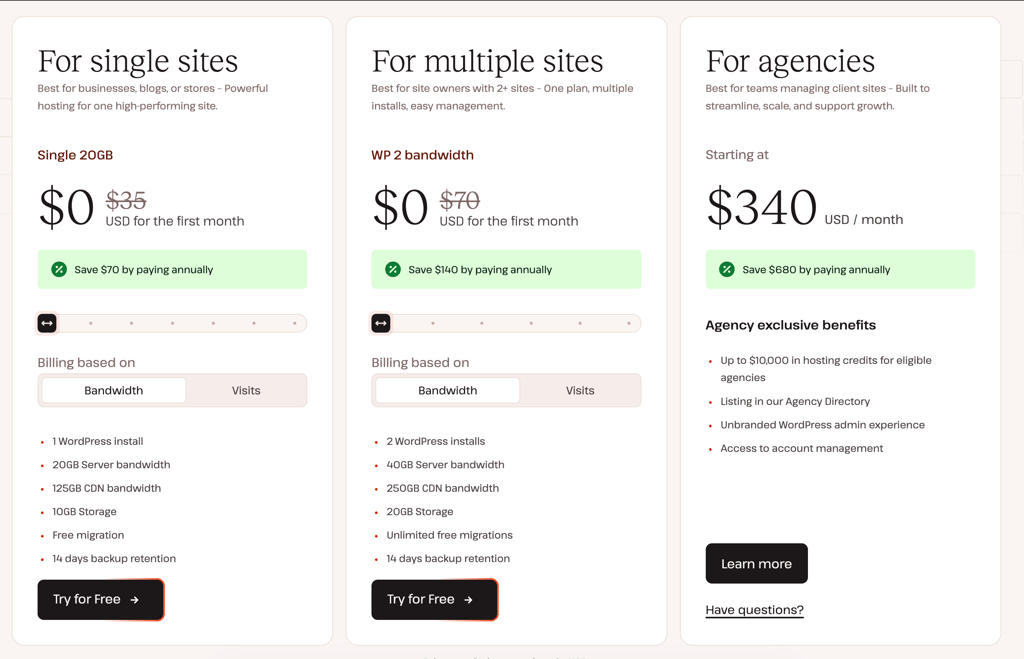
Kinsta has three plans:
- For single sites ($35.00/month) – includes 1 WordPress install, 20–750GB server bandwidth, 10–15GB storage.
- For multiple sites ($70.00/month) – includes 2 WordPress installs, 40–750GB server bandwidth, 20–100GB storage.
- For agencies ($340/month) – custom solution.
Kinsta ease of use
Kinsta uses its own control panel called MyKinsta, which I found really convenient. Everything from billing to site settings lives in one place, which is great for nonprofits juggling multiple projects with limited technical staff. That said, if you're used to cPanel, the switch might feel a little jarring at first. Personally, I appreciate it when web hosts invest in building their own dashboards rather than relying on generic solutions.
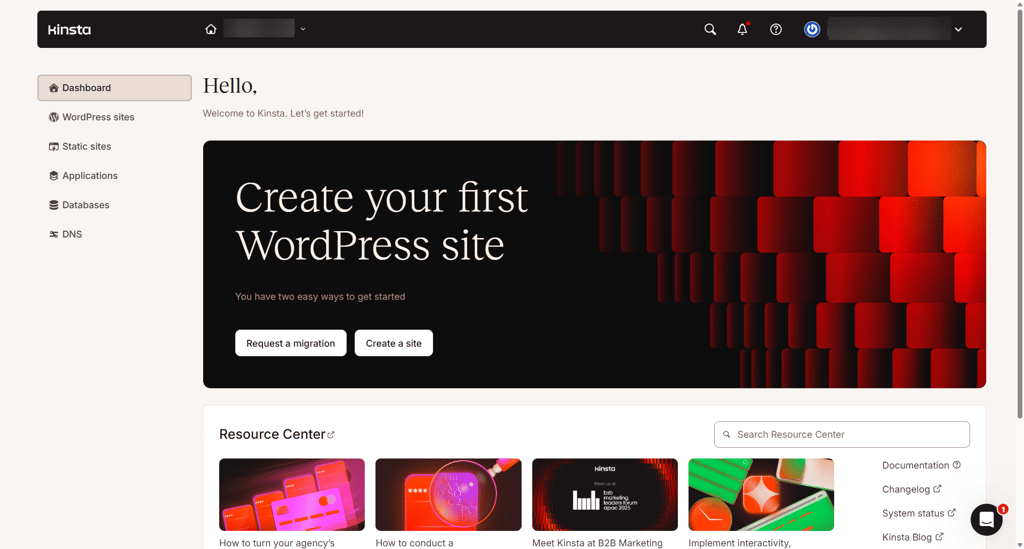
Setting up WordPress only took a few minutes, and once you're inside the dashboard, you get an instant overview of your services and key site statistics, so you're never left guessing about performance.
For a deeper look at features and pricing, our full Kinsta review covers everything you need to know. From a usability standpoint, Kinsta genuinely nails it – it’s beginner-friendly without sacrificing depth for more hands-on users. Pricing, however, is still a sticking point for me personally
Testing methodology
To determine the top nonprofit hosting providers, I first looked for services that offer affordable hosting for nonprofits. After narrowing down the list, I tested seven providers using the following web hosting testing criteria:
- Affordability and value (25%). Nonprofits often operate on tight budgets, so I prioritized cost-effective plans that offer essential features like free SSL, a free domain, and email hosting without unexpected price hikes. I also checked for any special offers to nonprofit organizations.
- Ease of use (20%). Many nonprofits don’t have dedicated IT teams, so simple setup and management were key factors. I checked how intuitive each provider’s interface was, how easy it was to launch and manage a website, and whether informational guides or customer support were available for assistance.
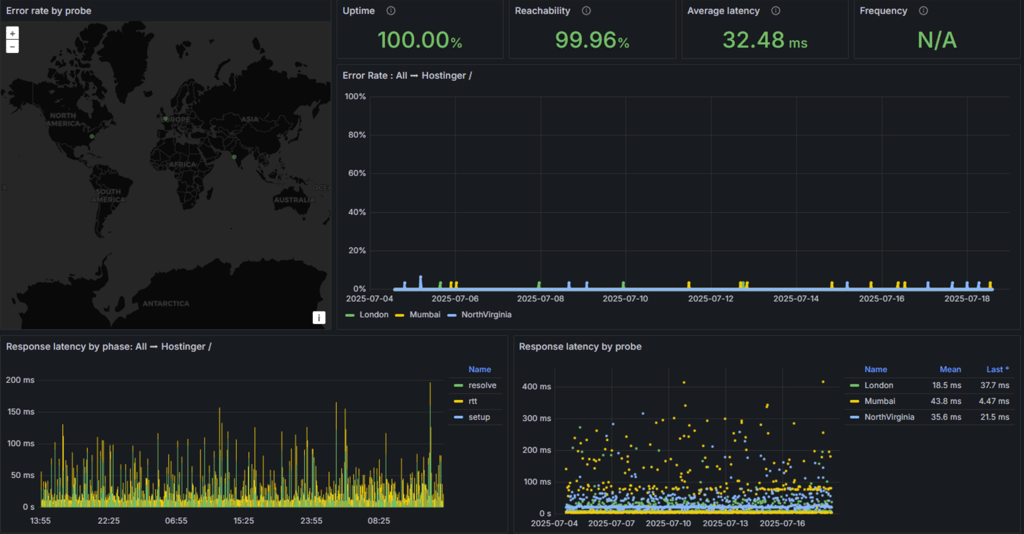
- Performance and reliability (20%). A nonprofit’s website should always be accessible to supporters. That’s why I monitored uptime, speed, and overall performance to ensure each provider could handle consistent traffic and donation surges without downtime or slowdowns.
- Security and protection (20%). Nonprofits often collect sensitive information, making strong security features essential. I checked for SSL certificates, DDoS protection, malware scanning, and backup options to ensure website safety.
- Support and additional resources (15%). Many nonprofits rely on hands-on support. I considered customer service quality, availability of one-on-one training, and extra features like website builders or marketing tools that could help nonprofits grow their online presence.
After conducting all tests, I ranked the best nonprofit web hosting providers based on their performance across these categories. I also compared pricing and features to determine which hosts offer the best overall value for nonprofits.
How to choose a web hosting for nonprofits
It is never a good idea to pick a hosting plan without proper research, whether you're looking for church website hosting or any other nonprofit organization. Resources like storage, bandwidth, security, and performance are not just entries on a list of features – they’re what determine the success of your website.
Resources
Ideally, a good hosting provider should let you build a website with generous storage and bandwidth for free, but that’s not always the case.
While some providers offer rather generous free hosting for nonprofits, others don’t give much with their free plans or don’t offer them at all. It doesn’t matter if you’re considering a free or a paid option – there are several factors to consider before you make the final decision:
- How much storage do you need? The more design elements or images you have on the site, the more storage you’ll need. For reference, an average WordPress site takes up to 5GB of storage.
- How much bandwidth do you need? If you expect high traffic, you must look at the bandwidth. This defines the maximum amount of data that can be transferred in 30 days. The more visitors on the site, the more data is requested from the server. To figure out how much bandwidth you need, use this equation: estimated visitors × site size (GB) × number of pages × 30.
- What level of security do you need? If you plan on accepting donations, involving money or sensitive personal information, you’ll want that extra bit of security. Alongside the basic SSL certificate, check if the plan includes DDoS protection, automated backups, web application firewalls, and malware scans.
In summary, free web hosting for nonprofits can offer pretty good storage options, bandwidth, and even security tools. However, be mindful that those aren't guaranteed. Before you choose the free version, check if it has all you need. If your nonprofit also manages a personal website or blog to share updates or stories, investing in reliable hosting can make a difference. Check out our guide on the best personal website hosting for affordable and secure hosting options that cater to smaller-scale websites.
Performance
Creating a website is only half the work. Once your site is live and running, you want it to perform as well as possible. To avoid future issues, you should check how well the provider performs. You need to consider these criteria before you make the final choice:
- Uptime. While ideally, you expect your website to be live all the time, that’s simply impossible. Servers have to have regular checkups, and for maintenance reasons, your site might be down, just not for too long. Look for a provider that offers a 99.9% uptime guarantee. Anything over that is great, and anything below is intolerable.
- Response time. This measure shows how fast the server reacts to a visitor’s request to open a site. For the best user experience, aim for a time no longer than 600ms.
- Ability to handle increased traffic. For this article, I have tested each provider's ability to handle traffic spikes. Chances are that you’re expecting to attract quite a bit of traffic. Surely, you don’t want the website to crash when it has reached its peak. For that reason, see how much traffic your chosen plan can handle. Due to different amounts of storage, RAM, CPU, and bandwidth, even the same provider’s plans will handle things differently.
So, while good performance should be a given, that's not always the case. To save yourself a potential headache, look into what you can expect in terms of performance and the features available with each provider.
Final recommendations
DreamHost is my #1 pick for the best nonprofit web hosting because it offers free hosting for eligible nonprofits, an easy-to-use custom dashboard, and solid performance for organizations that want a simple, low-maintenance solution. It stands out as an especially strong choice for nonprofits with limited technical resources, since it combines beginner-friendly management with useful features like free email hosting, a free .org domain, and flexible scaling options as your site grows.
However, the best host depends on individual needs. Every provider on this list brings unique benefits, so choosing the right one depends on your budget, performance needs, and expectations. Nonprofit organization owners should evaluate what matters most to them before making a decision.

FAQ
Can nonprofits get discounts on hosting?
Yes, some hosting providers offer discounts or free hosting for nonprofit organizations. To find out what deal you’re eligible for, visit hosting providers’ websites or refer to the providers I recommend.
Is shared hosting good enough for a nonprofit website?
Yes, shared hosting is good for a nonprofit website. It’s an affordable and easy-to-manage option, especially for new nonprofits. Just keep in mind that it’s most suitable for websites with moderate traffic.
Do I need email hosting for a nonprofit?
Yes, it’s recommended that nonprofit organizations use email hosting. Since email is the main means of communication between staff and the stakeholders, email hosting adds to the professional look of your organization. With email hosting, you can have multiple email addresses that end with your organization’s name.
Can I use Google for nonprofits for web hosting?
Yes, Google offers nonprofits free access to Google Workspace. While Google Workspace doesn’t directly provide hosting services, it includes Sites, which can be used for website hosting.


