Your questions, answered by Cybernews: Here’s how to hide your location from Instagram
Cybernews reader was worried that everyone on Instagram can see his location after Instagram rolled out the new Maps feature. Can you use Instagram without leaking your location? Each week, our team selects one pressing and common reader issue and deconstructs it to help you stay safe online.
Image by Cybernews

 Follow us
Cybernews reader was worried that everyone on Instagram can see his location after Instagram rolled out the new Maps feature. Can you use Instagram without leaking your location? Each week, our team selects one pressing and common reader issue and deconstructs it to help you stay safe online.
Instagram has recently introduced a new feature that allows users to constantly share their live physical location with others on the app. While the map might feel fun and social, it also creates unnecessary risks that teens and many adults don't necessarily understand.
Just a couple of days later, the feature has already sparked backlash from both users and privacy experts, who warn that it exposes sensitive personal data.
Instagram says that the feature is an opt-in. However, concerns intensified after several Instagram users claimed their locations appeared on friends’ maps without their knowledge.
“I wonder how many murders this will assist,”an Instagram user mused on Reddit.





“I was being cyberstalked by a friend on Facebook when they released a similar feature years ago on that platform,” shared another Redditor.
“This kind of stuff may seem harmless. But if people are able to see your location, they can start checking it obsessively and monitor your whereabouts without you even knowing.”
Content creators have also voiced alarm. Some said they already receive daily death threats – and now fear that, with this change, their exact physical location could be visible to anyone.
In response to reader concerns, the Cybernews editorial team checked whether Instagram can be used without giving away location data, both to the app itself and to other users.
Instagram Maps shares your physical location
The new feature, Instagram Maps, lets users opt in to continuously share their “last active” location with selected friends. Unlike the platform’s traditional location tags, which are tied to specific posts or stories and must be manually added, this new setting can update whenever a user opens the Instagram app or returns to it in the background.
Meta, Instagram’s parent company, says the feature is “off by default” and requires users to manually enable it.
“You can opt into sharing your last active location with friends you pick, and you can turn it off anytime," Instagram said in a blog post.
Instagram users can also choose who sees their location, including mutual followers, close friends, or a custom list. Users can also temporarily hide their location from certain people or in certain places.
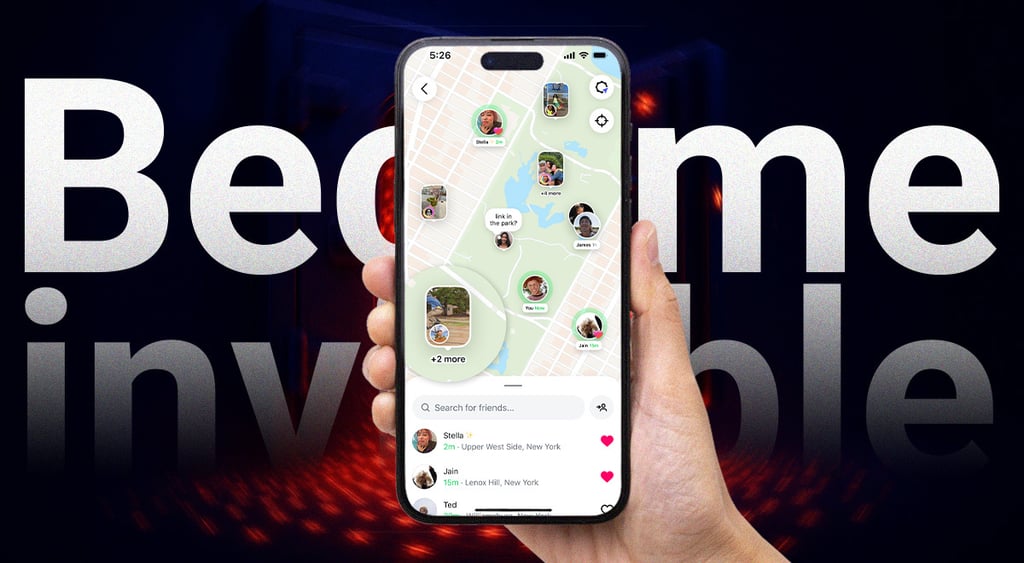
"You can also open the map to see content your friends and favorite creators are posting from cool spots. No matter how you use the map, you and your friends have a new, lightweight way to connect with each other," writes Instagram.
The map additionally displays public content tagged to locations, but Instagram says this does not reveal any user’s real-time location unless they have chosen to share it.
After the backlash, Instagram head Adam Mosseri responded on Threads, saying the company was “re-examining” the feature’s rollout and clarifying that it should not be active unless the user turns it on.
In an Instagram post, Mosseri said he personally uses the map to share his activities with “a handful” of close friends and curates that list carefully.
How can you stop Instagram from showing your location?
If you want to be invisible on Instagram Maps, start with the in-app controls. However, the safest option is to stop the Instagram app from collecting your location at all. You can do this in your device's privacy settings.
How to turn off Instagram Maps
- Open Instagram → Profile → Settings and privacy.
- Search for Location sharing.
- Under Who can see your location, select No one.
- Avoid tagging your current location in posts, stories, or reels – even with the feature off.
How to control Instagram’s access to your location entirely
On iOS
- Open Settings.
- Go to Privacy & Security → Location Services.
- Find Instagram.
- Select Never
- Turn off Precise Location for extra privacy.
On Android
- Open Settings.
- Tap Location → App permissions.
- Find Instagram.
- Select Deny or Allow only while using the app.
- Disable Precise location if your device offers it.
Does Instagram automatically share my location?
No. According to Meta, the new Instagram Map feature is off by default. You have to manually opt in for your real-time location to appear on someone else’s map. However, some users have reported seeing their location shared without realizing it, so it’s worth double-checking your settings.
Can I use Instagram without sharing my location?
Yes. If you don’t enable Instagram Maps, your real-time location won’t be shared. You can also block the app from accessing your location altogether by going into your phone’s privacy settings and revoking Instagram’s location permissions.
Who can see my location if I turn it on?
You control who sees your location. In the app settings, you can pick close friends, mutual followers, or create a custom list of people who can see your location. You can also hide your location from specific people or turn it off entirely at any time.
However, experts warn that sharing your location with anyone might pose a risk, especially in the context of social media, where not everyone on your friends list is an actual friend. Also, manually managing who can see your location and who can not might be confusing and highly complicated.
How is Instagram Maps different from tagging a location in a post or story?
Traditional location tags are tied to specific content you post and must be added manually each time. Instagram Maps updates your “last active” location whenever you open the app or return to it, even if you don’t post anything.