Everyone can find your car, phone or other WiFi: what can you do about it?
You might not like it, but your WiFi devices are already mapped and used in vast, public location tracking systems without giving you anything in return. This means that attackers can accurately pinpoint where you are from a couch on another continent.
Image by Cybernews.

 Follow us
You might not like it, but your WiFi devices are already mapped and used in vast, public location tracking systems without giving you anything in return. This means that attackers can accurately pinpoint where you are from a couch on another continent.
- Major tech companies and open services like Wigle.net collect vast amounts of data on WiFi networks and Bluetooth devices, and make this data or APIs public.
- Your WiFi and Bluetooth devices are extensively mapped and used in public location tracking systems, potentially allowing anyone to pinpoint your location.
- While some opt-out options exist (like adding _nomap to your SSID), they are not universally respected.
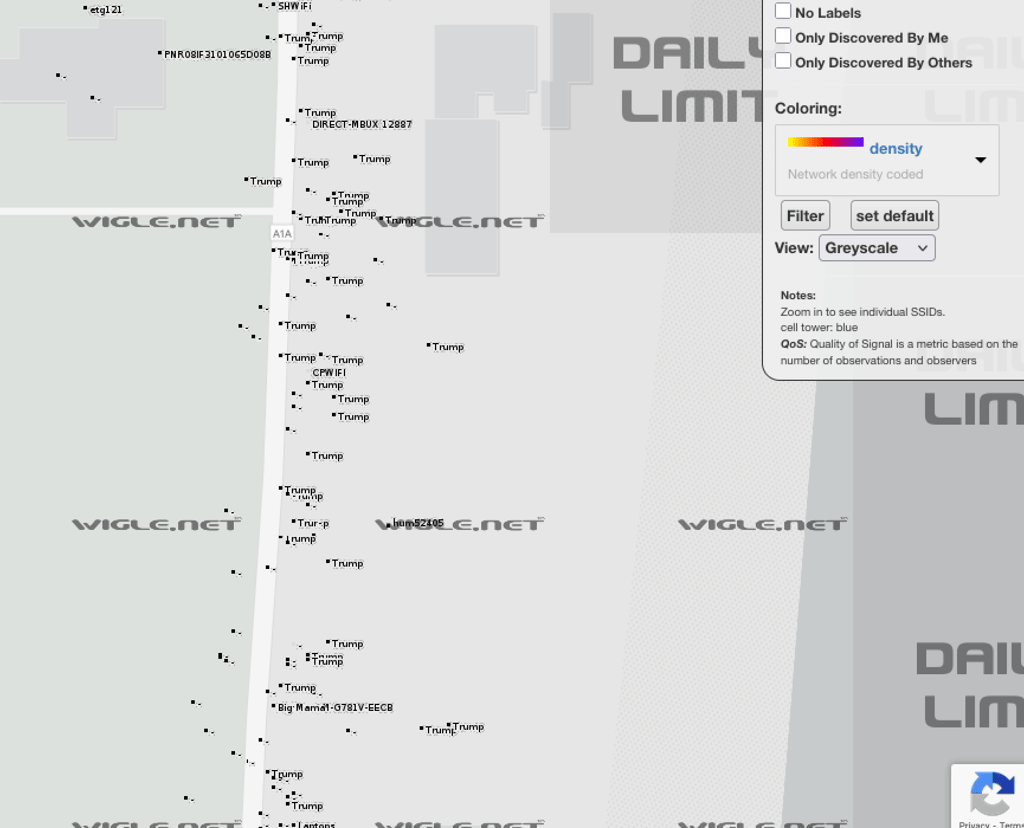
Actually, you don’t even need to be a hacker to find out that most of the WiFi networks around Mar-a-Lago are named “Trump,” and that there is also one WiFi network called “Big-Mamal-G781V-EECB.”
You can check that on a map. Most of the world’s access points are mapped and publicly accessible.





That alone has some serious security implications.
For example, you can check historic data to discover that Chinese TP Link, Huawei, or other access points were used in the Pentagon, as well as many less-than-safe consumer devices.
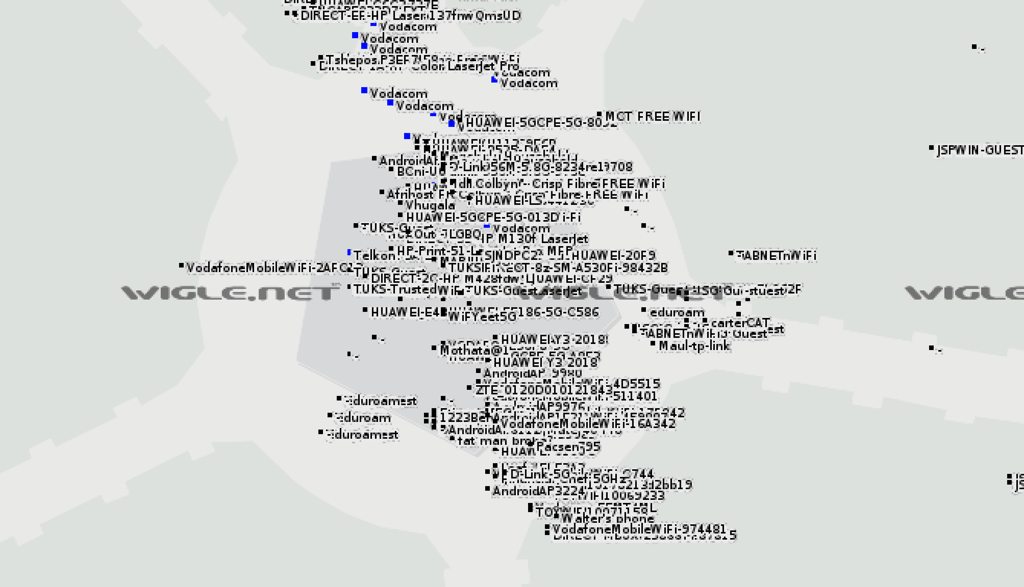
Even recent data contains a hotspot called “Maul-tp-link,” which might also be just a naming coincidence or inaccuracies in the geolocation. You can also find which devices still use outdated encryption.
And it’s not only routers. Many things, including your phone, can be WiFi access points when you use them as hotspots.
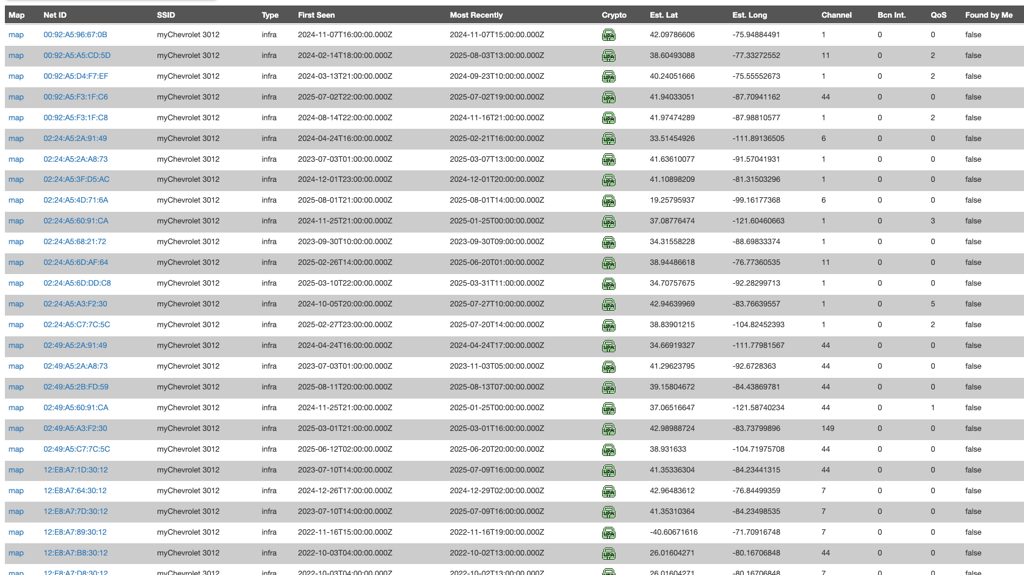
Cars are also WiFi hotspots. Like the “Toyota RAV4-5g_dee424” or “myChevrolet 3012” in the White House’s territory.
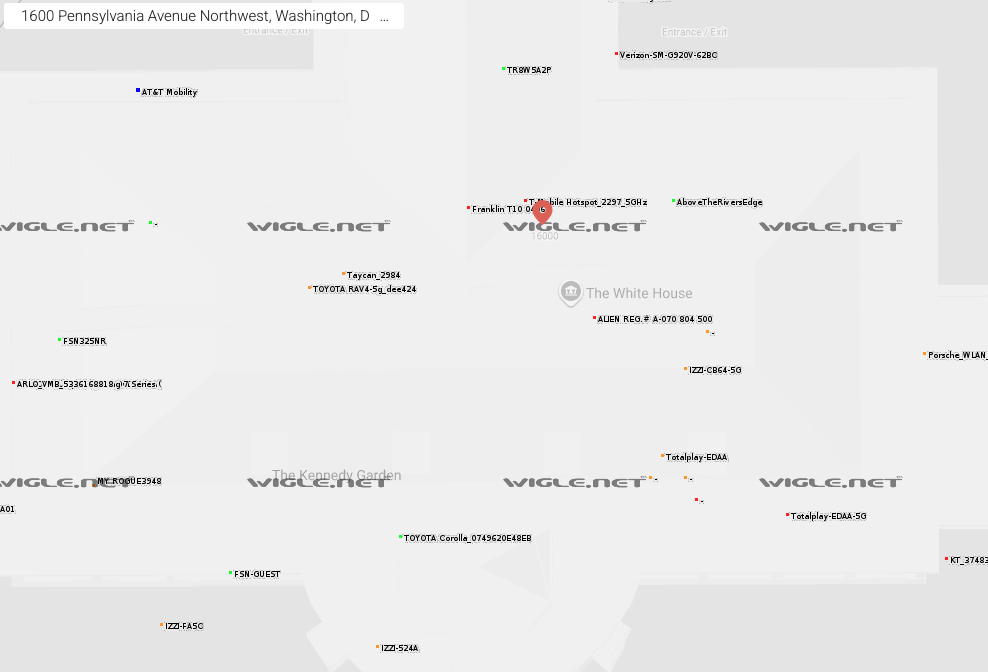
The mapped data includes much more than the WiFi’s name (SSID, or Service Set Identifier).
It contains the MAC address, signal strength, encryption type, timestamps, and other information. MAC addresses, which are also known as Basic Service Set Identifiers (BSSIDs) for WiFi access points, are unique to every device.
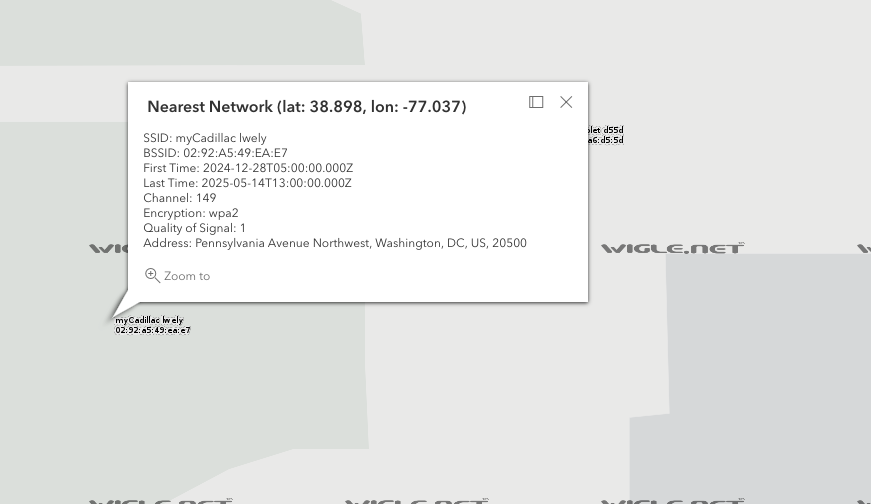
Have you ever wondered what you can do with a MAC address? Correct, you can find its current or previous locations. Also you can look up the vendor who produced the device.
In the examples above, Wigle.net was used. This website collects information about different wireless devices worldwide and provides data for free to anyone. It relies on contributors, searching for WiFi networks, which is also known as wardriving.
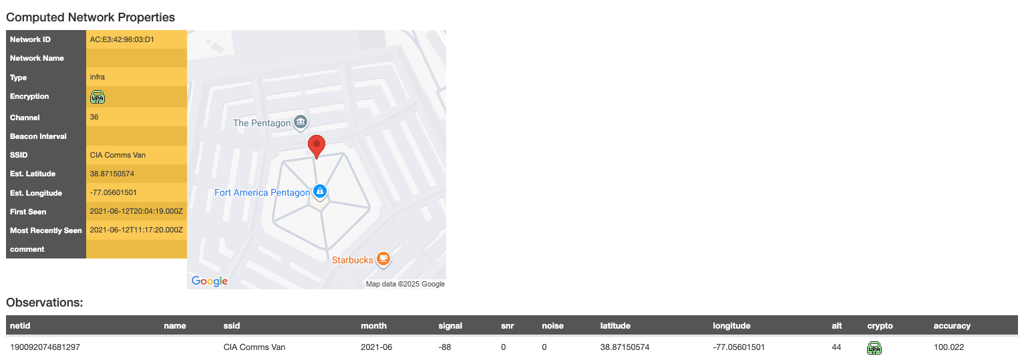
Wigle has already mapped over 1.67 billion WiFi networks, 4.2 billion Bluetooth devices, and 27 million cell towers. Anyone can look at any location on this map to find MAC addresses and search for where these MACs have been observed previously.
This Chevrolet in the White House doesn’t seem to be moving a lot.
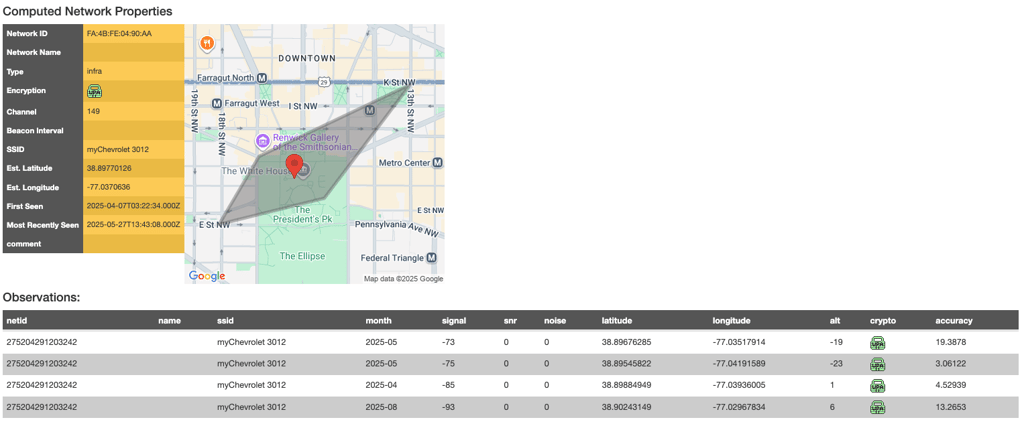
But others might.
A drop in an ocean
Yet, the Wigle service has fewer than a million contributors – a drop in the ocean compared to the billions of devices Google, Apple, Microsoft, and other companies have access to.
All major tech companies run their own WiFi positioning systems (WPS), which is what makes AirTags work, and many other services that require geolocation.
WPS works by measuring the strength of nearby WiFi and comparing it to a database of known router locations.
Apple, Google, Microsoft, and many other vendors are using your WiFi as a beacon to triangulate the exact location of other devices. They can pinpoint these and other devices precisely without many users realizing they’re participating in the process. Once your router’s location is measured, it’s used to help locate other nearby devices.




These companies know your precise location at all times, and they, too, share that data quite openly.
APIs beam location data for free
Any developer can use Google’s and other APIs to determine the exact current location, but the limitation is that they need to provide two MAC addresses. For example, a phone’s and a car's MAC addresses would be enough to track someone down. The service can be used for free, but you need to provide a payment card number to set up the account.
While big tech giants limit the abuse of tracking, less stringent APIs might exist in third countries. Many other companies advertise being able to “Locate Everything Everywhere.”
And researchers have previously demonstrated that WPSs can be abused by unprivileged attackers to perform mass surveillance. Tracking the devices’ movement patterns allows for reconstructing and predicting many people's daily routines, and bad actors have access to this data.
To sum up, you can find the MAC address of a particular device (phone, car) very easily by looking at the map and using historic data (e.g., when a car is in a garage). Then, you can track its current location using public APIs.
No real option to opt out: you can ask nicely or turn the device off
Stash your phone in a Faraday cage (an enclosure used to block electromagnetic fields) – that’s one of the nine recommendations McAfee gives to users who want to limit tracking of their smartphone. This one might be harder to apply to a vehicle.
The researchers have previously concluded that users are at the mercy of WPS operators and other vendors.
The big tech companies offer one alternative. If you don’t want your device mapped, you can change the WiFi’s name (SSID) to reflect that – opt out.
“To opt out, change the SSID (name) of your Wi-Fi access point (your wireless network name) so that it ends with ‘_nomap.’ For example, if your SSID is ‘12345,’ you would change it to ‘12345_nomap,’” Google suggests in its Help Center.
Apple will respect this ending, too: adding “_nomap” will prevent the device’s location from being sent to Apple. Even Wigle.net respects this: the open service maps devices that broadcast no SSID at all, but skips those with “_nomap.”
But not Microsoft. To opt out of Microsoft’s location services, you have to go to their website and enter your MAC address, which can be found on a sticker on the bottom of the device or its box. Alternatively, you can run the “ipconfig /all” command on the Windows command prompt and look for your WiFi adapter’s physical address.
Previously, the Redmond giant required adding an “_optout” tag to the SSID, but it’s no longer clear if this would work. To satisfy all companies, the WiFi name would need to end with both “_optout_nomap.”
And still, it would all be a false sense of security since not all services will respect it, and no law requires them to.
“In the near future, it will be required that your WiFI SSID be _optout_notrack_nothanks_offgrid_nomap,” joked one user on Hacker News.
“Note that unless you turn off your beacon, your network is still blasting the presence of your network to anyone within radio distance. And even with beacons off, your network can be noticed just via traffic flowing on it. As always, obscurity isn't security, encrypt all the things,” the admin of Wigle.net warned back in 2016.
What about Bluetooth?
Bluetooth is similar to WiFi in terms of tracking potential. There are even more Bluetooth devices, and many people carry several at a time. They’re also being tracked by WPSs, and their identifiers can be used to determine their location. Bluetooth does not offer an equivalent to WiFi’s “_nomap” options to ask companies not to track them.
Attackers can obtain the MAC addresses of the devices in range or obtain them in other ways and later use them to track the owner.
Many modern smart devices also implement MAC address randomization for Bluetooth to protect their owners’ privacy. However, many gadgets that require reliable pairing, like headphones, speakers, keyboards, or fitness trackers, often do not consistently implement randomization and remain susceptible to tracking. Conventional MAC address randomization also will not protect against sophisticated corporate WPSs and nation-state surveillance.
What else can you do?
The researchers at the University of Maryland have previously recommended frequently rotating the SSIDs and MACs (BSSIDs). However, this might not be very practical. First, many users lease the equipment from their ISPs.

Second, the researchers found that in some cases, Apple added the WiFi access points to its WPS after two to seven days of continuous operation. Every time you change the name of your WiFi, you need other devices to reconnect to it.
Power users are suggested to modify their access point software, like hostap, to randomize BSSIDs at each boot or every time the router moves.
Also, be aware that attackers can see your WiFi and how strong its security is from far away, so you want to reduce any chances of an attack.
Wigle data reveals that around five percent of WiFi networks still rely on early encryption, such as WEP or WPA1, which can be easily exploited. These devices should never be used for anything sensitive and should be upgraded to WPA3 devices with strong authentication.
Turn off Bluetooth, WiFi, and location services on your devices when you don’t need them.