Best affiliate marketing website builders – tried and tested in 2026
Our team of experts and researchers rigorously test and evaluate website builders through transparent, in-depth testing procedures and methods using both in-house and industry-approved tools.
Drawing on cybersecurity insights, we provide unbiased, empirical rankings and analysis to help users make informed digital platform choices.
Learn more
Affiliate marketing is one of the most profitable online business models, offering a chance to earn passive income by sharing affiliate links. But to get started, you need a website. If you're new to website development, a website builder can make this process easier. However, picking the right one can be tricky – things like built-in SEO tools, affiliate link flexibility, marketing integrations, pricing, and ease of use all play a big role.

To make things easier for you, I built and tested numerous sites to determine the best website builder for affiliate marketing. So, read on to learn which providers have the greatest potential as online business facilitators.
Best website builders for affiliate marketing 2026
- Wix (get the deal) – overall best website builder for affiliate marketing. Built-in SEO tools, 50+ affiliate integrations, and an intuitive editor
- Hostinger Website Builder (visit site) – cheapest affiliate marketing website builder. Affiliate marketing tool plugins and built-in SEO tools
- Shopify (visit site) – affiliate marketing web builder for brand collabs. AI-powered content tools and affiliate app integrations
- SITE123 (read more) – easy-to-use builder for affiliate marketing
- Squarespace (read more) – feature-rich website builder for affiliate marketing
- WordPress + Elementor (read more) – highly customizable web builder for affiliate marketing




Our in-house research team and expert writers work hand in hand to regularly test website builders and provide accurate and fact-checked information. Discover the ins and outs of how we test and evaluate website builders.
Best affiliate website builders 2026: practical review
I selected the best website builders for affiliate marketing based on factors crucial to creating personalized online businesses. Most notably, I evaluated the effectiveness of each provider’s SEO and marketing tools, customization capabilities, and performance metrics like page load speeds and uptime. Naturally, I took pricing into account since online marketing is all about balancing monthly costs against potential profits. Below, I break down each web builder for affiliate marketing and my experience with them.
1. Wix – best overall web builder for affiliate marketing

| Rating: | |
| Blogging platform: | ✅ Yes |
| Templates: | 2700+ |
| Free domain: | ✅ Yes, (with paid plan) |
| AI tools: | ✅ Yes |
| Pricing: | Free or from $17.00/month |
| Current deal: | Get Wix with 50% OFF |
Wix is the best website builder due to its immense design flexibility. I also think it’s the leading website builder for affiliate marketing sites because it grants many customizable marketing and SEO tools. Let’s see what Wix offers for affiliate websites:
- Goaffpro or Affiliate Builder app for making pages with unlimited partners, sales, and an admin panel to manage every affiliate-related detail
- SEO Setup Checklist – a step-by-step guide on how to improve the website’s SEO and online visibility
- Social media integrations to easily schedule and share content across multiple platforms to improve engagement
- Powerful AI features, including Harmony or the Aria AI agent, to assist you in every aspect of the site creation process, whether it’s building the site itself or rapidly creating content
- AI-assisted email marketing campaigns that help create, schedule, and optimize email outreach for your affiliates
- Integration with marketing analytics and ad platforms, including Facebook Pixel, Google Ads, TikTok Pixel, and ActiveCampaign, for performance tracking and automation
My experience creating an affiliate website with Wix
To test Wix’s capabilities, I opted for its Hobby plan, including Member's Area, Affiliate Portal, and Stats Dashboard. I know that some people find Wix intimidating because of its vast customization options. However, the interface is pretty intuitive, meaning it doesn’t take much time to get used to the service’s array of tools.
To make things easier, Wix asks what kind of website you’re interested in and gives you suitable template recommendations. Once you submit your answer, Wix asks whether you prefer building your website using a template or utilizing the Wix AI website builder, also known as ADI (Artificial Design Intelligence).

I selected the template option, which led me to Wix’s massive library of 2700+ functional templates. There are multiple templates specifically for affiliate marketing, all of which look fantastic.
After choosing a template, you’ll see Wix’s editor. I know beginners may get confused by all the customization options, but you’ll get the hang of it pretty fast. You can check out our Wix review based on real user experience for more insights.
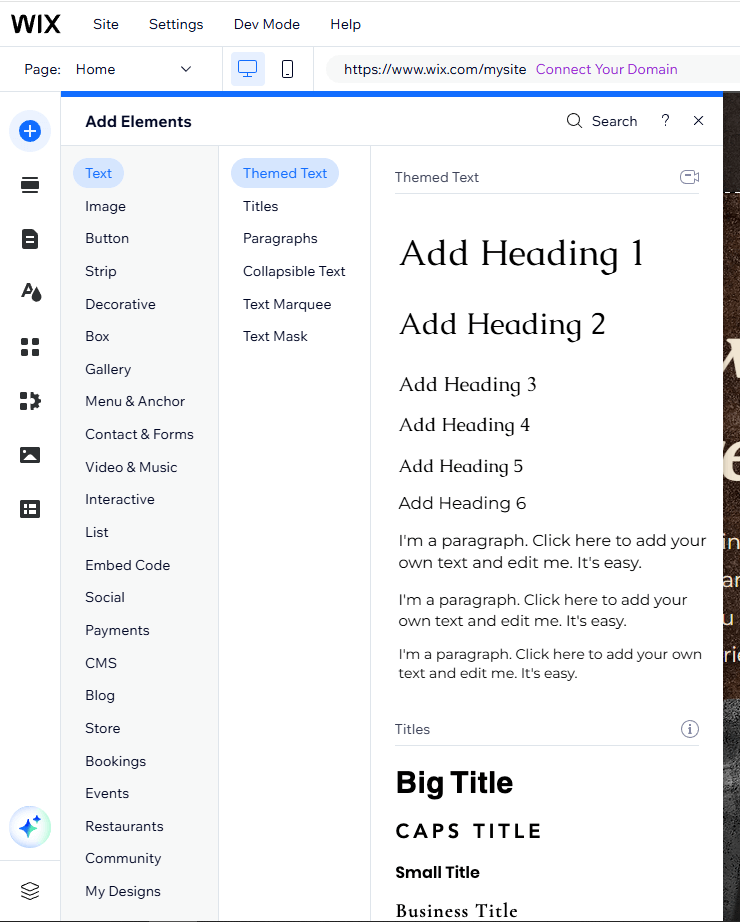
Wix’s editor allows you to manage sections, add pages and elements, manage your theme, and customize the background. You can also add apps and media content. Plus, with a massive library of customizable elements, you can create a unique website to suit your needs and preferences.
You can also add a blog from the editor. All you have to do is press the Blog button on the left. Feel free to choose a style and layout that you like. The same menu allows you to manage your blog posts.
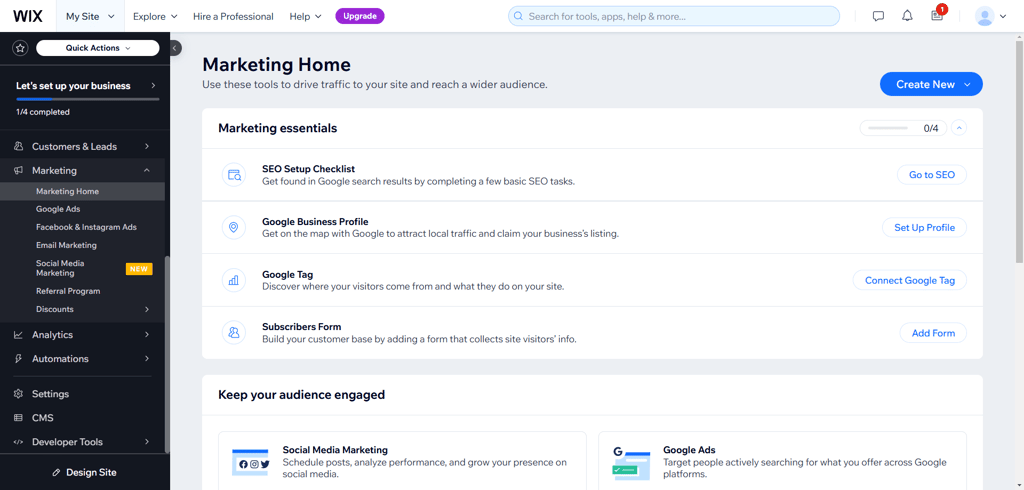
Wix has great marketing and SEO features, making it one of the best web builders for SEO. Using Wix’s marketing tools, you can run your email campaigns, manage social integrations, and connect to tools such as Google Analytics and Tag Manager. From here, you can access the extensive SEO settings or even hire an SEO professional.
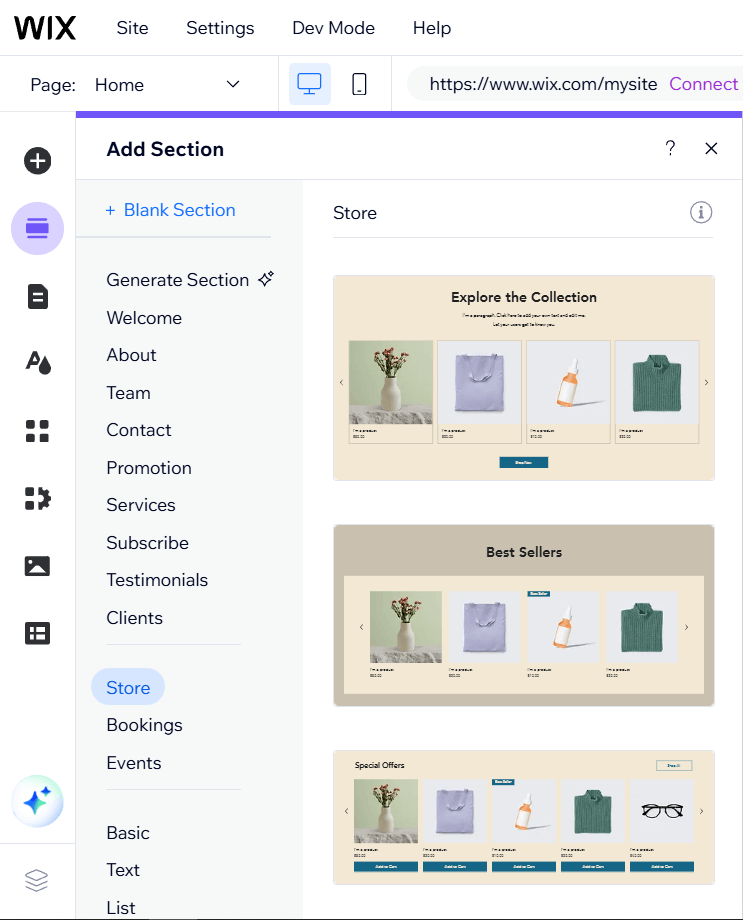
Also, Wix supports Amazon Associates integration, which makes connecting your Amazon affiliate account simple. You can easily customize how the affiliate links appear on your site, add product images, and start earning commissions from referrals. Lastly, you can handle all your social media posts directly from Wix’s dashboard, which streamlines the marketing process.
The bottom line is that Wix is very capable as a website builder for affiliate websites. You have plenty of high-quality templates to choose from, excellent ease of use, design flexibility, and extensive SEO and marketing options.
2. Hostinger Website Builder – most budget-friendly affiliate marketing web builder

| Rating: | |
| Blogging platform: | ✅ Yes |
| Templates: | 300+ |
| Pricing: | From $2.69/month |
| Current deal: | Get Hostinger Website Builder, 81% OFF + free months |
Hostinger Website Builder is my top recommendation for affiliate marketers on a budget. Its most affordable plan includes all the affiliate marketing essentials without optional extras like extensive AI tools and eCommerce features. However, the slightly pricier Business Website Builder plan grants comprehensive AI capabilities to make any creative process more efficient. Here are all the Hostinger features that contribute to affiliate website making:
- Hostinger Affiliate Marketing Tools plugin, which allows you to put products from Amazon or Mercado Livre on your site, and use affiliate links
- Built-in SEO tools that help adjust your site’s meta descriptions, URLs, and keywords
- AI heatmap to track user interactions on your website
- Social media integrations, especially the option to add your Instagram feed to your website
- AI tools (only with the pricier plan) to assist with image creation, writing, and blog creation
My experience creating an affiliate website with Hostinger Website Builder
Hostinger Website Builder is well-known for its simplicity. To test it, I chose the Business Website Builder plan since it includes far more affiliate marketing features than the Premium Website Builder plan. Once I signed up, I clicked on the Create New Website button in my dashboard, and I could begin my testing.
The first thing Hostinger Website Builder asks is whether you want to let AI build your website or pick a template. Hostinger’s AI does a great job at generating a website based on your needs. However, if you want to start from a template, you can pick from over 300 functional and sleek templates for any purpose. That said, there are no dedicated templates for affiliate marketing.
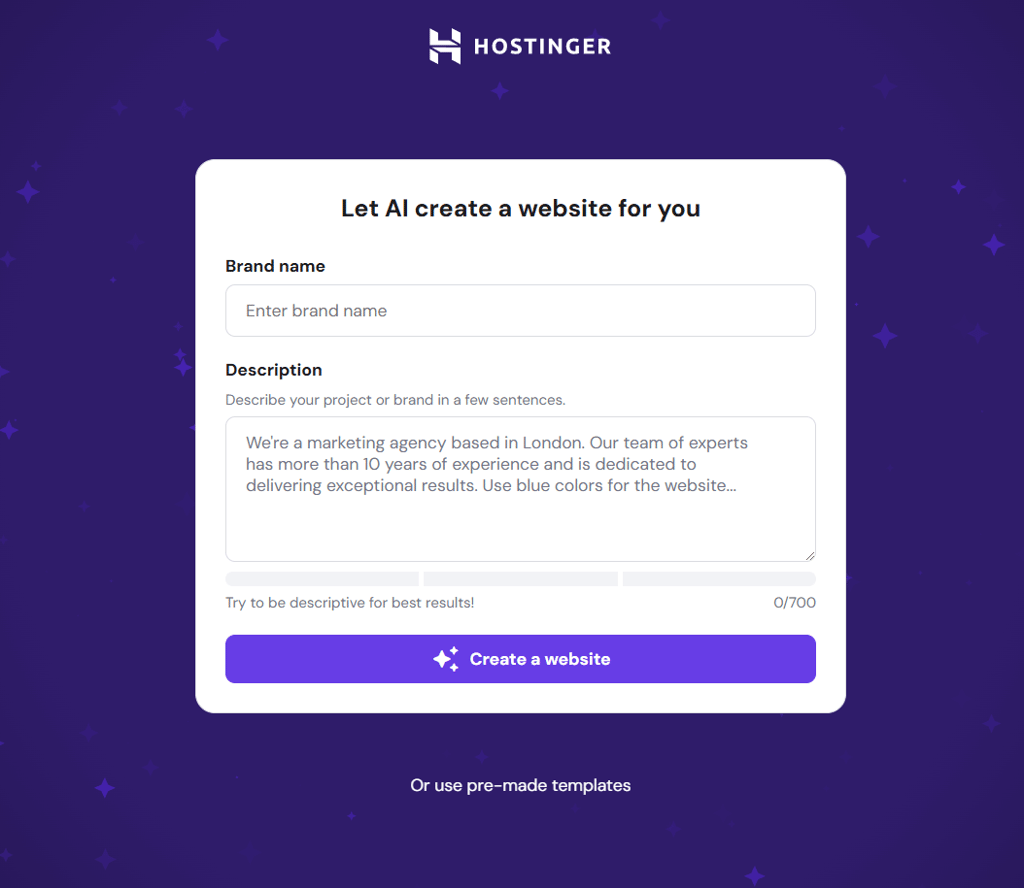
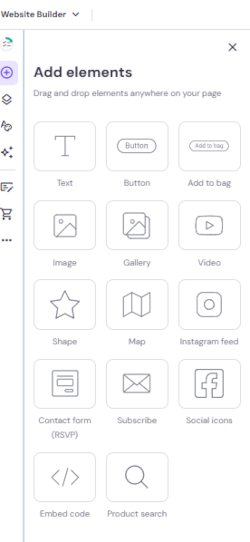
Once you choose a template or build a website using AI, you are free to navigate the editor. Hostinger Website Builder is one of the best drag-and-drop website builders out there. It allows you to add elements like text, buttons, media content, and social buttons. While Hostinger Website Builder's editor isn’t the most customizable, you can still play with element placement, colors, and fonts.
For affiliate marketing websites, it also offers blogging tools to help you drive more traffic and keep visitors engaged. For more insights on these tools, you can check our Hostinger Website Builder review with expert insights.

Speaking of SEO and marketing, Hostinger Website Builder has pretty reasonable elements. The SEO tool allows you to optimize your page titles and descriptions to be more search engine friendly. However, these tools are not as extensive as what Wix has to offer.

You can also connect your website to your Google Analytics account, enabling you to optimize your site even further. Just access Integrations under Website Settings, and you’ll find this feature.
Apart from blogging and SEO, Hostinger Website Builder offers quite a few marketing tools. The most notable one is the ability to add your Instagram feed to your site. Facebook, X, and Instagram social media link integration is also available.
Hostinger’s Website Builder also allows you to link your Amazon Associates account. You can insert product links and images to create more visually engaging content. However, customization options with Hostinger are somewhat more limited than those with Wix.
Lastly, alongside other AI tools like a blog title generator and writer, Hostinger Website Builder includes a handy feature: an AI heatmap. The tool highlights the areas where visitors look the most on your site. Based on this, you can place the information you want them to see first at the most active site areas.

The bottom line is that Hostinger Website Builder, while affordable and simplistic, can help you build a strong affiliate marketing website thanks to its business features.
3. Shopify – premium eCommerce builder with affiliate collaboration tools

| Rating: | |
| Blogging platform: | ✅ Yes |
| Templates: | 1050+ |
| Free domain: | ✅ Yes |
| AI tools: | ✅ Yes |
| Pricing: | From $29.00/month |
| Current deal: | Try Shopify free for 3 days + 3 months for $1 |
Shopify is a well-known eCommerce website builder and hosting platform. While Shopify is primarily built for eCommerce, its Collabs ecosystem makes it particularly strong for brand-led affiliate programs and influencer partnerships.
- Influencer discovery tool for recruiting influencers to promote your brand
- Affiliate traffic dashboard for your partners to track their performance
- Commissions tracking for accurate representation and monitoring of generated sales
- Product linking, in case your partners want to promote specific products
- Automated or semi-automated payouts, along with performance analytics
- Marketing asset libraries (banners, images, and product links) for affiliates to use
- Social media integration to include social media buttons on your website and link your store’s product pages directly to your social channels
My experience creating an affiliate marketing website with Shopify
For testing, I opted for Shopify’s Grow plan because it includes most of the features for affiliate marketing. What I first noticed is that the platform is a little different from other website builders in terms of the setup process. However, it didn’t take me too long. The main difference is that with Shopify, I had to first create a shop rather than a website, and only then could I pick the themes and edit my online store. What was a little inconvenient was that for editing, you have to go through Sales Channels > Online Store > Themes on the dashboard. The navigation could be made a little more convenient. Shopify offers a few free themes, and you can also generate some based on a prompt.
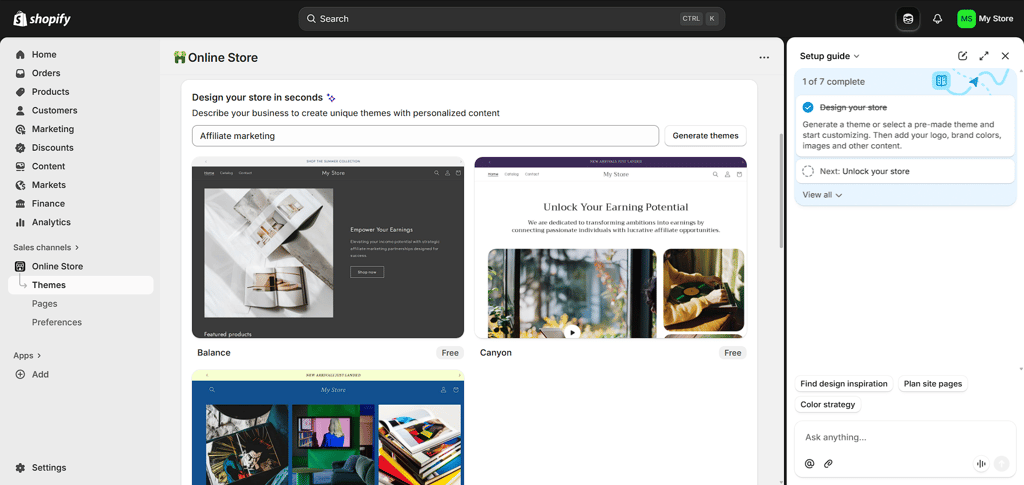
Setting up the website for affiliate marketing on Shopify is mostly done through the Collabs feature. It’s a pretty extensive tool, and Shopify offers a demo call to walk you through it. I decided to figure it out by myself, and I have to note that it took me a bit to get comfortable with it.
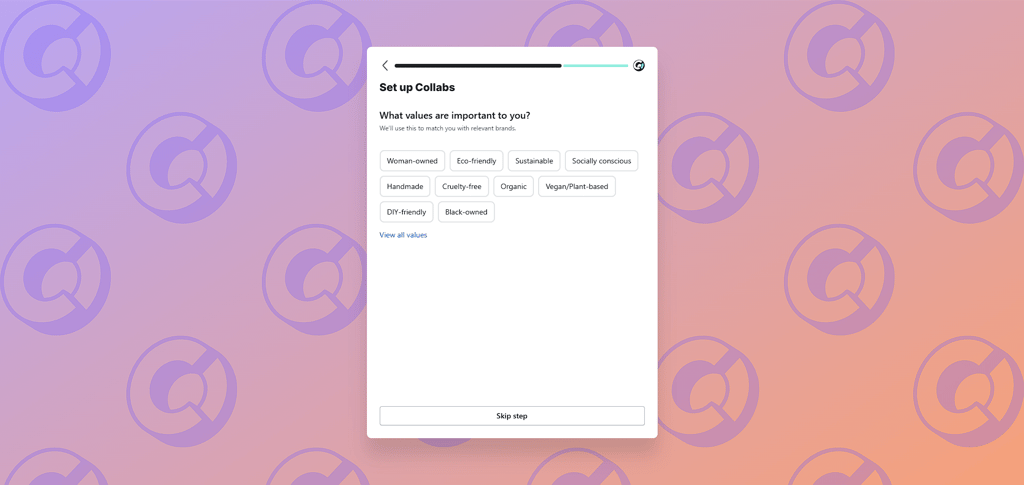
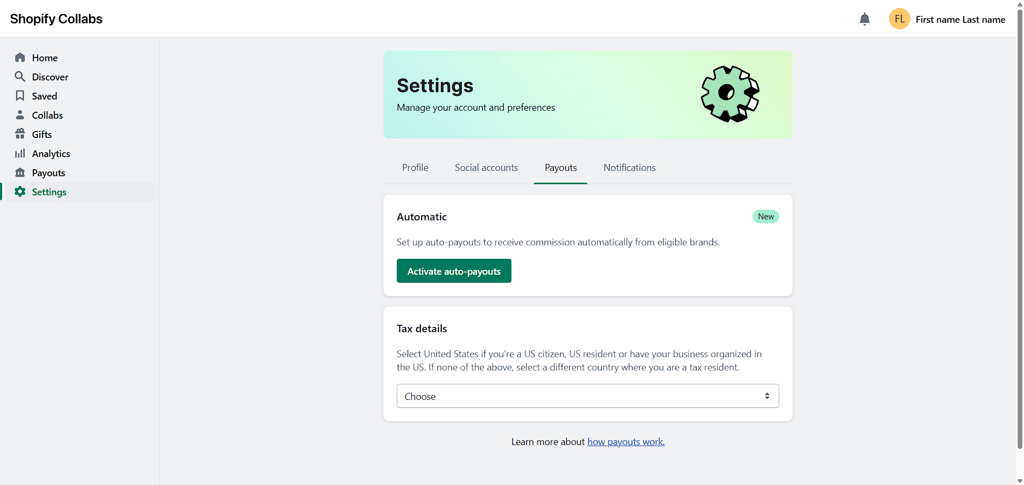
The Collabs feature is great for tracking your affiliate collaborations with brands. It has all that you might need integrated into it. That includes payouts, performance tracking dashboards, commission tracking, and advanced analytics. For more insights, you can refer to our Shopify review.
Overall, Shopify is a premium eCommerce solution that also includes tools for affiliate marketing. It is different from traditional website builders and might take time getting used to. However, after some time, it is one of the most convenient affiliate marketing site builders I’ve used.
4. SITE123 – well-rounded web builder for beginners

| Rating: | |
| Blogging platform: | ✅ Yes |
| Templates: | 160+ |
| Free domain: | ✅ Yes |
| AI tools: | ✅ Yes |
| Pricing: | From $4.60/month |
| Current deal: | Get SITE123 now 50% OFF |
SITE123 is a simple yet functional website builder best suited for beginners. It’s easy to use, has decent templates, and offers solid marketing and SEO tools that can help you grow your site into a profitable one. Plus, you can start building your site using the service’s free tier and upgrade to the premium plan once you’re ready to start your affiliate marketing business. Here’s what SITE123 has to offer for affiliate websites:
- Beginner-friendly SEO tools, such as the SEO Adviser tool to check the titles, meta tags, and desired keywords, ensuring your site ranks well
- Built-in feature to translate your content into several additional languages (not included in the Basic plan)
- Social media integration to embed share buttons on your website and add links to your store’s product pages to your social media platforms
- Conversion tracking (using Facebook Pixel integration) to monitor conversions from your social media profiles, helping you measure the effectiveness of your campaigns
- Extensive product management, which makes it easy to set up product pages and advertise your affiliate product, or even start dropshipping
- Built-in platform allows you to email your subscribers when you release new product reviews or blog posts and get insights on how your emails are performing
My experience creating an affiliate website with SITE123
To evaluate SITE123, I chose its Premium plan because it offers all the features for affiliate marketing. I really liked that it allows you to have a fully functional website in only a few steps. Firstly, SITE123 wants to know what type of website you want to create, and you have to choose among multiple options.
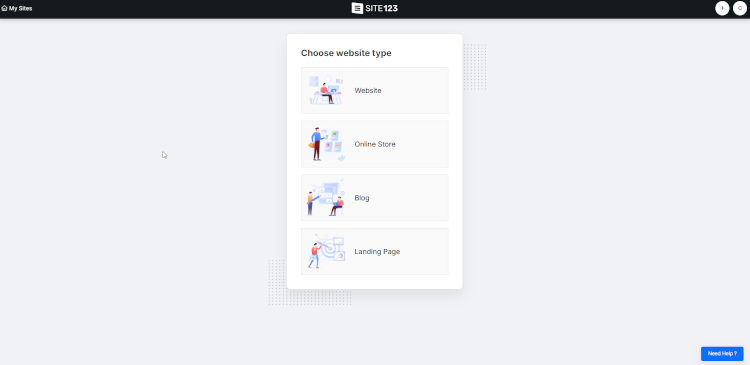
You will get a pre-generated website in a few seconds. Since there were no extended questions about your preferences, the end result is quite basic. However, it can be easily edited later on. On the other hand, you can start creating your website by choosing a template first.
You won’t find templates specifically designed for affiliate websites, but there is a wide range of options – over 160 simple and functional templates to consider. These templates are responsive and mobile-friendly, so you don’t have to worry about your website not working on smaller screens. This makes SITE123 one of the best mobile-friendly website builders.
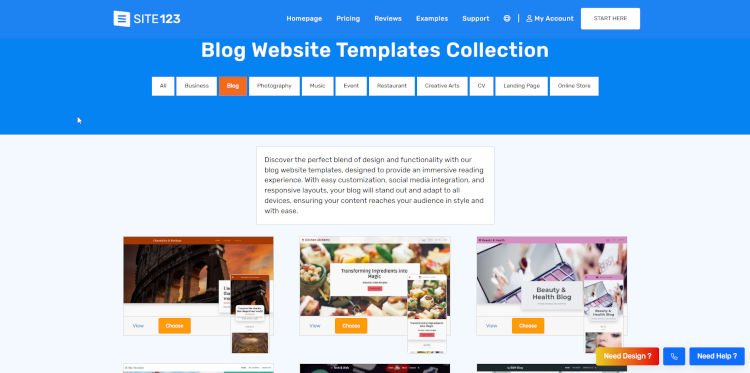
SITE123’s editor is intuitive and straightforward. While it doesn’t offer much design flexibility, you can easily manage pages, add sections and elements, and customize fonts and colors. You can also modify the background and include image filters.
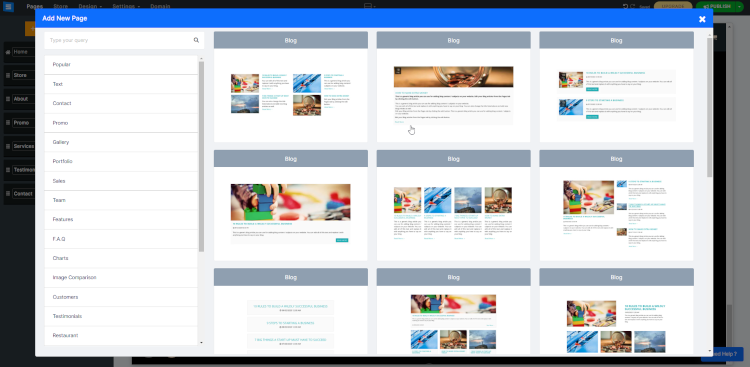
As for affiliate-related features, the provider allows you to add a blog to your website. You can find the option under Pages in the editor’s menu. There are several layouts to choose from. Once you add it, you can manage your blog posts by accessing the page.
Also, SITE123 offers Text AI, which can help you write blog posts for your website. I found this tool easy to use, and it can generate content for any page based on the prompt you give. Another useful feature is Website Languages. SITE123 allows you to change your website’s language at any time.
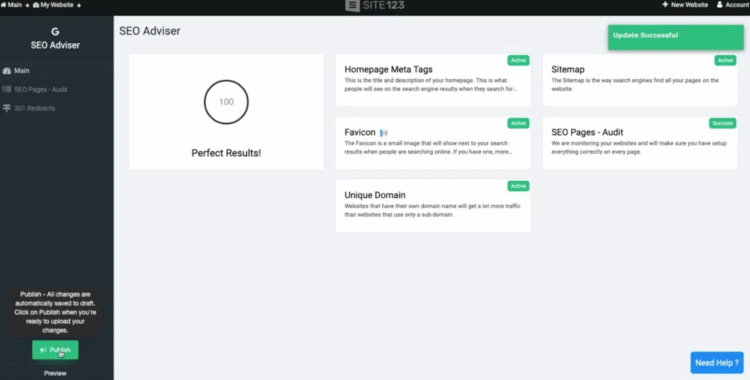
As for marketing and SEO, the platform has a few tools to help you promote your website, optimize it to rank well on Google, and increase your conversion rate. One of them is the SEO Adviser, which analyzes your website and lets you know what you have to improve. You can even run an audit for more details, and if you’re feeling overwhelmed, you can hire an SEO expert. However, I find this feature not as advanced as Wix’s SEO checklist.
Additionally, SITE123 lets you create a subscription form to get your visitors’ email addresses if you want to run email marketing campaigns. If not, you can opt for social media integrations on your website.
Other than that, you can install a few other marketing tools. Remember that SITE123’s plugin library isn’t the most extensive.
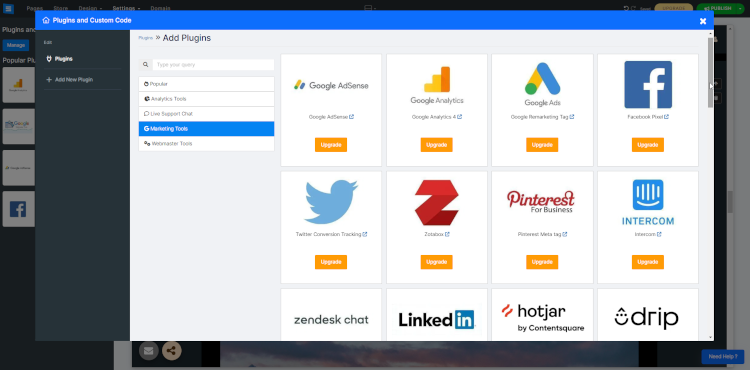
Regardless, SITE123 is a good option for an affiliate website. There are plenty of tools, and the website will be ready in seconds. For more information, check out our detailed SITE123 review from a user perspective.
Overall, SITE123 is simple and functional. It doesn’t have many tools, but the templates are nice-looking and functional. You should be able to create and run a successful affiliate website in no time.
5. Squarespace – multi-functional website builder for affiliate marketing

| Rating: | |
| Blogging platform: | ✅ Yes |
| Templates: | 199+ |
| Free domain: | ✅ Yes |
| AI tools: | ✅ Yes |
| Pricing: | From $16.00/month |
| Current deal: | Get up to 36% OFF Squarespace |
Squarespace is a premium website builder known for its beautiful, professionally designed templates and great in-house features. While there isn’t a lot of design freedom, you can create a functional affiliate website with minimal effort.The main Squarespace strengths for affiliate websites include:
- Site-wide SEO tools, including an SEO checklist for site optimization and built-in integration with Google Search Console to track ranking keywords
- Various analytics tools are available for tracking commerce, acquisition, and engagement metrics
- Social media integration for better reach
- Simple email marketing with ready-made layouts to easily share news, blog posts, and reviews with your followers
- Content creation tools, such as the Squarespace Video Studio app for iOS, can help create professional product marketing videos to drive conversions
- 199+ responsive and beautifully made templates for all purposes
My experience creating an affiliate website with Squarespace
For testing, I opted for Squarespace’s Core plan, as it offered the best value for creating an affiliate website. I liked that Squarespace made sure to streamline the website creation process. All I had to do was click on the Create Website button in my dashboard and pick a template. Alternatively, you can use AI to simplify the website creation process.
There are no specific templates for affiliate marketing, but you get to choose from more than 180 professional-looking templates for all purposes.
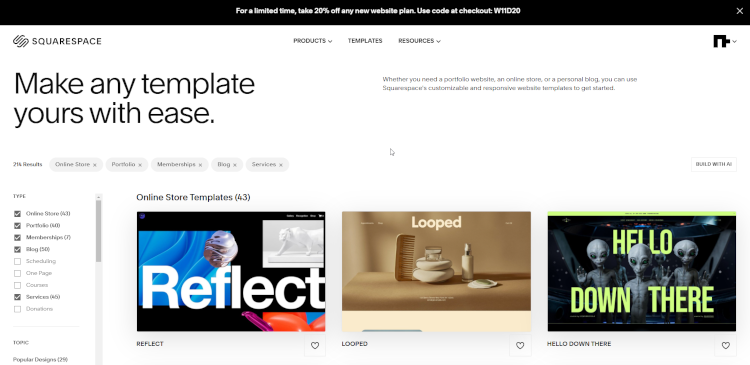
Once you pick a template, you have to name your website, and you’ll be taken to the editor.
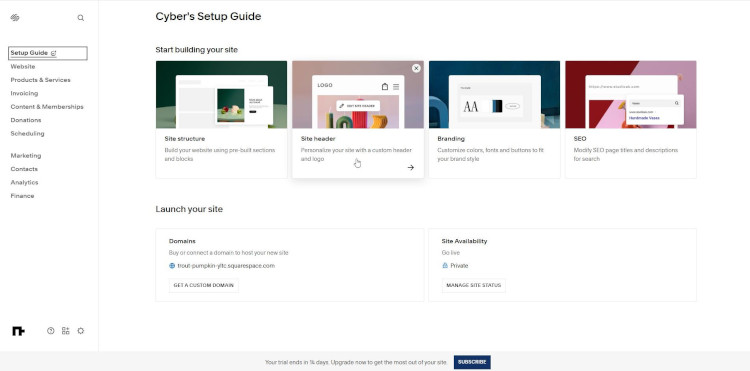
Squarespace’s editor is pretty easy to use. It’s a section-based editor, which shouldn’t give you any trouble. The menu on the left includes all the necessary features and settings. You can add pages, change their design, play with fonts and colors, and add buttons, image blocks, and product items. However, if you’re more into the drag-and-drop functionalities, the Fluid Engine builder is also available.
Squarespace also has integrated necessary tools that allow you to create and track marketing strategies, SEO, and analytics. To access the marketing features, go to the Marketing section in the editor’s left menu. There, you can run email campaigns, manage your SEO settings, and create promotion pop-ups directly from Squarespace.
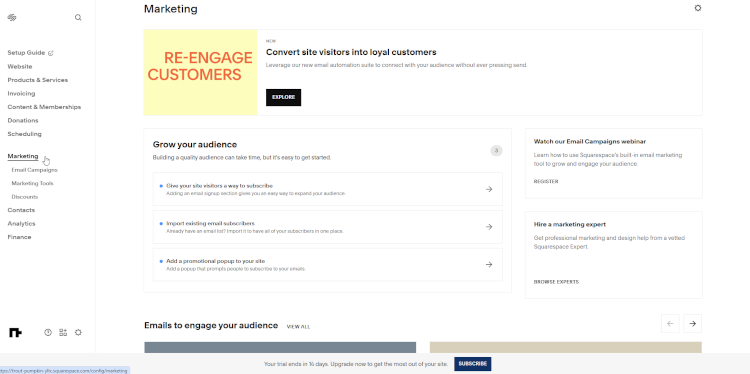
The Marketing menu also includes social media features. By opting for Instagram stories, you can inform your audience about new content or promotional deals.
As for SEO, click on the Settings cogwheel to find the SEO button under Marketing. The checklist redirects you to Squarespace’s articles on the matter. Additionally, the Google Search Keywords requires you to connect to your Google Console.
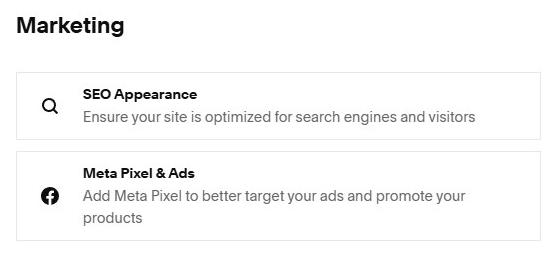
Squarespace offers a handy AI toolkit – Design Intelligence. It helps you to create a website copy, a business name, a product description, email campaigns, and blog posts. However, this tool is quite basic compared to what Wix or other AI website builders offer.
Squarespace also supports Amazon Associates integration, allowing you to add affiliate links and product images to your website for easy monetization.
To further enhance your SEO, you’ll need to create a blog. Organic traffic is achieved via keywords within your website’s content. A blog helps to bring in organic traffic and allows you to have a less formal connection with your audience.
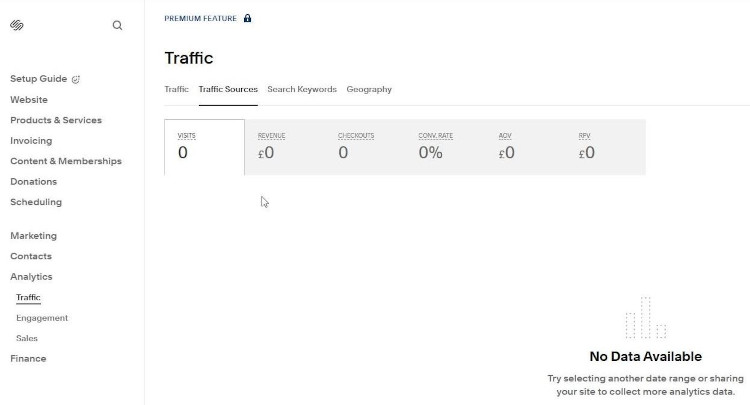
Lastly, you can use the analytics menu to find out if your optimization efforts are working. You’ll find the feature on your editor's left menu. That’s where you can analyze traffic, where it comes from, and the conversion rate. For more, check out our Squarespace review to learn more about its features and tools.
Overall, I consider Squarespace one of the best website builders for affiliate marketing because it has all the right tools for you to succeed.
6. WordPress + Elementor – flexible web builder for WordPress affiliate sites

| Rating: | |
| Blogging platform: | ✅ Yes |
| Templates: | 330+ |
| Free domain: | ✅ Yes |
| AI tools: | ✅ Yes, as plugins |
| Pricing: | From $4.99/month |
| Current deal: | Get Elementor, starting at $4.99/month |
Elementor requires you to have a WordPress website. Unlike other services on my list, it cannot be used as a standalone website builder. However, all that hassle is worth it because WordPress is a popular choice for affiliate marketing. No website builder provides as much design flexibility and as many features and plugins as WordPress does.
In short, Elementor is a plugin that turns your WordPress website creation process into a website-builder-like experience. Here’s what Elementor offers for your affiliate website:
- Many marketing options, such as landing pages, action links, hotspot widgets, and form widgets
- Various integration options, such as Mailchimp, Campaign Monitor, and MailerLite, so you can integrate your email marketing campaigns
- Immense flexibility and customization options of WordPress, which allows you to install any of its numerous plugins to further enhance Elementor’s capabilities
- Over 330 free responsive templates and 330+ more templates if you upgrade to one of the Elementor Pro plans
- An ability to generate variations of existing templates and fully customize them to match your needs
- An ability to edit almost everything from the content boxes to colors, layouts, and fonts
My experience creating an affiliate website with Elementor
Before we begin, remember that you must first create a WordPress website. To do that, you need to purchase one of the WordPress hosting provider services. For my testing, I chose Elementor’s One plan, as it includes a complete website builder experience. Once I had WordPress installed on my domain, I looked for the Plugin category, clicked on Add Plugin, searched for Elementor, and installed it on my website.

After Elementor is installed, you can feel free to choose a template. There are no dedicated themes for affiliate marketing, but all the templates can be converted into something you can use.

The free version of Elementor has 30 templates, and if you go for a premium plan, that number goes up to about 330. However, you have to create an Elementor account to connect to its template library.
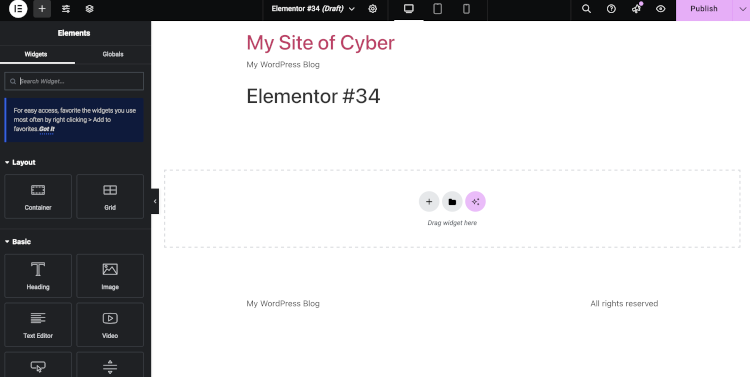
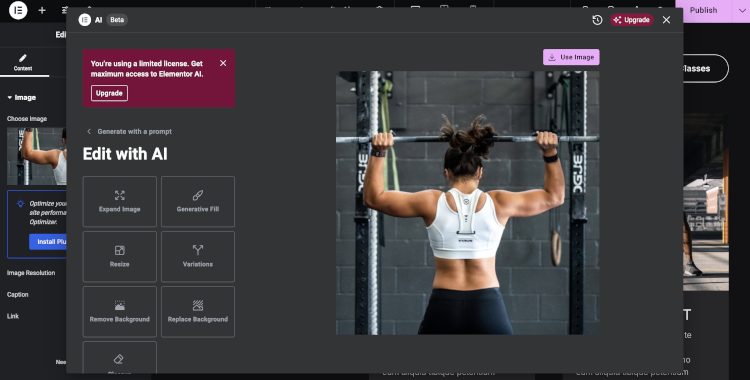
You can start editing once you’re all set up with the template. The drag-and-drop editor is a bit more complicated than standalone website builders, but you’ll get the hang of it quickly. You can insert more sections and headings, add some images, videos, and buttons, and change colors or fonts. Additionally, the Elementor AI tools can improve your workflow by creating any website elements you need with just a few prompts.
WordPress itself is already renowned as a blogging tool. It has a massive plugin library, many of which are free. You can use Yoast SEO or Rank Math for SEO, both of which are excellent options with loads of settings to best optimize your site for search engines.
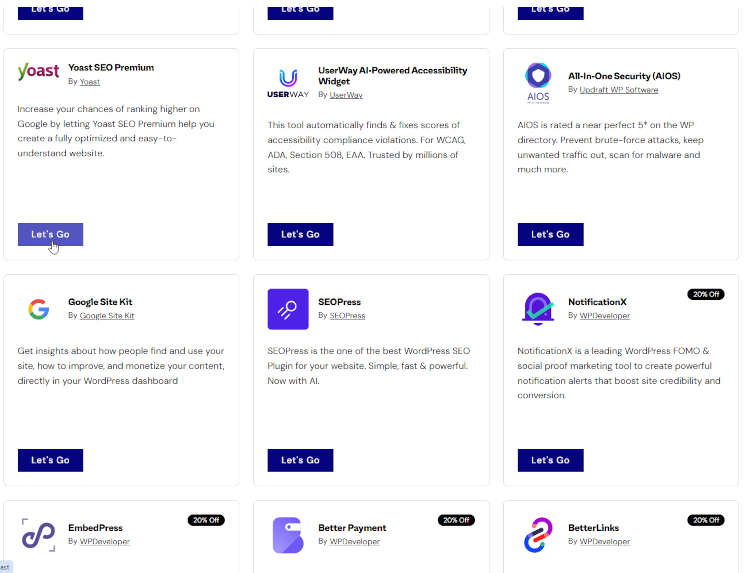
There’s also a wide variety of marketing plugins you can install. You can easily run email marketing campaigns, integrate newsletters, or create pop-ups. WordPress primarily relies on its plugin library for most features. You’ll find anything you need there, including social media integrations. Whether you want to add share buttons or schedule posts, the plugin library is there.
In general, I’d say that Elementor is more complicated, especially compared to Wix. Almost any feature requires installing a plugin. However, if you’re willing to spend some time learning how to use it, you’ll gain access to the cheapest possible way to create a successful affiliate website on WordPress.
All in all, Elementor is the best website builder for WordPress. Sure, it is a little more premium-priced, but an affiliate website would benefit from all the tools the builder offers.
Compare affiliate marketing web builders
I compiled a table that compares the pricing and key features of each affiliate website builder to help you make the final decision. Let’s take a look:
| Website builder | Starting price | AI capabilities | Drag-and-drop functionality | Amazon integration | Number of templates | SEO friendliness |
| Wix | From $17.00/month | ✅ Yes | ✅ Yes | ✅ Yes | 2700 | Excellent |
| Hostinger Website builder | From $2.69/month | ✅ Yes | ✅ Yes | ✅ Yes | 300 | Medium |
| Shopify | From $29.00/month | ✅ Yes | ✅ Yes | ✅ Yes | 1050 | High |
| SITE123 | From $4.60/month | ✅ Yes | ❌ No | ✅ Yes | 160 | Low |
| Squarespace | From $16.00/month | ✅ Yes | ✅ Yes, with Fluid Engine | ✅ Yes | 199 | Medium |
| Elementor + WordPress | From $4.99/month | ✅ Yes | ✅ Yes | ✅ Yes | 330 | Excellent |
What should affiliate marketing website builders have?
There are all kinds of affiliate marketing that you could do, and for all of them, you need a functional website builder. Here is my list of things to look out for in affiliate marketing site builders:
- Marketplace product integration. If your business model relies on integrating products from various online marketplaces like Amazon or Mercado Livre, it’s crucial that your website can support such product placement.
- Analytics dashboards and other tracking tools. Since a lot of affiliate marketing relies on collaboration with brands, you want to be able to track your sales and payouts easily. Nothing will stop you from using external tools, but I personally prefer having everything in one place.
- SEO tools. Don’t get me wrong, nothing can replace a good SEO strategy, but you also need some tools to execute it. A good affiliate marketing website builder should come with a comprehensive SEO suite – you want your site to be discoverable.
- Other marketing tools. These include email marketing, social media integrations, and newsletters. A lot of your reach will come from external channels, where SEO does not necessarily reach. A good website builder will already have features or plugins available for these purposes, so you don’t have to rely on external tools.
- AI tools. Not strictly required, but increasingly valuable in 2026 for scaling content and optimizing conversions. For example, I like using content generators for product descriptions or to help with the setup and layout of my pages. Hostinger’s Kodee is especially good at executing these kinds of tasks.

FAQ
What is an affiliate website?
An affiliate website is a site that promotes products – physical or digital – sold by other vendors. When visitors click your Buy button, they’re redirected to the vendor’s website. Once the purchase is made, you get a commission.
How much does it cost to build an affiliate marketing website?
You can build an affiliate marketing website at no cost using free web builders like Wix or SITE123. Naturally, such sites will have limited features and analytics, which can lead to fewer sales. Thankfully, affordable providers like Hostinger are available if you want to build a site for as little as $2.69/month.