RoboForm vs Bitwarden comparison in 2026
Being behind major reports like The Mother of All Breaches and WhatsApp Data Leak, our in-house cybersecurity experts conduct independent, unbiased testing and thorough analysis of password managers, helping users confidently manage their credentials and sensitive information.
We prioritize transparency by openly sharing detailed descriptions of our in-house testing procedures and methodologies.
Learn more
RoboForm and Bitwarden are two trusted password managers that cover the basics well – strong encryption, multi-factor authentication, and solid free plans for everyday users. However, Bitwarden appeals to those who value open-source software and transparency. RoboForm, meanwhile, is a more user-friendly option.
I tested both password managers over several weeks, assessing their security, ease of use, customer support, and overall value. The testing results allowed me to determine which provider is truly the best for 2026.
In this RoboForm vs Bitwarden comparison, I share my first-hand experience and explain who should choose which password manager. Continue reading to learn more.
RoboForm vs Bitwarden – overview
RoboForm and Bitwarden are both secure, AES-256–encrypted password managers with strong core protection and zero-knowledge architecture, but they take different approaches to usability and control. RoboForm focuses on simplicity, offering a more polished interface, smoother autofill, stronger customer support, and a beginner-friendly experience. Bitwarden, on the other hand, prioritizes transparency and flexibility with its open-source model, wider platform support, and deeper customization options, though its interface and feature access can feel less intuitive.
| RoboForm | Bitwarden | |
| ⭐ Rating: | ||
| 🥇 Overall rank: | #3 out of #20 | #6 out of #20 |
| 🔥 Coupons: | RoboForm coupon 60% OFF | Cybernews Password Manager Coupons |
| 💵 Price: | From $0.99/month | From $1.65/month |
| ✂️ Free version: | Yes, plus a 30-day money-back guarantee | Yes |
| 🔒 Encryption: | AES-256 | AES 256-bit |
| 🖥️ Platforms: | Windows, macOS, Android, iOS, Linux | Windows, macOS, Linux, Android, iOS |
| 🌐 Browser extensions: | Chrome, Firefox, Opera, Microsoft Edge, Brave, and Safari | Chrome, Firefox, Edge, Opera, Safari, Vivaldi, Brave, Tor, DuckDuckGo |

Recent Updates
Key differences between RoboForm and Bitwarden
Below, I share a quick breakdown of how RoboForm compares to Bitwarden. These key differences show which password manager is better suited to different types of users and priorities.
Choose RoboForm if:
- You’re looking to save money. RoboForm is one of the cheapest password managers, with plans starting at around $0.99/month.
- You want a straightforward experience. It sticks to essentials like autofill, password creation, and secure storage without unnecessary complexity.
- You value easy access to support. RoboForm provides multiple help channels, including live chat and phone callbacks, alongside email assistance.
- Security and reliability matter most. It has a clean security record, strong encryption with high hashing iterations, independent audits, and SOC 2-certified infrastructure.
- You prefer a smooth setup. RoboForm offers clean desktop apps across major systems, flexible password sharing with permissions, and responsive support across all plans.
Choose Bitwarden if:
- You need secure sharing for groups. It supports encrypted password sharing and family plans for up to six users, making it suitable for households and teams.
- You prefer built-in security tools. Autofill, emergency access, account recovery, and strong 2FA options are included without needing extra plugins.
- You’re looking for an affordable premium upgrade. Bitwarden’s paid plans add features like advanced authentication and encrypted file storage at a low cost.
- You value open-source transparency. Its code is publicly auditable, which appeals to users who prioritize trust and community verification.
- You want flexibility and control. Bitwarden supports self-hosting and customization, giving more advanced users greater control over their setup.
RoboForm vs Bitwarden: plans and pricing
| Plan | RoboForm | Bitwarden |
| Free | $0.00 | $0.00 |
| RoboForm Premium/ Bitwarden Premium | $0.99/month | $1.65/month |
| Family/Families | $1.59/month (5 users) | $3.99/month (6 users) |
| Business | $3.33/month/user | $4.00/month/user |
| Try RoboForm | Try Bitwarden |
RoboForm pricing
RoboForm has a lineup of plans for personal and business purposes. Here's what users can choose from:
- RoboForm Free
- RoboForm Premium – $0.99/month for 1 user
- RoboForm Family – $1.59/month for 5 users
- RoboForm Business – $3.33/month/user
The RoboForm Free plan introduces the password manager’s service and potential, but it offers only core features and a 2FA. To access the full list of features, you need to upgrade to Premium. This plan is for 1 user and comes with unlimited logins, password audit, emergency access, cloud backup, and an option to securely share items and folders.
If you’re sharing a plan with others, RoboForm Family can fit up to 5 users. It offers all the same features that you’d find in the Premium plan.
RoboForm Business plan is ideal for both small and large organizations and can easily cover up to 10,000 users. The price depends on the length of subscription and the amount of users needed to be covered.
Bitwarden pricing
Similarly, Bitwarden also has 4 plans:
- Bitwarden Free – $0.00
- Bitwarden Premium – $1.65/month for 1 user
- Bitwarden Families – $3.99/month for 6 users
- Bitwarden Teams – $4.00/month/user
The free plan comes with only basic features. It’s a good trial plan to test out the provider but too limiting for everything else. To enjoy features like a two-step login with more authentication methods, 1GB of storage space, and priority support, you need to subscribe to its Premium plan.
Meanwhile, the Families plan includes all Premium features, supports up to 6 users, and adds an extra 1GB of encrypted storage for shared organizational items. Plus, unlimited password sharing among the 6 users is allowed.
RoboForm vs Bitwarden: security comparison
When it comes to security, RoboForm and Bitwarden share quite a few similarities in how they work. Their main differences lie in encryption and authentication practices and the number of security audits.
| Security features | RoboForm | Bitwarden |
| Encryption | AES-256 and PBKDF2 SHA-256 | AES-256 (can also use AES-CBC 256-bit with PBKDF2 SHA-256 or Argon2) |
| Two-factor authentication | ✅ Yes (authentication app, email, or SMS) | ✅ Yes (authenticator app, email, Duo, YubiKey OTP, or FIDO2) |
| Biometric authentication | ✅ Yes (fingerprint, facial, iris recognition) | ✅ Yes (fingerprint and facial recognition) |
| Zero-knowledge architecture | ✅ Yes | ✅ Yes |
| Security audits | Audited by Secfault Security | Audited by Cure53, Fracture Labs, Insight Risk Consulting |
Encryption
RoboForm and Bitwarden handle encryption in a rather similar manner. To start, the two password managers are zero-knowledge encryption solutions, so all encryption and hashing of data is done locally on your device, and only encrypted data is sent to their servers. You’re the only one with access to your vault.
Additionally, both password managers use 256-bit AES encryption to protect your vault and PBKDF2 SHA256 to derive your encryption key.
Our RoboForm review showed that its hashing algorithm is on the stronger side at around 8 million iterations. In contrast, Bitwarden’s default iteration count is 700,000, but you also have the option to configure the number.
Bear in mind that higher numbers would be more successful in slowing down brute force attacks. However, at the same time, higher iterations may adversely affect performance as well.
Multi-factor security
Multi-factor authentication functions as a pivotal extra layer of protection that defends against breaches. With it, you need to verify your identity using two or more methods to access your vault.
RoboForm supports all the major two-factor authentication (2FA) methods on its free and paid plans. Barring hardware keys like YubiKey, all other common apps such as Google Authenticator, Microsoft Authenticator, and Authy are allowed. RoboForm also allows email and SMS verification, but it’d be best to avoid it as SMS verification is one of the least secure 2FA methods.
Bitwarden’s free plan supports two-step login using email, authenticator apps, and even FIDO2 security keys for added protection. Meanwhile, Premium users get all the same 2FA options as free users, plus support for YubiKey OTP and Duo for even stronger login protection.
To sum up, both password managers supported various authentication methods well. This way, the risks of compromised passwords are greatly reduced.
Data storage
It’s very common for password managers to double as a secure cloud storage vault for other sensitive data, too. In RoboForm’s case, you get Safenotes. This is similar to a digital notebook that’s encrypted to shield the content from prying eyes.
Here, you can store safe combinations, software activation codes, and insurance policies. However, media like videos and photos aren’t supported. For those items, RoboForm recommends GoodSync instead.
Conversely, Bitwarden offers its paid users from 1GB of encrypted storage. The Premium plan includes 1GB of personal storage, while the Families plan adds an extra 1GB for organizational items. You can also buy additional space in 1GB increments. That said, there are a few limitations to keep in mind.
First, storage can only be utilized if you save the files as attachments, which is far from intuitive. Plus, restrictively, each file has to be under 500MB or 100MB if you upload from a mobile device.
Overall, RoboForm has a slight edge because its data storage is user-friendlier compared to Bitwarden’s clumsy approach.
Privacy policy
Both RoboForm and Bitwarden don’t miss out on the chance to collect data, either. Between the two, Bitwarden is more aggressive with its data collection.
RoboForm collects basic user information, including email addresses, names, operating systems used, and addresses. However, as far as privacy policies go, RoboForm’s is standard and above board. Plus, it’s transparent about how and what it collects. For certain data, you even have control over how it's handled and shared.
Conversely, Bitwarden tends to collect more data. Among other things, it logs:
- Personal identifiers, including name, address, IP address, and email address
- Financial information like billing data
- Employment information like the name of your employer and job title
Bitwarden isn’t very discriminating in how it uses the data, too. Ambiguously, your user data could be shared for legal purposes, emergencies, and to protect the security and integrity of the site or Bitwarden service. Plus, information could also be shared with third parties like subsidiaries, affiliates, and partners.
Third-party security audits
Trusted password managers go through independent security checks to make sure they’re safe to use.
RoboForm has been reviewed by security firm Secfault Security in both 2023 and 2025, with no major issues found. Its servers are hosted in a highly secure data center in Virginia, protected by backup power, internet redundancy, and strict on-site security. However, RoboForm hasn’t publicly confirmed meeting certain industry security standards like SOC 2, which some other providers follow.
Bitwarden, meanwhile, takes a very open and transparent approach. It’s been reviewed by several independent security firms, including Cure53, Insight Risk Consulting, and Fracture Labs. It also meets SOC 2 standards, which means it follows strict guidelines on how it protects your data. Since Bitwarden is open-source, anyone can inspect its code, and it even runs a public bug bounty program to catch potential issues faster.
RoboForm vs Bitwarden: features overview
In addition to core password storage, both RoboForm and Bitwarden include key tools like password importing, generation, sharing, recovery, and autofill. RoboForm takes the lead with a more polished and user-friendly implementation, offering smoother autofill, simpler navigation, and a more intuitive overall experience compared to Bitwarden’s more technical approach.
| Security features | RoboForm | Bitwarden |
| Emergency Access | ✅ Yes | ✅ Yes |
| Automatic autofill | ✅ Yes | ✅ Yes |
| Password generator | ✅ Yes | ✅ Yes |
| Secure password sharing with anyone | ❌ No (with RoboForm users only) | ✅ Yes (Bitwarden Send) |
| Weak password monitoring | ✅ Yes (Security Center) | ✅ Yes (Vault Health Reports) |
| Payment card autofill | ✅ Yes (Form Filler) | ✅ Yes (Autofill cards) |
| Passkeys | ✅ Yes | ✅ Yes |
| Data storage | ❌ No | ✅ From 1GB |
| Password importing | ✅ Yes | ✅ Yes |
| Password exporting | ✅ Yes | ✅ Yes |
Password importing
It’s a no-brainer for password managers to provide password-importing features to make it easier for users to switch to their respective services. In RoboForm’s case, it allows bulk password importing from various sources. This includes:
- Browsers like Chrome, Firefox, Safari, Opera, and Edge
- Other password managers such as Bitwarden, NordPass, and Keeper
- CSV files
The importing process is straightforward and requires just a few clicks when prompted.

Meanwhile, Bitwarden allows password importing from an even longer list. You can count RoboForm, Chrome, CSV, and JSON files, among the entries in the list.
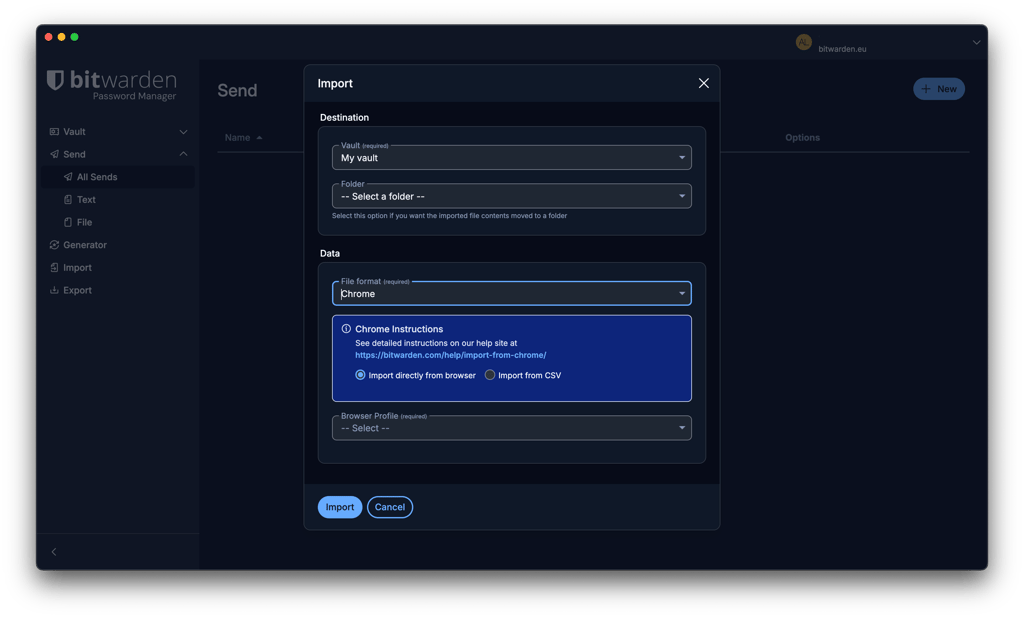
However, a big letdown here is that Bitwarden doesn’t support bulk import for file attachments. Instead, all file attachments must be manually migrated to your Bitwarden vault. Plus, Bitwarden’s importing process is slightly clunkier and time-consuming.
Overall, both password managers get a gold star for offering extensive password-importing options. However, RoboForm has a slight lead because of its more intuitive process.
Account and password recovery
If you’ve lost or forgotten your master password – both RoboForm and Bitwarden are easy to deal with and offer a few helpful recovery methods.
For RoboForm’s paid users, there’s an option to pick an emergency contact who can access your account and download your data. However, the contact must have a RoboForm account. Additionally, if you’ve enabled biometrics on your mobile app, RoboForm lets you use it to restore your password.
As for Bitwarden, account recovery is only possible if specific options are set up in advance. For example, you may log in using a registered encryption-enabled passkey and access it via a trusted device. Alternatively, if you’ve set up a master password hint, you can request for it to be emailed to you. Otherwise, you can appoint an emergency contact to get Read or Takeover access to your vault.
Password generator
To quickly create unique and strong passwords, you need a password generator. This is a standard tool that you can find in most quality password managers’ packages.
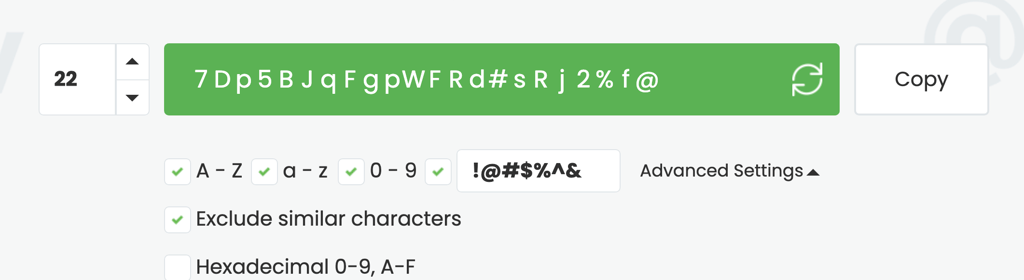
With RoboForm’s password generator, you can include or exclude upper and lower case letters, numbers, hexadecimal, and symbols. However, its main appeal is that you can generate up to 512 characters per password.
Similarly, Bitwarden’s password generator also allows all sorts of customizations. For instance, you can choose between passwords and passphrases, which are capped at 128 characters and 20 words, respectively. Other than that, you can include or exclude capitalizations, numbers, and symbols.
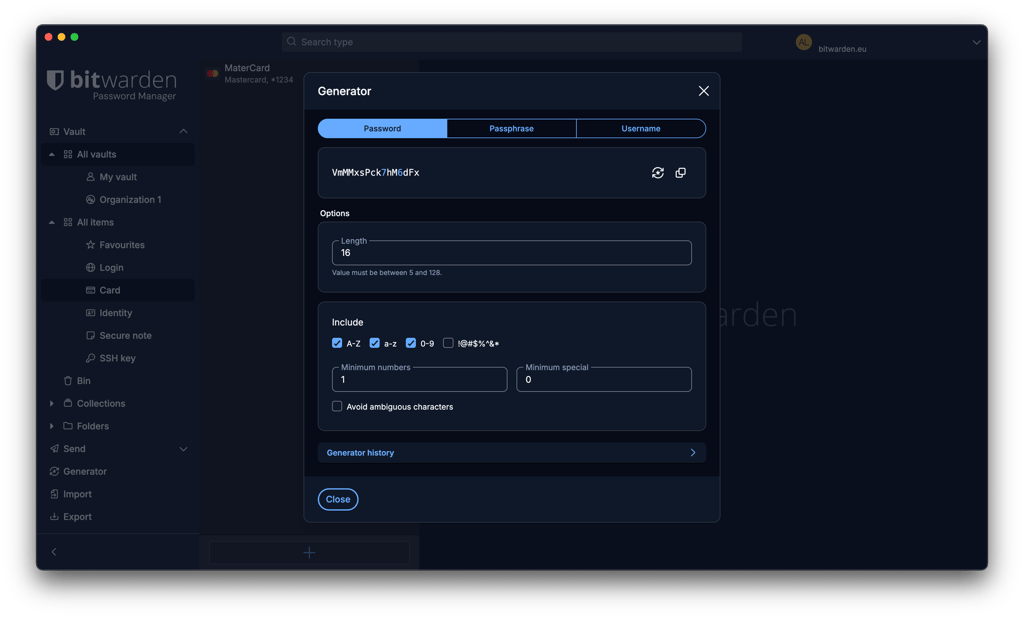
All in all, both password generators help to swiftly and easily create random passwords that are difficult to hack. That said, RoboForm’s password generator has a narrow edge because it’s more customizable and has a higher character limit.
Password sharing
When it comes to the Bitwarden vs RoboForm password-sharing feature, RoboForm comes out ahead by a large margin.
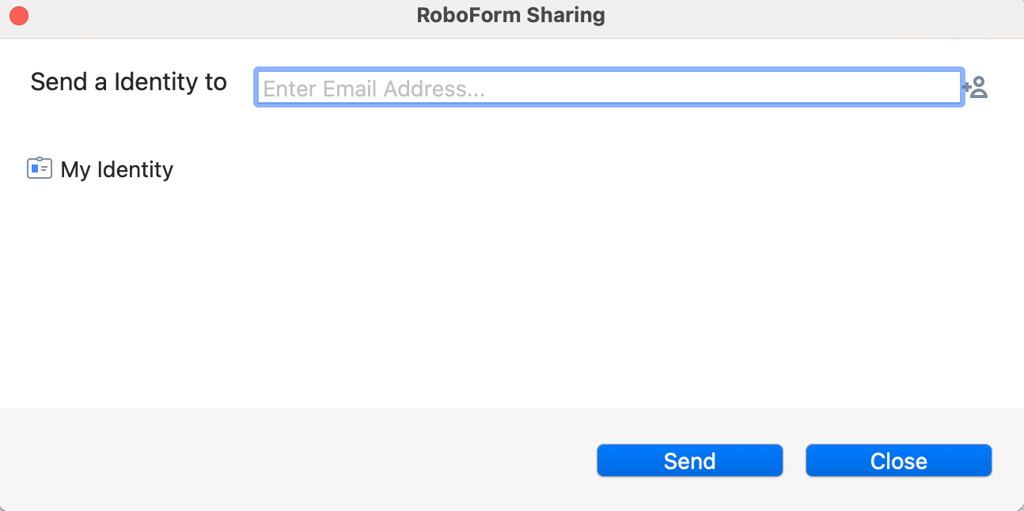
RoboForm lets you easily share passwords using just a link sent via email. You have the option to modify permissions as well as revoke access at any time. You can even share folders, too. The one limitation is that your recipient must have a RoboForm account. Since the password manager has a free tier, this should be easy enough.
Bitwarden offers multiple ways to share information, though full vault sharing is limited to paid plans. Free users can still securely share encrypted text through Bitwarden Send, while premium users also get file sharing and additional controls like expiration dates, limited views, and optional passwords.
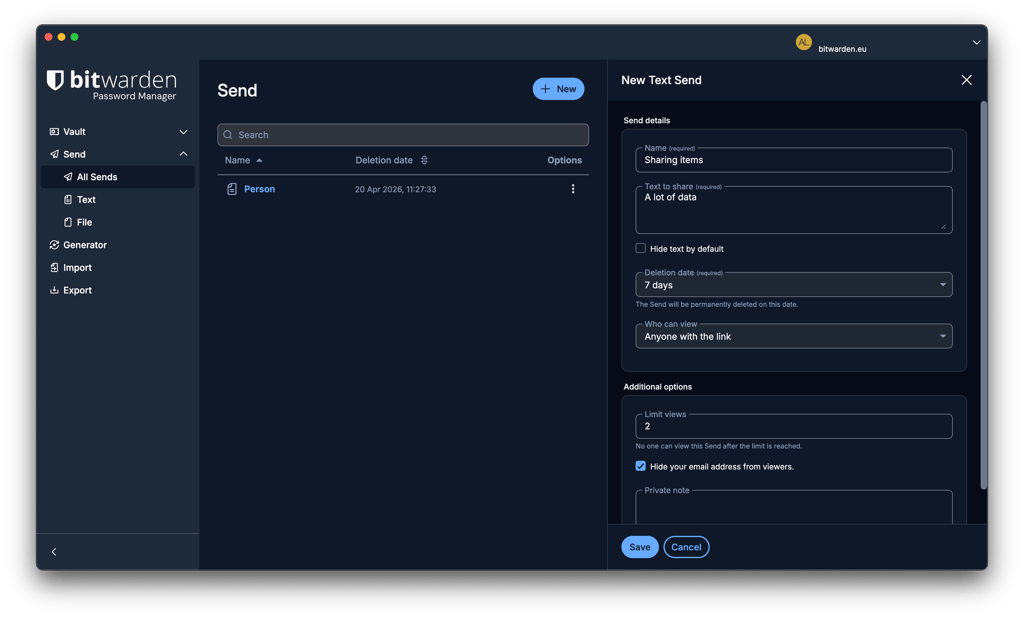
To sum up, RoboForm’s password sharing is considerably more intuitive and flexible, making it one of the more recommended password managers for families. In the meantime, Bitwarden stands out with its flexible Send feature, which even lets free users share data securely with non-users.
Autofill
Both RoboForm and Bitwarden have autofill to make login, payment, and other form-filling processes easier, faster, and more secure. Unfortunately, Bitwarden’s autofill feature doesn’t live up to its potential.
With RoboForm, its autofill feature takes care of all the heavy lifting on your behalf. Just click on the RoboForm icon, and it’ll fill in all the relevant fields and submit the form for you. It does this for all your login credentials, payment details, personal details, and more.
In comparison, Bitwarden’s autofill feature is far less intuitive. You’ll need to click your way through the process: right-click the box, click on Bitwarden’s icon, search for the right login entries, and, finally, click autofill. This, essentially, makes it more trouble than it’s worth.
In brief, it’s an easy victory for RoboForm. Compared to Bitwarden’s clunky version, its autofill feature does exactly what it should: it simplifies and expedites form-filling processes in a secure manner.
RoboForm vs Bitwarden: compatibility and user experience
RoboForm and Bitwarden work with all mainstream operating systems and web browsers. Yet ease of use is where their differences start to show up.
| RoboForm | Bitwarden | |
| Supported OS | Windows, macOS, Android, iOS | Windows, macOS, Linux, Android, iOS |
| Browser extension | Chrome, Firefox, Opera, Edge, Safari, Tor, Brave | Chrome, Firefox, Edge, Opera, Safari, Vivaldi, Brave, Tor, DuckDuckGo |
| Number of users | Up to 5 | Up to 6 |
Desktop apps
Both RoboForm and Bitwarden offer desktop apps for Windows and macOS. Bitwarden also supports Linux, while RoboForm recommends using its browser extension on Linux systems. Whether you opt for RoboForm or Bitwarden, the installation and setup processes involve just a few clicks when prompted. However, RoboForm has the advantage here because it’s more functional and easier to use.
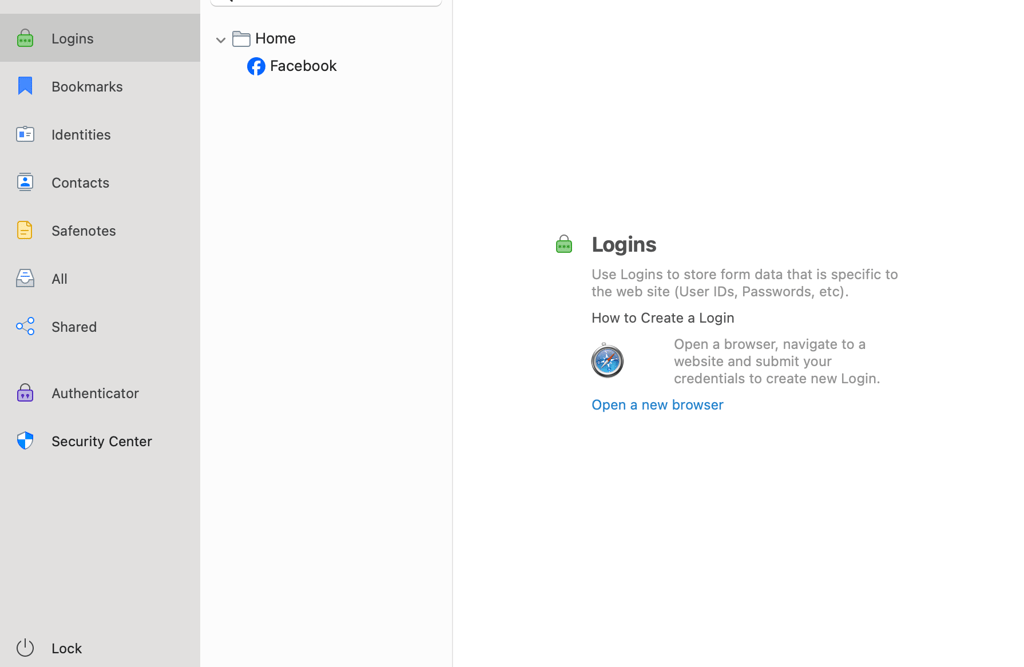
RoboForm’s desktop apps for the different operating systems all look rather similar to each other. Your app will be minimalistic, streamlined, and intuitive. However, you’ll need a minute to get used to it.
Meanwhile, Bitwarden’s desktop apps look more dated. They’re also not as easy to get around, and you’ll need to do some serious clicking to get to an item. However, on the bright side, the apps are clean and not too complicated to figure out.
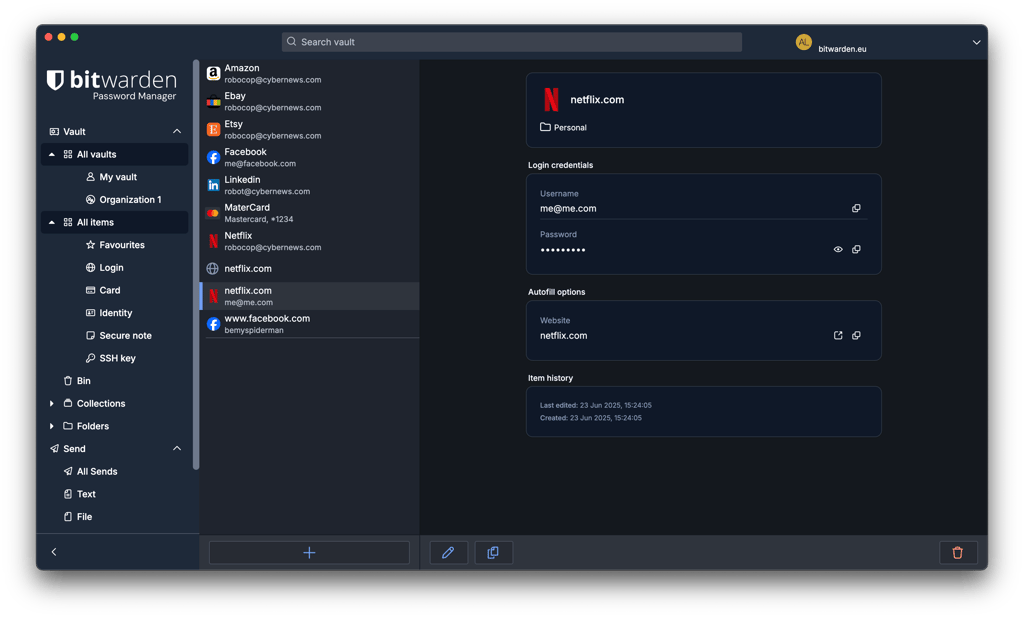
Overall, both password managers’ desktop apps are solid platforms for password management. However, RoboForm’s versions win the day with their ease of use.
Browser extensions
As is standard for any reputable password managers, RoboForm and Bitwarden support all the main browsers, including Chrome, Safari, and Firefox. The setup process is basically just a click or two and could be done in seconds.
Quite common among password managers, both providers’ functionalities are heavily tied to their web apps. On the extensions alone, you’ll only get key features like autosave, autofill, and password generator.
Mobile apps
When it comes to RoboForm and Bitwarden’s mobile apps, installation involves just downloading your chosen app from the Apple App Store or the Google Play Store.
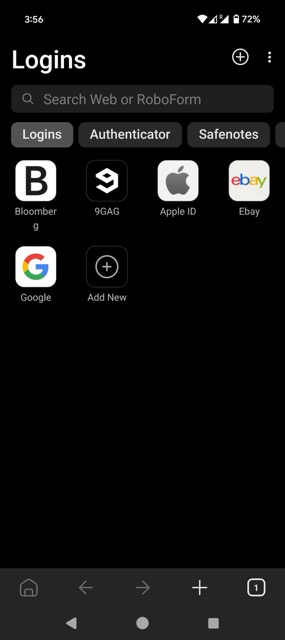
With RoboForm, you’ll find that its mobile apps for iOS and Android look very similar. RoboForm’s apps are sleek, responsive, and user-friendly – they cover all the basic password management tasks. However, don’t expect the full range of features, as only core ones like autofill, password generator, and password audit are available on mobile.
Quite similarly, Bitwarden’s mobile apps also only offer basic functionalities. You get autofill, password sharing, and a password generator. That’s about the entire list.
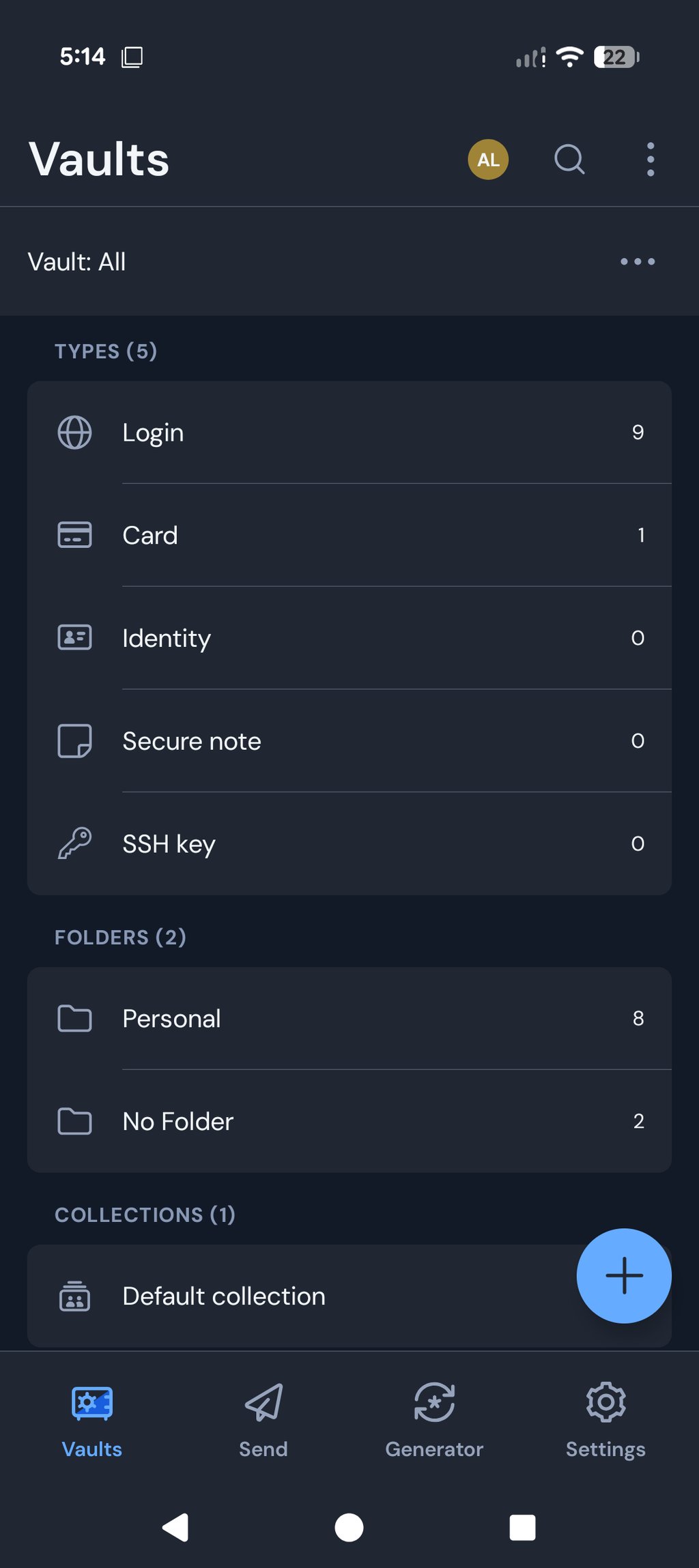
Look-wise, Bitwarden’s apps for iOS and Android are pretty identical. The app’s design is clean enough, but it certainly isn’t going to wow you with its aesthetic prowess. Instead, the apps are more plain and utilitarian than anything else.
Customer support
Customer support is an important factor when choosing a password manager, especially if you need quick help with setup or account issues. RoboForm and Bitwarden both offer solid self-help resources, including detailed knowledge bases and community forums. However, their support approaches differ significantly, particularly when it comes to real-time assistance and direct contact options.
| RoboForm | Bitwarden | |
| Email support | ✅ Yes | ✅ Yes |
| 24/7 live chat | ✅ Yes | ❌ No |
| Phone support | ✅ Yes | ❌ No |
| Knowledge base | ✅ Yes | ✅ Yes |
| Community forum | ✅ Yes | ✅ Yes |
| Social media support | ✅ Yes | ✅ Yes |
RoboForm offers more comprehensive and accessible customer support than Bitwarden. Free users get 24/7 email support, while paid users receive priority 24/7 email support and access to live chat and phone assistance during business hours (Monday-Friday, 9 AM to 5 PM EST). RoboForm’s Help Center, user manuals, and tutorials are also rich in detail and include step-by-step guides with visuals.
On the other hand, Bitwarden doesn’t offer real-time support. Its users are limited to email, a community forum, and weekly live Q&A sessions. While its knowledge base is extensive, it leans toward a more technical tone and lacks visual guidance, which can be overwhelming for less tech-savvy users.
To sum up, RoboForm’s easily accessible customer support gives it the advantage in this comparison.
RoboForm vs Bitwarden – which one to choose?
RoboForm and Bitwarden are both solid password managers if you're looking for something secure and affordable. However, RoboForm is the winner of this comparison. It feels easier to use, with smoother autofill and more helpful support – great for day-to-day use.
Bitwarden, on the other hand, is open-source and puts privacy first, which might suit you better if you’re a bit more tech-minded and want something you can customise or trust for its transparency.
More password manager comparisons from Cybernews:
FAQ
Is RoboForm better than Bitwarden?
Yes, RoboForm is better than Bitwarden. Although RoboForm and Bitwarden are equally secure and affordable, RoboForm has more functional features, greater ease of use, and more accessible customer support. Meanwhile, Bitwarden’s features are far more restrictive. Additionally, its lack of real-time support options is also a cause for concern.
Which is better for mobile: RoboForm or Bitwarden?
Both RoboForm and Bitwarden are good for mobile since their apps are responsive and intuitive. RoboForm’s mobile apps are more modern, while Bitwarden’s apps focus on utility. However, one thing to remember here is that both providers’ mobile apps only come with key features for basic password management.
Can RoboForm import passwords from Bitwarden?
Yes, RoboForm can import passwords from Bitwarden. To do so, you first need to export your data as a CSV file from Bitwarden. Then, head over to RoboForm, select the Import option, pick Bitwarden from the listed options, and click the Import button.