7 best Linux hosting providers in 2026
Our in-house experts conduct internal independent, hands-on testing and transparent reviews of web hosting providers by using custom-built tools or utilizing industry-recognized tools and methods to ensure impartial and evidence-based assessments.
Using the same criteria for all services, we share our detailed methodologies and practices to help customers make informed hosting decisions.
Learn more

Linux hosting continues to be the go-to choice for website owners who need stability, security, and flexibility. If you own a personal blog, business site, or resource-heavy web application, the right Linux hosting provider is important for optimal performance. In this guide, the Cybernews research team and I tested and reviewed the 7 best Linux hosting providers in 2026. We focused on speed, uptime, pricing, and key features to help you pick the right Linux hosting provider for you.

7 best Linux hosting providers in 2026
- Hostinger – best web hosting provider for Linux overall, starting at $2.69/month
- Bluehost – reliable Linux server hosting for beginners, starting at $1.99/month
- HostGator – affordable yet reliable Linux servers for web hosting, starting at $3.75/month
- DreamHost – cheapest WordPress-focused Linux hosting, starting at $1.99/month
- SiteGround – best secure Linux hosting solution, starting at $1.99/month
- GoDaddy – cheapest Linux server hosting provider for business, starting at $4.99/month
- Hosting.com (formerly A2 Hosting)– fast Linux server hosting solution, starting at $1.99/month




Our in-house research team and expert writers work hand in hand to regularly test hosting services and provide accurate and fact-checked information. Discover the ins and outs of how we test and evaluate website hosting providers.
Is Linux web hosting good?
Linux web hosting is highly praised for its flexibility and customization options, making it a popular choice among web hosting providers. Its open-source nature allows extensive modifications to tailor the system to specific needs, from simple personal blogs to complex business websites. Additionally, Linux servers are known for their stability and security, which are critical for maintaining the integrity and performance of hosted websites.
Windows hosting is an option for those seeking alternatives, particularly for sites heavily reliant on popular Microsoft applications like ASP.NET, MSSQL, Microsoft Exchange, and Azure. However, it typically involves higher costs due to licensing fees. Another alternative option could be cloud hosting, which offers scalability and performance benefits and seamlessly adapts to your site’s growing demands.
The best Linux server hosting 2026 – detailed list
Linux server hosting is one of the most popular hosting options. However, this does not mean that every provider offers the same level of quality. So to offer you only the best Linux hosting solutions, we compared 64 of the top hosting providers and shortlisted the 7 best ones that offer high-quality services for an affordable price.
1. Hostinger – the best Linux servers for web hosting overall

| Pricing: | From $2.69/month |
| Avg. response time: | 60ms |
| Best for: | Fast and affordable web hosting |
| Current deal: | Get up to 81% OFF Hostinger + 3 free months |
Hostinger is the best Linux hosting provider due to its low prices and good performance that we've tested out ourselves. Hostinger’s shared plans start at just $2.69/month.
Although Hostinger doesn’t cost you much, performance doesn’t suffer at all – this provider has 8 server locations worldwide. You can pick the location that’s closest to your visitors. The closer it is, the better the performance of your site will be to your audience. In addition, Hostinger uses NVMe-based SSD storage, which offers significantly faster speeds and improved reliability compared to traditional SATA SSDs.
For even more enhanced performance, Hostinger uses a technology called LiteSpeed WebServer. It’s one of the fastest web server technologies available. This software also delivers caching solutions so that your site is speedy. Combining LiteSpeed with the ability to choose the best location for your audience results in the best possible performance.
Now, let’s take a closer look at Hostinger’s prices. The provider offers 2 shared and 1 cloud hosting plan. The Premium plan starts at $2.69/month, the Business plan is $3.59/month, and Cloud Startup is just $7.19/month.
All plans include a free domain, an SSL certificate, free email, automatic backups, GIT access, and 1-click WordPress and Google integration. The AI assistant can also help with anything, like Linux commands or distributions. As for the specifics:
- Premium – allows connecting up to 100 websites, has 100GB SSD storage, allows up to 25,000 visits monthly, gives Google ads credit and unlimited bandwidth.
- Business – everything from Premium, except it offers 200GB NVMe storage and allows up to 100,000 visits monthly. Plus, the Business plan adds daily backups instead of weekly. For a small business, this plan is more than enough.
- Cloud Startup – 300 websites, 200GB NVMe storage space, dedicated IP address, priority support, cache manager, free daily backups, and CDN. This plan is a good solution for anyone looking for powerful hosting with dedicated resources and enhanced performance.
Of course, if shared hosting is not enough for your projects, you can scale it up. VPS hosting starts at only $5.84/month, which is suitable for large-scale projects. With Linux VPS hosting, you get a virtual private server to host your online project. Hostinger adds a dedicated IP address, a malware scanner, a built-in firewall, and a DDoS traffic filter to ensure your server security. Plus, there is a user-friendly dashboard to make your server configuration and management easier.
Premium is the best plan you can start with. The initial purchase saves you 81% of the cost, and you get almost as many resources as you would get if you went for the Business plan.
Hostinger performance
Performance is the one factor that can make or break a provider. Hostinger doesn’t have issues in this department. With the uptime result of 100% and an average response time of 176ms, this is one of the most reliable hosting providers on the market.

Considering the fact that 600ms response time is the average shared hosting time, Hostinger does great. This provider also showed a 100% uptime, which surpasses the regular 99.9% uptime guarantee.
If you would like to see detailed performance testing results, visit the full Hostinger review.
All in all, Hostinger shows admirable performance results, making it way harder for competitors to beat the low prices.
Hostinger is great for Linux because it’s affordable, the plans are inclusive, and you have enough scalability options to satisfy your needs even if you take on large-scale projects.
2. Bluehost – beginner-friendly Linux server hosting

| Pricing: | From $1.99/month |
| Avg. response time: | 119ms |
| Best for: | WordPress hosting and ease of use |
| Current deal: | Get up to 78% OFF Bluehost |
Bluehost is known as one of the top beginner-friendly Linux hosting providers on the market. It mainly focuses on WordPress hosting and provides user-centered tools to make its management easy.
First things first, Bluehost understands just how easy it is to make a mistake when creating and optimizing a website. When you choose Bluehost, you get access to a staging area. In short, a staging area is a duplicate of your live website. It enables you to test any changes or major new features that you plan to implement without having to show them to your site visitors.
Another thing you should know about Bluehost is that it’s easy to use. Bluehost offers a simple native management panel alongside cPanel integration. The main management area is easy to navigate, and you can add your domain name, install WordPress, and manage your sites from there. cPanel allows more advanced changes like changing PHP versions and accessing databases, but don’t be intimidated – it’s still just as easy to navigate as the main area.
Leaving what Bluehost has to offer behind, let’s talk about pricing. When it comes to shared hosting, Bluehost offers 3 plans. Basic costs $1.99/month, Choice Plus has an initial price of $3.95/month, and Pro is $9.99/month.
All four plans include unmetered bandwidth, free SSL certificates, 1 domain free for one year, and free CDN. Of course, all of them come with their own particularities:
- Basic – offers hosting for 10 websites with 10GB NVMe storage. You can also get a free email trial. This plan is great if you're just starting out.
- Choice Plus – same as Basic, except that you can connect 50 websites and get 50GB NVMe storage. The plan also comes with free daily backups for the first year. You can work with this plan if you want to create multiple websites and need more resources.
- Pro – what makes this plan different from the previous one is that you get 100 websites and 100GB NVMe storage, and it is ideal for 400,000 visitors monthly. This plan is suitable for those who require better performance and more resources.
When your project exceeds the resources shared hosting can offer, feel free to upgrade. Bluehost has multiple scalability options. VPS hosting starts at $46.99/month, and it’s ideal for larger websites. You can also go for dedicated servers, for which the prices start at $144.19/month. It’s a solution suitable for heavy projects. Additionally, Bluehost provides 24/7 phone line support for dedicated hosting plans.
While the Basic plan would work great if you’re just testing the waters, the best value for money lies with the Choice Plus plan. It gives you the freedom of hosting more than 10 websites and more storage.
Bluehost performance
Bluehost doesn’t disappoint when it comes to performance. When I performed my tests, I got an average response time of 154ms and an uptime of 100%.
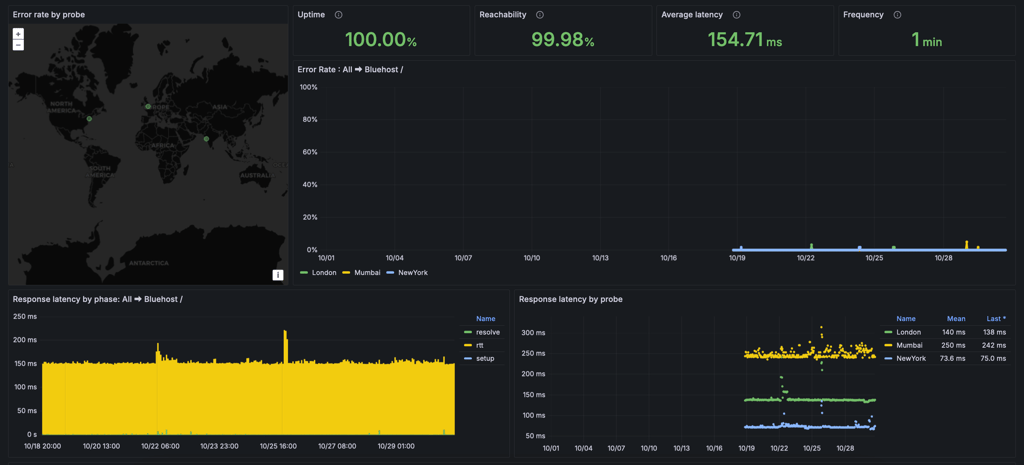
Bluehost is among the very few hosting providers that don’t have an official uptime guarantee. Furthermore, Bluehost’s average response time came up to only 154ms, far from the market’s average of 600ms.
Additionally, Bluehost only has servers in the US (Provo and Orem in Utah), so it’s more suitable for US-based audiences. Keep that in mind if you’re looking into this provider.
If you’d like to see the performance testing results in greater detail, our Bluehost review has you covered.
All in all, Bluehost showed great performance results. And while it does not have an uptime guarantee, it left me with a great impression.
Overall, I’d say that Bluehost is an excellent Linux hosting provider. It’s easy to use, the prices are great, and the performance is reliable.
3. HostGator – reliable and budget-friendly Linux servers for web hosting

| Pricing: | From $3.75/month |
| Avg. response time: | 162ms |
| Best for: | Beginner users and small business sites |
| Current deal: | Get up to 73% OFF HostGator |
Due to its affordable pricing, good resources, and ease of use, HostGator is yet another great Linux hosting solution to consider. Plus, HostGator uses the intuitive cPanel, and the performance is up to standards.
A very appealing feature of HostGator is its ease of use, making it ideal for beginners. The dashboard includes the primary cPanel shortcuts for some of the most significant actions you need to undertake when setting up your website – creating and accessing email accounts and setting up a domain. HostGator also comes with WordPress pre-installed and includes malware scanning for added security. Plus, the cPanel itself is available with one click.
HostGator is an excellent choice for a provider since it has affordable prices with all essentials included – domain, SSL, and email accounts. The entry-level plan costs only $3.75/month, and the most expensive shared hosting plan doesn’t exceed $6.25/month.
There are 3 shared hosting plans. Hatchling costs only $3.75/month, Baby is $4.50/month, while Business costs $6.25/month. For a high-end plan, it’s pretty cheap.
No matter which of the plans you choose to go for, you get access to unmetered bandwidth, up to 50GB SSD storage, a free SSL certificate, a free email trial, and a domain free for one year. As for what’s particular to each of the plans:
- Hatchling – you can connect 10 websites. It’s more than enough if you’re just starting out.
- Baby – this is pretty much Hatchling, except that you can connect up to 20 websites, get 20GB SSD storage, 2 CPU cores, and Cloudflare CDN.
- Business – apart from all the features from the previous plans, you also get 50 websites, 50GB SSD storage, free daily website backups for a year, and domain privacy for the first year.
Moreover, HostGator has a couple of scalability options. VPS hosting starts at $34.99/month, and it’s perfect for larger websites. For heavy websites, HostGator’s dedicated servers will suffice. Prices start at $141.19/month.
If I were to purchase a HostGator plan for the first time, I’d go with the Baby plan. It’s only a bit more expensive than Hatchling, but for that price, you get more websites and more storage.
HostGator performance
Even though HostGator is a big name in the industry, it gets a lot of hate due to some past mishaps. Even so, the provider showed 100% uptime and an average response time of 162ms. It has definitely improved over the years.
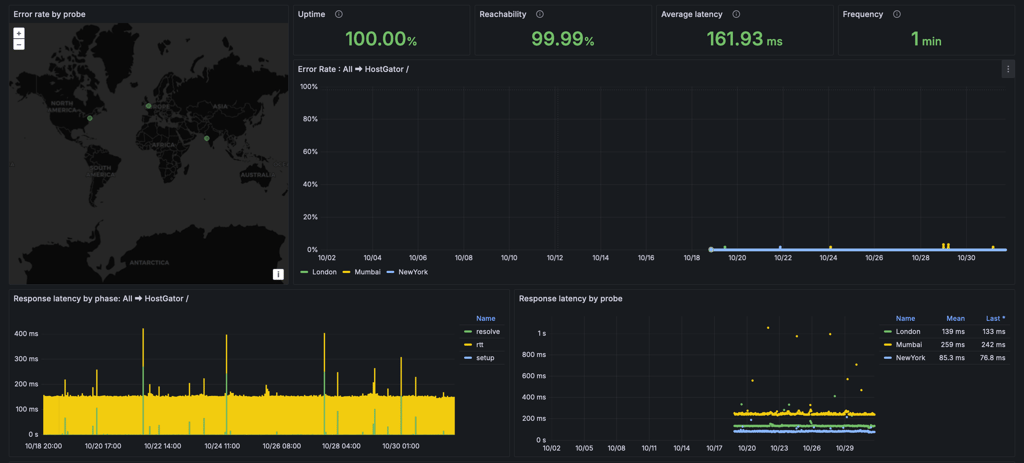
HostGator’s official uptime guarantee is 99.9%, but the uptime results showed 100% uptime. I’m always happy when a provider sticks to its uptime guarantee, and HostGator exceeded my expectations.
The average response time was great. It’s a lot better than the industry standard of 600ms.
Note that HostGator has servers only in the US, so, once again, we’re talking about a provider ideal for websites with US-based audiences.
Additionally, if you’re looking for all the details of the HostGator performance test, visit the full review of HostGator.
Overall, HostGator is a reliable and fast Linux hosting provider.
In general, HostGator is a pretty good choice for a hosting provider. The performance is reliable, it’s easy to use, and you don’t have to break the bank for decent Linux hosting.
4. DreamHost – best WordPress-focused Linux server hosting

| Pricing: | From $1.99/month |
| Avg. response time: | 239ms |
| Best for: | Both personal and business websites on WordPress |
| Current deal: | Get DreamHost, now 83% OFF |
Based on our testing and expertise, DreamHost proved to be a great Linux WordPress hosting option. Its 1-click WordPress installation is truly 1-click, and a WordPress-based web builder is helpful. Other than that, DreamHost is affordable, and the performance is outstanding.
One reason why users go to DreamHost is that it delivers ease of use. Even a beginner should do just fine with its native control panel. From there, you have access to the 1-click installs, WordPress website builder, emails, backup and restore tool, and domain management.
Additionally, DreamHost takes security seriously. When it comes to protection measures, you get domain privacy, Web Application Firewall, and daily automated backups to help you protect your site against the most common threats.
Now, as far as DreamHost prices are concerned, it offers 3 plans. Launch costs $1.99/month, Growth goes for $3.49/month, and Scale plans – $9.99/month. The plan prices apply to 1-year subscriptions, but even the monthly plans are cheap too.
DreamHost’s shared hosting plans are pretty similar. They include a free domain for a year, daily automated backups, free automated WordPress migrations, a website builder, and free SSL certificates. However, there are a few differences:
- Launch – you can host 25 websites. Automatic backups are daily, which is quite unusual for the cheapest plan. It’s a good plan when you’re starting out.
- Growth – you can host 50 websites, the SSD storage is unlimited, and you can create as many email accounts as you want at no extra charge.
- Scale – supports up to 50 websites and is optimized for up to 400,000 monthly visits.
DreamHost also offers a few scalability options. VPS hosting starts at just $10.00/month. It’s not the cheapest, but it still falls under affordable. Cloud hosting is available as well – you can run your own cloud server for $4.50/month. And lastly, dedicated hosting is the most expensive, with prices starting at $165/month.
One of the best things about DreamHost is that it has one of the best money-back guarantee policies on the market – 97 days.
When you choose DreamHost as your Linux hosting provider, I recommend you go for the Shared Unlimited plan. It costs more than the Shared Starter plan, but you get a lot more than it’s actually worth.
DreamHost performance
DreamHost offers a lot of resources on its hands and promises a 100% uptime guarantee. In our tests, we received 100% uptime results, as promised. The average response time was good as well, at 239ms.

DreamHost tests showed that server response time was wonderful, averaging at 239ms. While the shared hosting industry is known to average at around 600ms, this is really good.
Additionally, DreamHost is yet another provider that decided to have servers only in the US. Of course, that’s not an issue as long as it ensures fast-loading pages for its users’ target audience.
Overall, DreamHost’s performance is good. The uptime is reliable, and the response time is as speedy as it gets.
DreamHost is a good choice when you’re looking for Linux hosting. It performs beautifully, it’s easy to use, and your bank account won’t get crippled.
5. SiteGround – fast and secure Linux hosting solution

| Pricing: | From $1.99/month |
| Avg. response time: | 56ms |
| Best for: | Premium hosting for personal and business sites |
| Current deal: | Get up to 88% OFF SiteGround + FREE TRANSFER |
SiteGround is a highly reliable and speed-oriented Linux hosting provider. The host is best known for its excellent customer support and many tools to help you manage a successful website.
To begin with, SiteGround plans come with some serious speed-boosting technologies. This includes its in-house caching solution (SuperCacher), SG Optimizer plugin, Ultrafast PHP, and customized MySQL setups. Plus, it uses the powerful Google Cloud infrastructure to host all the websites.
More so, alongside impressive speeds, SiteGround also makes the hosting and site management process simplistic. There are various features like automated setup, an easy-to-use Site Tools control panel, and extra perks like collaboration tools and a staging environment. Lastly, the host strongly prioritizes security. You’ll find everything from a free SSL to an in-house WordPress Security plugin, Web Application Firewall, constant threat monitoring, AI bot protection, and automatic backups.
Now, in terms of pricing, SiteGround has 3 shared hosting plans: StartUp ($1.99/month), GrowBig ($3.99/month), and GoGeek ($5.99/month).
All plans come with a free domain for a year, SSLs, a custom caching option, the possibility to add collaborators, free email accounts, and daily automated backups:
- StartUp – offers hosting for 1 website with 10GB storage and supports 10,000 monthly visits. It’s the only plan that doesn’t feature staging and Ultrafast PHP setup.
- GrowBig – allows hosting unlimited websites and gives 20GB storage for it. Plus, it accommodates up to 100,000 visits monthly. Additionally, you also get staging, an option to add collaborators, and Ultrafast PHP setup.
- GoGeek – the plan allows hosting unlimited sites, 40GB storage, and bandwidth for 400,000 monthly visits. It also doubles as a reseller or agency plan, allowing you to provide white-label hosting to clients.
Additionally, SiteGround offers a great scaling option – cloud hosting, with prices starting at $100.00/month. Lastly, if the services are not what you expected, SiteGround also has a 30-day money-back guarantee.
Pick GrowBig with a 1-year subscription to get the advertised price. Just keep in mind that the renewal prices are higher. So to get the lowest monthly rates for the longest time, opt for a 1-year subscription.
SiteGround performance
Now in terms of performance, SiteGround scores are very high when it comes to reliability, speed, and server power. The host was up 100% of the time during our testing. Plus, the average response time was incredible at just 56ms – the best result out of all providers we tested for this guide.
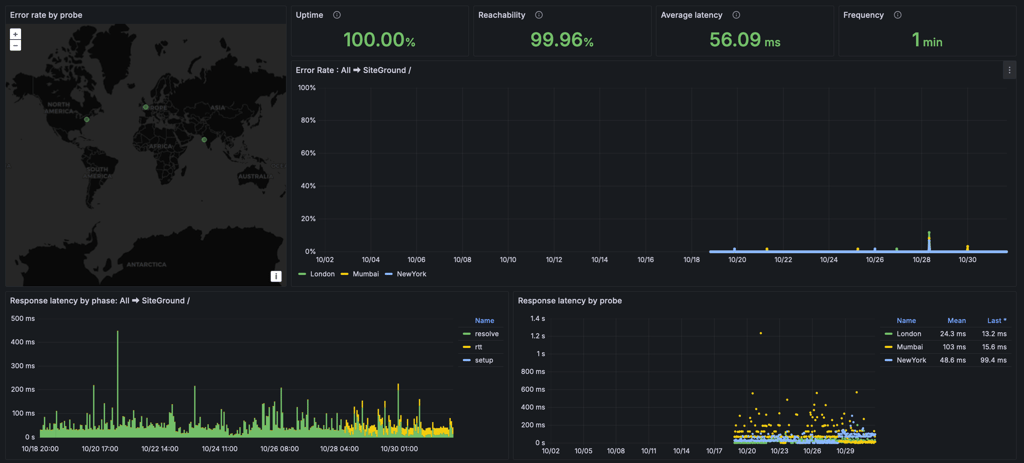
While the official uptime guarantee offers 99.9%, the actual results are much better.
Additionally, SiteGround makes sure that you can keep such good speeds no matter where your audience is from. The host allows you to choose server locations on 4 continents.
For more in-depth performance testing results, visit the full SiteGround review.
I really don’t have a bad word to say about SiteGround’s performance. It’s as fast, reliable, and powerful as any personal and business site requires.
Altogether, SiteGround is a very speedy and reliable Linux hosting solution suitable for anything from a personal to a business site. It’s easy to use, there are many additional features, and the customer support agents are helpful too.
6. GoDaddy – best business Linux servers for web hosting

| Pricing: | From $4.99/month |
| Avg. response time: | 179ms |
| Best for: | Business-focused hosting |
| Current deal: | GoDaddy coupon 66% OFF |
GoDaddy is a very solid choice when looking for Linux hosting due to its ease of use, performance, and many business-oriented features.
First things first, GoDaddy is incredibly easy to use. From signing up to having a WordPress website up and going, it takes mere minutes. Every essential feature can be set up directly from the dashboard.
Additionally, GoDaddy is faithful to cPanel. You can easily add emails and subdomains and manage on-demand backups from a familiar interface.
As far as prices are concerned, they’re mid-range. There are 4 shared hosting plans. Economy is $4.99/month, Deluxe is $9.99/month, Ultimate costs $14.99/month, and Maximum is $21.99/month.
All plans come with a free SSL for a year, unmetered bandwidth, a free domain for one year, and a free email trial. As for particularities:
- Economy – allows connecting 1 website and offers 25GB storage. It’s more than enough for a small website.
- Deluxe – allows connecting 10 websites and offers a free SSL certificate and 50GB of storage.
- Ultimate – everything from Deluxe, plus it gives you 25 websites, 75GB of storage, and maximized processing power. It’s ideal for a small to medium business.
- Maximum – everything that the previous plans offer, plus 50 websites and 100GB of storage.
All plans feature faster optimized NVMe storage and automatic daily backups. Now, if you need more than shared hosting can offer, GoDaddy provides two other options. You can go for VPS hosting, whose prices start at $8.99/month. Just remember that you need some experience here since the servers are self-managed, hence the low rates. Or you can choose dedicated hosting, whose prices start at $129.99/month, which is perfect for corporate websites.
I’d start with the Deluxe plan. The resources are generous, and you can create as many websites as you need. With a 12-month plan, you’ll spend $9.99/month.
GoDaddy performance
With such a name comes great responsibility, especially in terms of performance. Luckily, GoDaddy didn’t disappoint in this department. With an uptime of 100% and an average response time of 179ms, I was delighted.
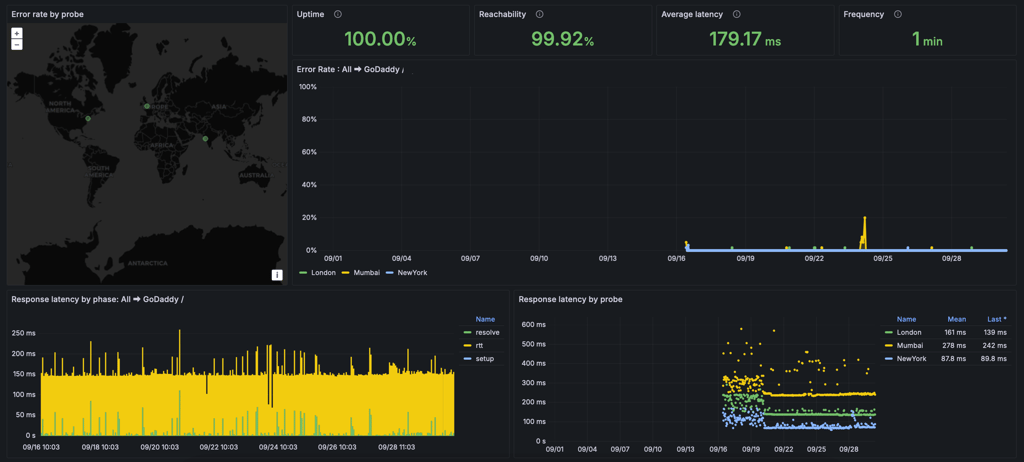
This hosting provider exceeded all my expectations and surpassed its uptime guarantee of 99.9%. The average response time was also incredible, averaging at 179ms – way better than the industry standard.
It’s also worth mentioning that GoDaddy has data centers on 3 continents. As a result, users can target audiences in the US, Europe, or Asia.
GoDaddy proved its worth in other performance tests too. Visit our GoDaddy review to read more about its performance.
So, when it comes to performance, GoDaddy proved to be a very worthy hosting provider – excellent uptime and speedy response time make it suitable for Linux hosting.
All in all, GoDaddy does an excellent job as a hosting provider. Its performance is reliable, ease of use is guaranteed, and you get access to many tools to make the whole web development process a whole lot easier.
7. Hosting.com – fast business-oriented Linux shared server hosting

| Pricing: | From $1.99/month |
| Avg. response time: | 168ms |
| Best for: | Secure business website hosting |
| Current deal: | Get hosting.com, now up to 86% OFF |
Hosting.com, rebranded from A2 Hosting in May 2025, is an old-school Linux hosting provider that mainly focuses on speed, security, and ease of use. Due to its simplistic cPanel and numerous speed optimizations, it’s a no-fuss option for beginners and experienced users alike.
First things first, hosting.com is known for its big claims of delivering only the best performance. Its Turbo-labeled plans come with a unique infrastructure, which entails enterprise-grade AMD EPYC processors, NVMe drives, LiteSpeed Web Server with a caching engine, A2 Optimized software, data centers on 4 continents, HTTP/3, QUIC, and ESI.
In terms of use, hosting.com offers a highly favored cPanel, which makes website management fast and simplistic.
Lastly, hosting.com puts a strong emphasis on security. The provider comes bearing numerous security features, like an SSL, DDoS protection, automated backups, a server-level firewall, virus scanning, server hardening, and many more.
Talking about price, hosting.com offers 4 Linux shared hosting plans: StartUp ($1.99/month), Drive ($10.49/month), Turbo Boost ($13.99/month), and Turbo Max ($2.99/month).
The plans all come with unlimited transfers. Plus, they also include freebies like a free website builder, SSL certificates, and staging:
- Starter – allows connecting a single website and includes 15GB of storage. That’s enough space to publish a relatively decent personal site or a medium business landing page.
- Plus – allows hosting two websites and offers 30GB of storage. Lastly, it also includes automatic backups. Affordable enough, it’s a good option for personal or professional use.
- Pro – you get 10 websites and 50GB of storage, along with stronger servers. It’s a business-oriented plan.
- Max – gets you 100 websites and 100GB of storage. This means that you get even more resources and performance benefits.
Now, if shared Linux hosting is not what you’re looking for, A2 Hosting also has some scaling options – numerous VPS and dedicated hosting plans.
If you want powerful, secure, and speedy Linux hosting, choose Turbo Velocity with a 3-year subscription to enjoy a longer-lasting introductory discount.
Hosting.com performance
Just as promised, hosting.com (previously A2 Hosting) delivers speedy and reliable performance, not to mention its capability of withstanding high levels of traffic.
In our tests, hosting.com delivered a perfect 100% uptime. Meanwhile, server response times averaged at 168ms.

Considering that the host comes with an official 99.9% uptime guarantee, the results are much better than expected.
For more in-depth performance testing results, visit the full hosting.com (formerly A2 Hosting) review.
So as a whole, hosting.com kind of delivers what it promises. But take those big claims with a grain of salt. It’s fast, stable, and reliable, but not dozens of times better than other speed-focused hosts.
Altogether, hosting.com is more of a premium business-focused Linux hosting option. It will make sure your website is reliably and speedily available at all times to all visitors. It’s no-fuss performance-focused hosting.
How I picked the best Linux web hosts
Evaluating Linux hosting providers requires a careful review process. At Cybernews, we follow a clear set of steps, from initial reviews to detailed analysis with specialized tools.
To find the best Linux web hosts, the research team and I conducted a hosting review on 58 providers, considering their features, performance, and pricing. We then tested the hosting providers and selected the top 7 that met our criteria. Here’s how it went:
- Research and selection standards. The research team and I set specific standards for choosing Linux hosting providers. The criteria included key features, server performance, user-friendliness, customer support, pricing, and overall value.
- Initial provider screening. The process began by researching Linux hosting providers, focusing on their reputation, user reviews, and expert opinions. This helped create a shortlist of providers for further evaluation.
- Technical evaluation. Using specialized tools, the research team and I examined the technical details of each Linux hosting provider. Tools like Pingdom, GTmetrix, and Sucuri were employed to measure server response times, website loading speeds, and security features.
- Verification of compliance. Cybernews researchers and I ensured each Linux hosting provider met the necessary standards. This involved checking their security protocols, data encryption methods, and other required safeguards. Business practices and compliance with regulations were carefully reviewed to ensure the highest standards.
- Practical testing. We directly tested each Linux hosting provider. Test websites were set up to evaluate user interfaces, ease of setup, and overall experience. This approach provided real-world insights into using each hosting service.
- Performance benchmarking. We performed performance benchmarking tests to compare Linux hosting providers objectively. This included evaluating server response times, uptime records, and the capacity to manage traffic spikes, which are crucial for reliable hosting.
- Security checks and vulnerability assessments. The research team and I carried out comprehensive security checks and vulnerability assessments using leading industry tools. This ensured each Linux hosting provider was capable of handling cyber threats effectively.
- Final evaluation. I used all the data gathered to rank each Linux hosting provider based on their overall performance.
How to pick the best Linux hosting provider
Choosing a reliable Linux hosting provider should not be a complicated task. However, if you haven’t been in this position before, there are a few things you need to consider. For instance, what resources will you need? Or what type of hosting?
First things first, Linux hosting is one of the most popular types of hosting in the industry. It’s more affordable, flexible, and secure. Plus, Linux is compatible with PHP and MySQL, which support WordPress, Zen Cart, and other popular scripts. Windows is more commercial, which makes it less secure and more prone to hacking.
So what you have to understand is that Linux hosting is basically all hosting. Some providers also offer Windows hosting, but when we refer to hosting, in general, we usually mean Linux.
Now, what about the type of hosting you need? There are four primary types of hosting:
- Shared hosting
- VPS
- Cloud hosting
- Dedicated servers
Let’s take a look at them in detail.
Linux shared hosting
The most commonly used type of hosting. When you purchase a subscription, you share a server with other users. The resources are more limited than with any other option, and performance might suffer a bit too. Even so, it’s the cheapest solution you have at hand.
Shared hosting plans are the most popular choice for beginners looking to host their first sites.
Linux VPS hosting
The middle ground between shared and dedicated hosting. You don’t purchase the resources of an entire server. However, this time, you get an allotted number of resources depending on what you need. Linux VPS hosting is a highly customizable solution. Basically, you get all the pros of dedicated hosting at lower prices.
This type of hosting is mainly used by people who have outgrown shared hosting and need more powerful servers for business websites and applications. VPS allows installing custom modules or applications that aren't supported by your shared host.
Linux cloud hosting
This is a type of hosting that, instead of using one server to host your app or website, uses multiple, interconnected servers. Apart from spreading your data across different machines, cloud hosting harnesses their power too, meaning that this type of hosting is incredibly potent compared to the other options.
Cloud hosting can be great for larger organisations that must have near-perfect uptime and want to scale their servers as they see fit.
Linux dedicated hosting
You rent an entire server for yourself. All resources from one server belong to you, so it’s pretty obvious why the dedicated hosting option is the most expensive.
This type of hosting is best if you have a large organization and you’re looking for improved security, optimal performance, and a high level of customizability.
At the end of the day, it all depends on what you need. Do you want a small website for yourself? Then shared hosting will do. Or perhaps you have a big business that requires a heavy website. Then VPS hosting might do the trick. No matter the case, remember that you can always ask for help by reaching out to the provider's customer support.
Final recommendations
When it comes to Linux web hosting, there are plenty of options available. If you're in search of the right Linux web hosting solution, it's essential to consider your specific needs and preferences.
Hostinger stands out as our top choice for Linux hosting. Starting at just $2.69/month, Hostinger offers budget-friendly hosting without compromising on features or performance.
Meanwhile, Bluehost is an excellent option for beginners in the Linux hosting space. With an impressive uptime results of 100% and an average response time of 154ms, it's a reliable choice, especially for WordPress websites.
Ultimately, your decision between our top Linux hosting providers should align with your specific requirements.
FAQ
Where can I get a Linux server?
You can get a Linux server from Hostinger, which offers affordable Linux hosting options, including shared, VPS, and cloud hosting, starting from $2.69/month. Hostinger is known for its user-friendly platform, making setting up and managing your Linux server easy.
Is it better to host a website on Linux or Windows?
Linux hosting is generally better than Windows for most websites because it's the most popular operating system for web servers and offers features that web designers expect. Linux is also known for its stability, security, and cost-effectiveness, making it the preferred option for many developers. However, if your website needs specific Windows applications like ASP.NET or MSSQL, Windows hosting is necessary.
Do you need Linux hosting?
Yes, you need Linux hosting if you're setting up complex websites like eCommerce sites with shopping carts or blogs with multiple apps, Linux hosting is a great option. It supports many web technologies without the need for Windows applications, making it ideal for most web projects. Linux hosting is also known for its stability and cost-effectiveness.
What is the difference between Linux hosting and web hosting?
Linux hosting uses the free, open-source Linux operating system on its servers. Web hosting provides space on a server for websites to be accessible online. The main difference is cost: Linux hosting is typically cheaper because it doesn't involve licensing fees, unlike other hosting types like Windows.
What is the difference between Linux hosting and cPanel hosting?
Linux hosting uses the Linux operating system on its servers, which is stable and cost-effective. cPanel hosting uses the cPanel control panel to manage your hosting service. The main difference is that Linux hosting refers to the server's OS, while cPanel hosting refers to the management interface.
Why choose Linux shared web hosting?
Linux shared web hosting is more affordable, more flexible, and more secure than its Windows counterpart. More so, most of the shared hosting is Linux-based, which means you have more options.


