Best website builder for political campaign in 2026
Our team of experts and researchers rigorously test and evaluate website builders through transparent, in-depth testing procedures and methods using both in-house and industry-approved tools.
Drawing on cybersecurity insights, we provide unbiased, empirical rankings and analysis to help users make informed digital platform choices.
Learn more

Finding a web builder suited to political campaigns can be surprisingly difficult. Many builders lack campaign-specific features like secure donation handling, volunteer signups, or compliance tools.
I've been testing web builders for over 6 years, and in this article, I share my picks for the best website builder for political campaigns in 2026. I break down why each platform works well and highlight its fundraising capabilities, email list management, templates, and marketing tools.
You will find tools that inform, engage, and convert visitors into supporters. Choose one that fits your budget and technical expertise level.
Best political campaign website builders in 2026
- Wix – the best political campaign website builder in 2026
- Squarespace – great website builder for well-designed websites
- Hostinger – website builder for unrestricted customization and designing
- Webflow – best website builder for customizability
- Canva – most beginner-friendly website builder with powerful AI tools
- GoDaddy – simple builder for professional political candidate website
- WordPress – best website builder for scalability and flexibility
- PoliEngine – best specialized website builder for political campaigns
- Site123 – the best choice for free usage
Best political campaign website builders: detailed list
Together with our research team, I tested various website builders and identified the top 9 builders ideal for political campaigns. We selected these builders focusing on such aspects as user-friendly donation options, templates for branding, and blog options.
1. Wix – the best website builder for political campaigns overall

| Rating: | |
| Starting price: | Free or from $17.00/month |
| Templates: | 2700, with 37 dedicated to political campaigns |
| Free domain: | ✅ Yes (with paid plan) |
| AI features: | ✅ Yes |
| Current deal: | Get Wix with 50% OFF |
Wix is the best website builder for political campaigns for experimenting with designs and creating a visually stunning website. It comes with a vast selection of templates, a beginner-friendly editor, and multiple professional tools for marketing and integration.
Why Wix is great for a political campaign website
After reviewing Wix, I can say with confidence that it has everything you might need to create a professional political campaign website. Here’s what you can expect with Wix:
- Templates made for campaigns. You can start with a design built for politics, so you spend less time building and more time campaigning.
- Easy volunteer and donor tools. It lets you add sign-up forms and donation buttons easily, which is how you build your ground game and raise funds.
- Built-in event management. You can list your town halls and rallies directly on the site, so people know where to find you.
- Includes a secure blog. You own your message here. It's a direct way to share updates without the noise of social media.
- Keeps data secure. Your site and donor information are protected with a secure connection, which is essential for trust.
- Connects to your other tools. It works with email services and analytics, so you can understand your audience and keep them engaged.
With Wix, you can build a visually appealing professional website that has all the tools needed for branding and marketing.
My own experience building a political campaign website with Wix
To test Wix, I created a website for a local city council candidate. I needed to quickly build a professionally looking website that includes a candidate’s portfolio.
Thanks to extensive Wix’s AI tools, all I had to do was briefly describe my site, and after clicking Generate Site, I had my website up and running in no time. I also checked the mobile preview and ran the built-in SEO assistant, which suggested meta descriptions and alt text. From my experience, Wix is one of the easiest website builders to use.
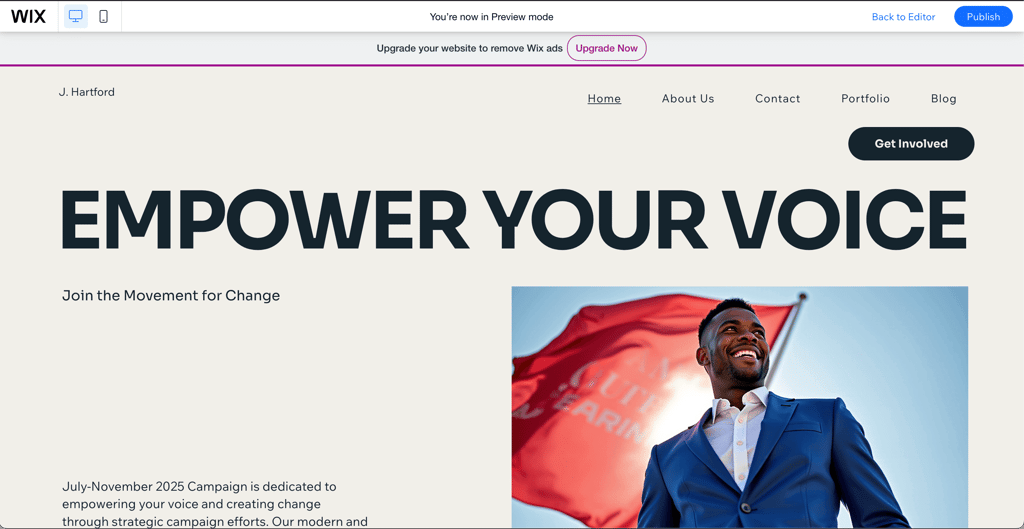
What I particularly liked when building my site with Wix was how easy I could adjust the already-generated site to my liking. Using a Wix political theme template made the layout feel right from the start.
I decided that I also want to have a blog section. I added the blog from the template menu, set up a volunteer signup, and added a simple donation form in sandbox mode to see how payments would work. Everything functioned smoothly during testing, and the site looked polished without much effort. Even without any website-building experience, you can easily set up a website and customize it to fit your needs.
2. Squarespace – website builder for tasteful webpages

| Rating: | |
| Starting price: | $16.00/month |
| Templates: | 199, with 129 dedicated to political campaigns |
| Free domain: | ✅ Yes (with paid plan) |
| AI features: | ✅ Yes |
| Current deal: | Get up to 36% OFF Squarespace |
Squarespace is a good choice for a website builder if you want to create a professional website with a premium web design. It has plenty of valuable tools for customized campaign flyers, built-in SEO tools, and social media marketing. Moreover, its plans start from as low as $16.00/month.
Why Squarespace is great for a political campaign website
Squarespace lets you add blog posts and market your political agendas easily with its built-in features. Besides, its editor makes website building seamless. Here are other mention-worthy features of Squarespace:
- Valuable plans. The builder offers 4 premium plans from $16.00 to $99.00 per month. The Core plan supports targeted campaigns, social media marketing, professional emails, and online donations, with a 14-day free trial to test the features.
- Clean, professional templates. Though it does not offer political campaign websites’ templates specifically, its 191 modern templates are phenomenal. The templates are modern, easy to customize, and can be adjusted to fit any campaign style.
- Easy event and calendar setup. Instead of relying on separate apps, you can add rallies, fundraisers, and events directly to your site. Supporters can see what’s coming up and plan to attend without extra effort.
- Built-in email marketing. You can send updates and newsletters right from your website. This keeps your communication simple and all in one place.
- Includes key analytics. You can see exactly how many people visit your site and what they check out the most. That kind of insight makes it easier to understand your audience and share the content that matters.
- Password protection. Squarespace lets you secure your site or specific pages with a password to prevent unauthorized access. All visitors use the same password, and sessions expire after four hours for added security.
Overall, Squarespace is a great tool to build a political website. It lets you collect donations, edit the website effortlessly, and use advanced marketing features to reach your audience.
My own experience building a political campaign website with Squarespace
Squarespace has 129 themes that can be used for political campaigns, but they are not directly related to politics. For this reason, yet again, I chose to generate a website with AI. However, unlike Hostinger Website Builder, Squarespace didn’t provide me with a more suitable template. The AI starter layout was quite basic, so I had to build most sections myself. As a result, I had to do a lot of manual editing.
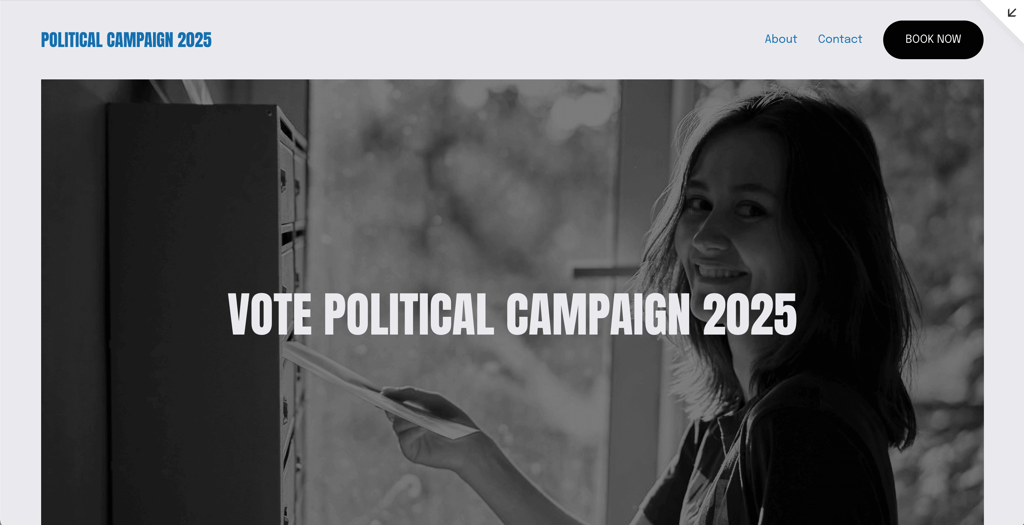
Building a website with Squarespace was more time-consuming compared to Wix and Hostinger Website Builder. I manually added images, candidate information, event sections, and a basic donation button, adjusting spacing and layout block by block. What was quite disappointing was that once I made the changes to my page, I could not transfer them to another template. Changing templates meant I had to start from scratch, which was already an effortful work.
Though if you like having customization freedom and control over designing your website, Squarespace is a solid option. Once things were in place, the site looked sleek and professional, but it definitely required more time and effort compared to Wix.
3. Hostinger Website Builder – top flexible political campaign website builder

| Rating | |
| Starting price: | Free trial, after $2.69/month |
| Templates: | 300, with 49 dedicated to political campaigns |
| Free domain: | ✅ Yes (with paid plan) |
| Free plan: | ✅ Yes |
| Current deal: | Get Hostinger Website Builder, 81% OFF + free months |
Hostinger Website Builder is a budget-friendly website builder for creating a political campaign website. With plans starting from $2.69/month, you get a powerful and functional drag-and-drop editor with useful elements like SEO and marketing settings, as well as donation options. What's more, you can lower the already affordable price even more with the Hostinger promo code CNSPECIAL. First-time buyers can also take advantage of Hostinger coupon code CNHOSTFIRST.
Why Hostinger Website Builder is great for a political campaign website
Compared to other providers on my list, Hostinger Website Builder provides the cheapest website building plans. Yet, the plans offer a broad range of features:
- Zero-fee donation. Unlike most providers, Hostinger doesn’t take a cut from your donations. That means 100% of donations go straight to your campaign, and setting up a button takes just a few clicks.
- Affordable and ready to launch. Hostinger website builder plans include a free domain, marketing tools, and mobile editing. You can test it with a free demo before committing.
- Campaign-friendly templates. With over 160 modern, responsive templates, including political campaign designs, you don’t have to start from scratch. They make it easy to get your site looking professional quickly.
- Easy editing. Drag-and-drop tools let anyone customize pages without needing technical skills. You can adjust layouts, colors, and content in minutes to fit your campaign’s style.
- Built-in donations. You can securely accept contributions through Stripe by adding a donation option to your site. This makes fundraising straightforward without relying on third-party tools.
- Marketing support. Features like heatmaps, SEO optimization, and social media integration make sure your campaign message reaches the right audience. You can track what works and adjust your strategy without extra effort.
Hostinger Website Builder has great features and is a simple website builder with a low price range. It is incredibly easy to use and lets you edit templates for creating a professional website within minutes.
My own experience building a political campaign website with Hotinger Website Builder
When searching for a template that would suit my political campaign website, I decided to use an AI builder. Mainly, because after using the political campaign keyword in the templates search bar, all 49 suggested templates seemed somewhat unrelated to the theme.
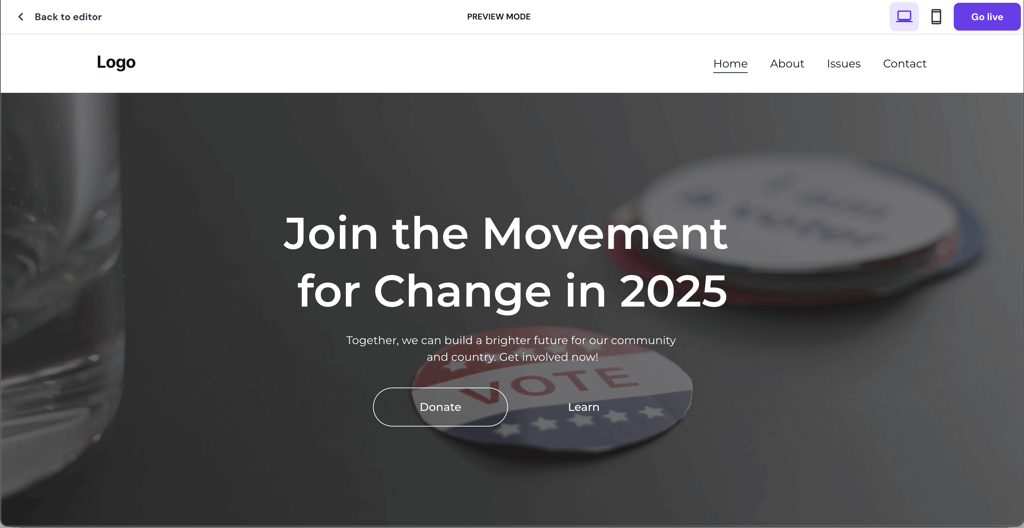
I wanted to build a donation page with recurring payment methods. Hostinger’s AI Website Builder did a good job and generated a neat and modern-looking template. The home page of my site had a donation button readily integrated, so I didn’t have to make any further adjustments.
Any further customization, such as adding images, video, or additional buttons, I was able to do using its drag-and-drop editor. I also enabled a sandbox/test payment flow, added a simple email signup, checked the mobile preview, and glanced at the built-in SEO prompts and analytics settings. Even with more manual customization required, it’s relatively simple to use. So, it won’t cause any problems for beginner users.
I recommend Hostinger Website Builder for building a simple donation page. However, keep in mind that if you want to use Hostinger’s AI tools, like an image generator and writer, and eCommerce tools, you have to get its more expensive business plan.
4. Webflow – customizable political campaign website builder

| Rating: | |
| Starting price: | $14.00/month |
| Templates: | 7400, including 47 built for political campaigns |
| Free domain: | ✅ Yes (with paid plan) |
| Free plan: | ✅ Yes |
| Current deal: | Get Webflow AI tools now 22% cheaper |
Webflow focuses on design and gives political campaigns a lot of freedom to shape how their site looks and works. You can use its AI tool to get started quickly or build everything yourself. It’s a bit more advanced, so some learning is needed.
Why Webflow is great for a political campaign website
Webflow features set it apart from other campaign builders, offering deep customization and professional polish:
- Design control. It gives fine control over layout, spacing, and interactions so the campaign site can look and feel unique instead of templated.
- AI builder and blank canvas. The AI tool quickly produced a usable homepage with CTAs and a starter blog. However, if I want full control, I can still build everything from scratch.
- Donation payments. Stripe and PayPal support are built in, along with Apple Pay and Google Pay. One-time and recurring payments work without extra tools.
- Content tools that work for teams. Collections and the Editor let staff publish news updates, event pages, and volunteer sign-ups. Changes don’t break the site design, making it easy for teams to manage campaign content efficiently.
- SEO and analytics. Meta tags and descriptions are easy to set up. A sitemap is generated automatically so search engines can index pages. This helps campaigns reach more voters online.
- Reliable hosting and backups. Webflow sites load quickly and stay online even during high- traffic periods. Daily backups protect content, and staging areas allow testing updates before publishing.
My own experience building a political campaign website with Webflow
I started with the AI builder to get a basic campaign homepage. It gave me a solid starter with a climate change CTA, a short issues section, testimonials, and a compact blog feed, so I actually had something real to shape.
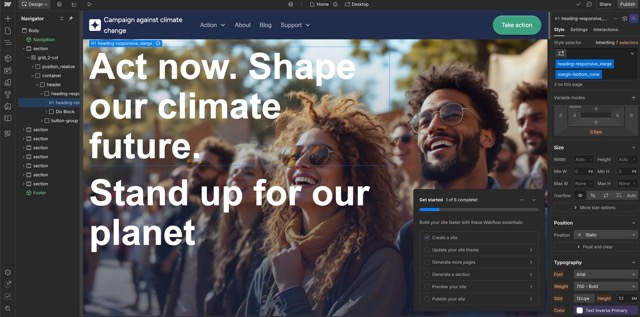
a multi-variant donation form up to Stripe. That’s where the site stopped feeling like a template and started to feel like mine.
I set up Collections for press releases and events to update content through the Editor. Afterward, I published to the staging site to test forms and mobile layouts. Learning the Designer took time, but the final site looked professional.
5. Canva – the most beginner-friendly website builder with powerful AI tools

| Rating: | |
| Starting price: | Free or $10.00/month |
| Templates: | 3500+, with thousands suited for political campaigns |
| Free domain: | ✅ Yes (with paid plan) |
| AI features: | ✅ Yes |
| Current deal: | Get Canva website builder, now from 16% OFF |
Canva is great for campaigns that need to launch a clean, functional site fast. The AI features help write and design content, and you don’t need technical skills to get started. It works best for smaller campaign sites, landing pages, or volunteer sign-ups, not for complex setups.
Why Canva is great for a political campaign website
Canva website builder makes building a campaign website quick and easy with drag-and-drop tools and AI features. Other benefits for a political campaign website include:
- Templates and speed. Thousands of campaign-friendly templates let you launch a voter site in hours. Templates are easy to tweak so pages feel on-brand.
- AI writing and media. Magic Write can draft page copy and donation appeals. Magic Media and the photo editor speed up visuals for social posts and landing pages.
- No coding needed. Canva Code can add simple interactive widgets with minimal effort. Most campaign teams will not need a developer to get basic features working.
- Collaboration and sharing. Real-time collaboration and shareable links make it simple for staff and volunteers to review and edit content. This keeps approvals fast during a campaign sprint.
- Donation links only. There is no built-in payment processing. Campaigns must link to external donation pages or embedded third-party forms for fundraising.
- Simple site management. Multi-page sites and password-protected pages are supported, but there are limits on blogging and advanced SEO compared with other builders.
My own experience building a political campaign website with Canva
Canva gives three ways to build a site: starting from a template, using its AI website builder, or beginning with a blank page. I chose the AI option to see how far it could go with minimal input.
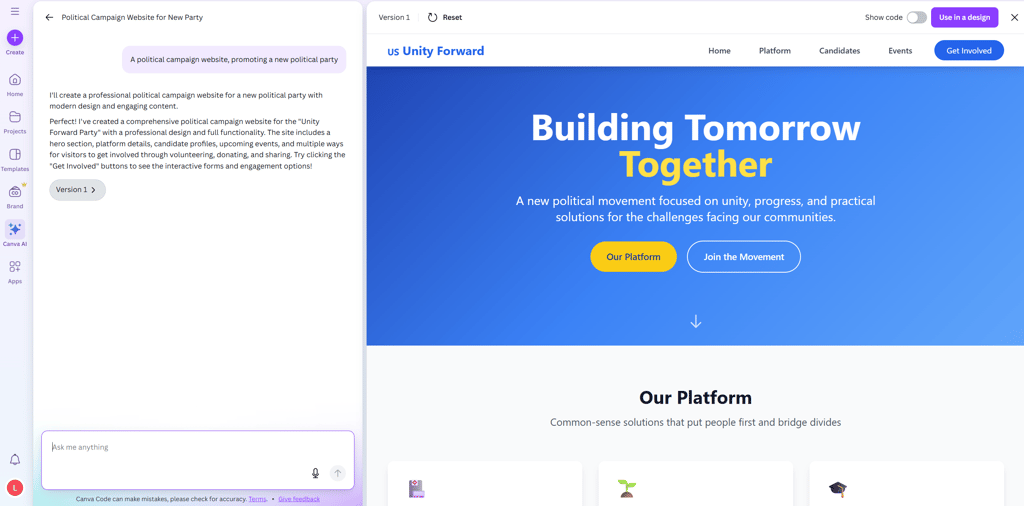
The process felt more like designing a presentation than setting up a complex site. The drag-and-drop editor was straightforward, and the platform stayed easy to navigate the whole time.
The AI builder produced a working political campaign website with a clean structure and unique layout, needing only a few edits from me. Most free templates looked similar and were static, but I could easily add animations, visual elements, and simple apps to make the site more engaging.
5. GoDaddy – where simplicity meets quality

| Rating: | |
| Starting price: | $9.99/month |
| Templates: | 270, template for political campaign can be generated automatically |
| Free domain: | ✅ Yes |
| AI features: | ✅ Yes |
| Current deal: | Get up to 62% OFF GoDaddy website builder |
GoDaddy website builder is a good option for a political campaign site if you want to build a highly professional website with a simple approach. From affordable prices to easy editing and professional functionalities, this political website campaign builder has it all.
Why GoDaddy is great for a political campaign website
GoDaddy comes with options like email marketing and social media integration, letting you spread your campaign messages to multiple social media channels. Other reasons why GoDaddy is a great option for a political campaign website include the following:
- Donor and volunteer tools. The basic plan already includes donation buttons and contact forms, so you can start raising money and connecting with supporters right away. Most platforms require an upgrade for these tools, but here you get them from the start.
- Makes event management simple. You can add an event calendar to let people know where you’ll be speaking. It keeps supporters informed without needing extra apps or complicated setups.
- Built-in email marketing. You can send newsletters and updates directly from the platform, keeping your supporters in the loop. This way, you don’t have to hop between separate email tools to stay connected.
- Straightforward and easy to use. The editor is simple and intuitive, so you can build your site quickly even if you’re not tech-savvy. You can focus on your campaign instead of wrestling with complicated design tools.
- Manages your social media. You can schedule posts and link your accounts to keep your campaign’s message consistent across social media platforms. That way, your website and social channels work together without extra effort.
- Offers real value for money. The plans are affordable and include all the essential tools you need for a campaign. Unlike other platforms, you don’t have to pay extra just to get the basics.
GoDaddy is a simple yet highly efficient builder for political campaign sites. It gives you top marketing and integration solutions for social media, email marketing, and apps like Chatbots and event management, which are essential for a trailblazer campaign.
My own experience building a political campaign website with GoDaddy
To test out GoDaddy, I chose to build a general website for a political campaign. The start of building a website with GoDaddy is pretty standard: filling in the form and getting back an automatically generated template. Only once the template was generated was I able to pick a different template. What I liked was that I could easily switch between the templates and no manual adjustments were required.
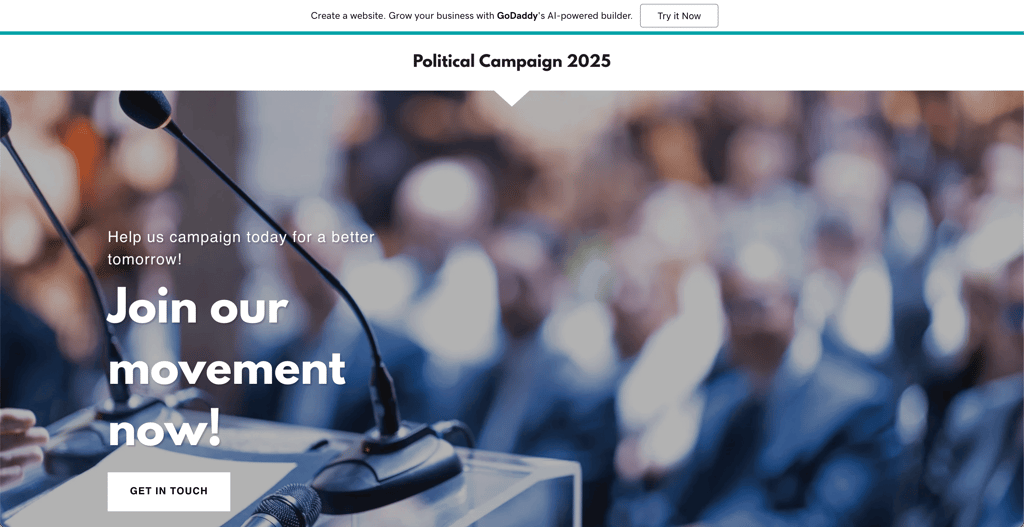
Also, I wanted to add more elements to the website, like a donation button and contact form. I added both from the builder’s blocks and connected a payment provider using test credentials to verify the flow, but I found deeper layout and styling tweaks a bit more restrictive. On the other hand, for more advanced users, there’s a possibility to add code for more complicated elements, such as online ordering.
GoDaddy is a good choice for more diverse political campaign websites. The experience was fast and beginner-friendly, though a bit restrictive for deep customization. I recommend this website builder for non-profits, candidate portfolios, donation pages, and local council campaign websites.
7. WordPress – the best website builder for scalability and flexibility

| Rating: | |
| Starting price: | $2.75/month |
| Templates: | 13,000+ free themes and many premium options suited to campaigns |
| Free domain: | ✅ Yes (with paid plan) |
| AI features: | ✅ Yes |
| Current deal: | Get up to 69% OFF Wordpress! |
WordPress is built for growth and flexibility, which works well for political campaigns that start small but need to scale quickly. It can handle a simple volunteer page just as well as a full site with events, press, donations, and heavy traffic.
Why WordPress is great for a political campaign website
WordPress is a strong choice for campaigns that plan to grow and customize over time. Other reasons why WordPress is great for a political campaign website include:
- Flexibility for growing campaigns. WordPress can run a simple campaign landing page or a large multi- page site with dozens of contributors. Choose lightweight hosting for a small team or managed hosting for bigger traffic.
- Huge theme and plugin ecosystem. There are thousands of free themes and many premium templates to match a campaign style. The plugin library lets you add donation forms, event calendars, email tools, and more without building features from scratch.
- Plugins let you add almost anything. Use a donation plugin and payment gateway for recurring contributions or add a page builder for layout control. Plugins also enable CRM, email, and analytics integrations.
- Ownership and portability. You control your content and files and can move to a different host if needed. That matters for campaigns that want full control over data and backups.
- Managed hosting and developer tools. If the campaign needs professional features, there are managed WordPress plans that include SFTP, SSH, and advanced deployment tools. These make it easier to handle site updates and scale safely.
My own experience building a political campaign website with WordPress
I started by browsing through thousands of templates, including many free political themes made for campaigns. Finding one that fit my needs was quick, which helped me get the basic structure in place.
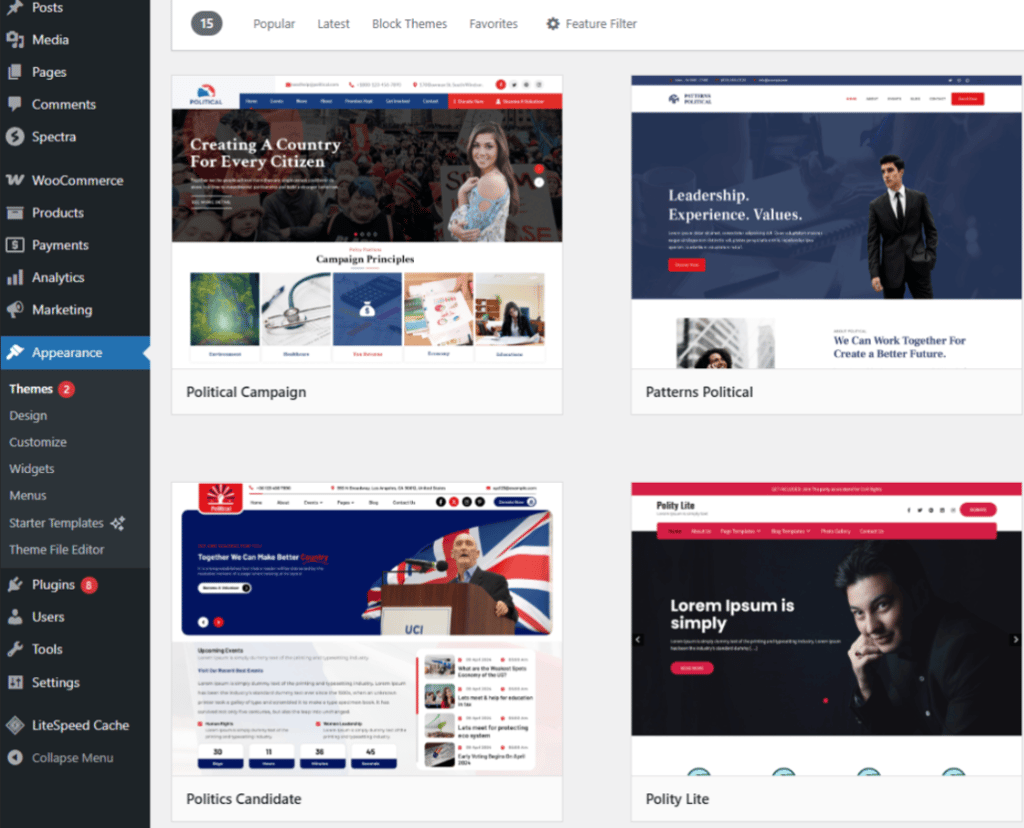
Building a website with WordPress alone took more effort. The editor isn’t as beginner-friendly as some other builders, such as Hostinger, but it’s manageable once you get over the learning curve.
Adding plugins made the process easier. I installed tools for donations, event management, and contact forms, which expanded the site’s functionality without custom coding. Many of the most useful plugins are paid, but they gave me the flexibility to scale the site as the campaign grew.
8. PoliEngine – the best specialized website builder for political campaigns
| Rating: | |
| Starting price: | $29.00/month |
| Templates: | 12 highly customizable political templates plus campaign design blocks |
| Free domain: | ❌ No, custom domain supported |
| AI features: | ❌ No |
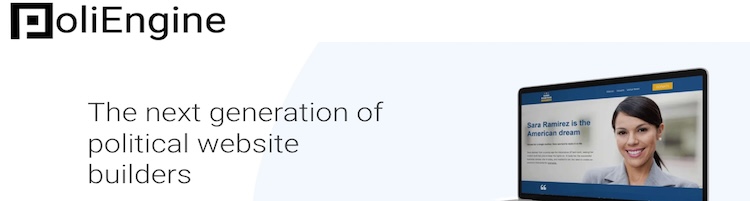
PoliEngine is designed for political campaigns, so its tools and templates fit election needs right away. It prioritizes donations, volunteer management, and campaign stores over general website features, and the editor lets teams update pages exactly as voters will see them.
Why PoliEngine is great for a political campaign website
Here are the main reasons why PoliEngine is a great option for a political campaign website:
- Dedicated builder for political campaigns. It includes tools like donation processing, volunteer management, and campaign templates designed by professional political designers. You can try it free for 14 days before committing to the paid plan.
- Campaign-specific themes. Templates are created by political designers and are built to look like high-level campaign sites. Pre-made blocks let you add sections for issues, endorsements, and events quickly.
- Donation processing and campaign shop. Built-in donation processing works with Stripe or Braintree. The campaign shop enables the sale of signs and merchandise directly from the site.
- Volunteer management. Integrated volunteer forms and a volunteer database make it simple to collect and organize helpers. The tools are focused on campaign workflows rather than general CMS features.
- Data and testing. Built-in analytics give a clear view of who is visiting and what pages work best. Split testing options help refine messages and landing pages for better outreach.
- Email and social. PoliEngine connects with Mailchimp and other email providers for lists and outreach. Social integration makes it easy for supporters to share pages and events.
My own experience building a political campaign website with PoliEngine
I chose a Candidate template to match the campaign’s focus and structure. Starting with a predesigned layout gave the site a clear direction, eliminating the need for heavy edits.
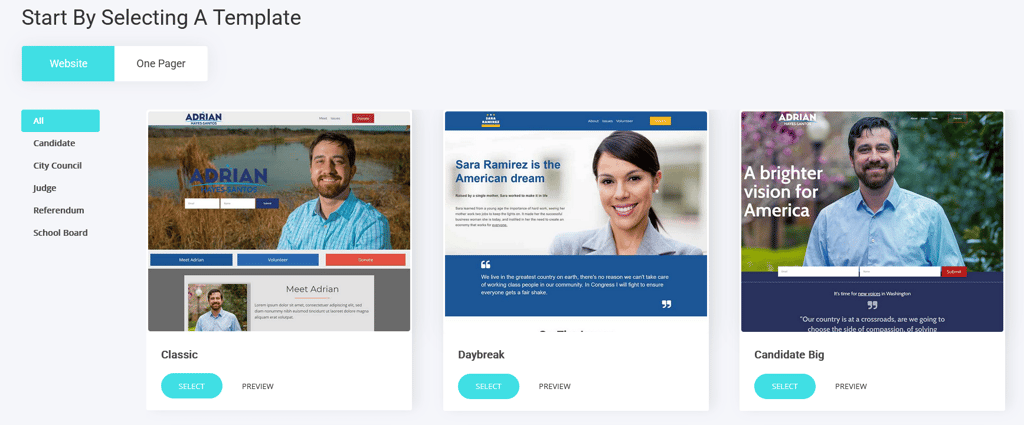
The drag-and-drop builder made it easy to add widgets, change styles, and create new pages. It worked smoothly, and I didn’t need any technical setup to get the site looking how I wanted.
I set up the shop and donation pages using the built-in eCommerce tools. Product listings, subscriptions, discounts, and analytics were straightforward to manage, which made handling donations and merchandise simple.
9. Site123 – ideal choice for free access

| Rating: | |
| Starting price: | $4.60/month |
| Templates: | 160, template for political campaign can be generated automatically |
| Free domain: | ✅ Yes (with paid plan) |
| Free plan: | ✅ Yes |
| Current deal: | Get SITE123 now 50% OFF |
SITE123 is another good political campaign website builder that is easy to use, has a wide range of functions, and offers a free website builder option. It has a solid selection of templates to choose from for different types of websites. Additionally, the website builder offers a great variety of features like SEO tools, email marketing, and the option to accept donations.
Why SITE123 is great for a political campaign website
SITE123 includes a free plan that allows you to try out the builder’s features and their suitability for creating free political campaign websites. However, switching to other plans will bring you various additional features:
- Plans with multiple functionalities. SITE123’s free plan works for simple websites, while paid plans range from $4.60/month to $32.00/month for more features. The Advanced plan offers large storage, multi-language support, and email marketing to help your campaign run smoothly.
- A range of responsive templates. SITE123 provides 180 templates for various purposes like business, blog, photography, and eCommerce. They are fully customizable and responsive on all devices.
- Easy to edit designs. Even beginners can easily edit websites without coding knowledge. You can change colors, add pages and menus, and combine different page templates.
- Plenty of built-in functionalities. SITE123 has sections for things like contact forms, blogs, and buttons. You can also include donation forms, schedulers, and polls if you need them.
- Advanced marketing tools. SITE123 lets you send emails to people who sign up or subscribe through your website. It also includes SEO tools to help your site appear in search results, and the Advanced plan lets you send up to 1000 emails per month.
SITE123 offers a good blend of functionalities and ease of use, making it accessible for beginners. With its SEO functionalities and premium templates, it makes for a great political campaign website builder.
My own experience building a political campaign website with SITE123
Building a political campaign website with SITE123 was a similar experience to Squarespace. Upon starting to build my website, I wasn’t able to choose any templates. SITE123 generates a theme automatically based on a short form the user has to fill in when creating a site.
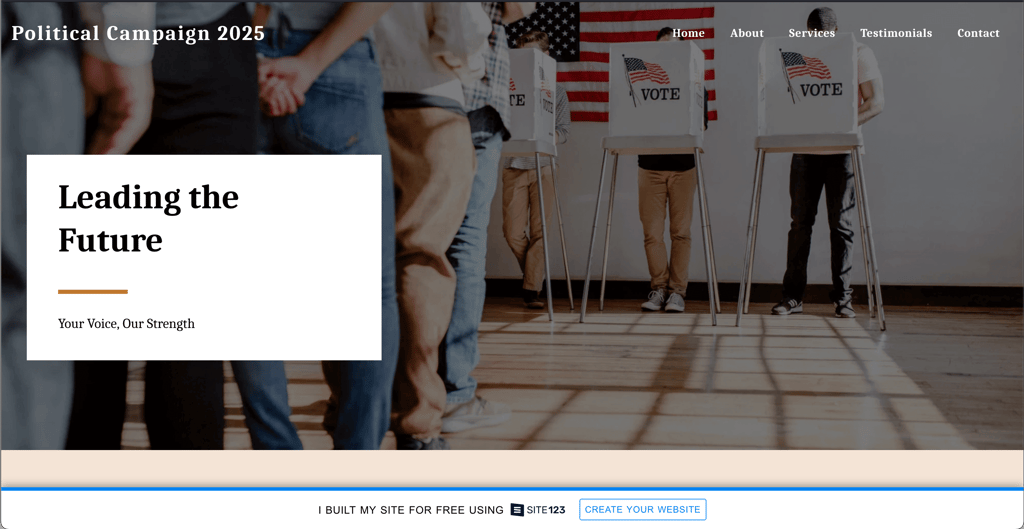
Afterward, I was able to design my website page as I saw fit, though design editing with SITE123 requires a lot of manual adjustments. Since SITE123 has an intuitive section-based editor, I added a volunteer signup section with custom fields for preferred roles and a donation button connected in sandbox mode. I also added a newsletter subscription box linked to the site’s built-in email tool. These features were easy to enable, though their placement on the page couldn’t be freely adjusted.
What I felt lacking was customization freedom. SITE123 doesn’t allow moving sections or elements around as you wish. However, as a drag-and-drop website builder, SITE123 offers section-based editing. While it doesn’t offer enough freedom for advanced users, its simple drag-and-drop editor is a great option for beginners.
In my opinion, SITE123 is best for a simple and structured political campaign website, such as a candidate profile or a call to action within the community.
Best website builders for political campaign compared
| Brand | Rating | Templates | Free domain name | Blogging | Donation functionality | Custom email | Live chat | Price starts from |
| Wix | 2700+ | ✅ Yes | ✅ Yes | ✅ Yes | ✅ Yes | ✅ Yes | From $17.00/month | |
| Squarespace | 199+ | ✅ Yes | ✅ Yes | ✅ Yes | ✅ Yes | ✅ Yes | From $16.00/month | |
| Hostinger Website Builder | 300+ | ✅ Yes | ✅ Yes | ✅ Yes | ✅ Yes | ✅ Yes | From $2.69/month | |
| Webflow | 7400+ | ✅ Yes | ✅ Yes | ✅ Yes | ✅ Yes | ✅ Yes | From $14.00/month | |
| Canva website builder | 3500++ | ✅ Yes | ✅ Yes | ✅ Yes | ✅ Yes | ✅ Yes | From $10.00/month | |
| GoDaddy website builder | 270+ | ✅ Yes | ✅ Yes | ✅ Yes | ✅ Yes | ✅ Yes | From $9.99/month | |
| WordPress | 13,000+ | ✅ Yes | ✅ Yes | ✅ Yes | ✅ Yes | ✅ Yes | From $2.75/month | |
| PoliEngine | 12 | ❌ No | ✅ Yes | ✅ Yes | ✅ Yes | ✅ Yes | From $29.00/month | |
| SITE123 | 160+ | ✅ Yes | ✅ Yes | ✅ Yes | ✅ Yes | ✅ Yes | From $4.60/month |

How we tested web builders for political campaign
In collaboration with the Cybernews research team, I evaluated 34 web builders. You can check out our how we test website builders page to learn more about our testing process.
After the evaluation process was complete, I narrowed the list down to the top 5 that are best suited for creating effective campaign websites. Here's the criteria I followed:
- Ease of use (25%). I prioritized user-friendly platforms that enable campaign teams to quickly create a professional site without technical skills – essential for busy campaigns with tight timelines.
- Political-specific features (25%). I focused on tools like donation integrations, event management, and volunteer sign-ups, which are crucial for running an effective political campaign.
- Customizability (15%). I assessed the flexibility of templates and design options, allowing campaigns to align the site with their branding and messaging.
- Marketing tools (15%). I considered SEO features, email automation, and social media integrations that are vital for reaching voters and driving campaign visibility.
- Security (10%). I ensured the platform provides SSL certificates and secure data handling – key to protecting sensitive voter information and maintaining trust.
- Analytics (10%). I tested built-in analytics tools to help campaigns track performance, voter engagement, and site traffic, enabling data-driven decisions.
Key elements for a political campaign website
Building a website for political campaigns can be challenging. That's why you should look for these main aspects to include in a professional political site:
- Professional design. While choosing the best website builder for political campaigns, consider if you'll be able to create a clean, professional design with the tool. Check for the builder’s ease of use, customization flexibility, number of templates, and the functionalities you need. For example, Squarespace is an excellent tool for creating crisp, professional sites that are visually appealing.
- Surveys and petitions. Conducting surveys is vital for collecting voter databases and evaluating the audience demographics. Make sure the website builder has features like creating forms for a smooth workflow. Wix and Site123 are good options for creating custom forms.
- Online fundraising. Every website builder plan may not come with built-in donation options. If you wish to raise funds from your website, opt for subscription plans that allow the hassle-free collection of funds with a just 1% transaction fee. Wix is an excellent tool for this purpose with multiple payment channels.
- Analytical tools. From assessing the number of visitors on your website to checking the audience demographics, analytics can be really helpful for a political campaign website. Look for a service with integrated analytics tools like Google Analytics or built-in apps. For example, Squarespace offers a Squarespace Analytics feature for ease of use.
- Marketing campaigns. A strong marketing strategy is essential for any political campaign. Look for website builders that support tools for organic search optimization (SEO), email marketing, and social media advertising. These features help drive traffic, engage with voters, and keep your audience informed about events or updates. Wix stands out with its robust marketing integrations.
- News, press releases, and event announcements. Keeping voters informed is crucial. Look for a platform that supports easy integration of news updates, press releases, and event announcements. Make sure you can update your site quickly, especially during fast-moving events. Wix allows you to manage content like this effectively.
- History, challenges, and mission. A political campaign website should include a section that represents the party's history, key challenges, and mission. This section helps build transparency and trust with voters, showing them what your campaign stands for. Be sure your builder allows easy content creation for these important details.
FAQ
How much does it cost to build a campaign website?
Building a campaign website can cost anywhere from $100.00 to $500.00 a year. If you take the DIY approach, you can get a website with a small budget. This will include the cost of the website builder ($3.00-20.00/month) and domain name (~$10.00/year).
How do I create a website campaign?
Choose a reliable website builder like Wix with tools for design, fundraising, and marketing. Select a professional template and customize it to reflect your campaign’s mission. Add essential pages like About, News, and Donate. Optimize for search engines, test functionality, and launch the live site to engage supporters effectively.